---
INSTALLING THE PAPER ROLL
Your cash register features a heavy-duty printer "which uses· one roll
of
2-ply, 57mm (2lt) carbonless cash
register paper, one for the customer receipt (outside) and the OthsriorthE!jdTIin8! reeorti'(inside). The register
will also accept standard
2%"
calculator paper for a single tape record. If a customer receipt is not required,
an extra option
is
offered
to
reduce the number of spaces between each transaction, for further details see Rag
14,
Option
1,
on
Pages
38
and
39.
INSTALUNG THE PAPER ROLL
•
1.
Plug in your cash register and set the
Control Lock
In
the
"REG"
(Register) mode.
2.
Open the journal compartment cover, first
be sure that the lock
Oocated
on the left side
of the journal compartment cover) is
unlocked using the Cash Drawer/Journal
Lock
Key
#515. Grip the left side of the
joumal cover and gently pull back. The
cover
will remain open in an upright
position.
3. Cut the end
of
the paper roll evenly for a
straight even edge for proper feeding
through the printhead.
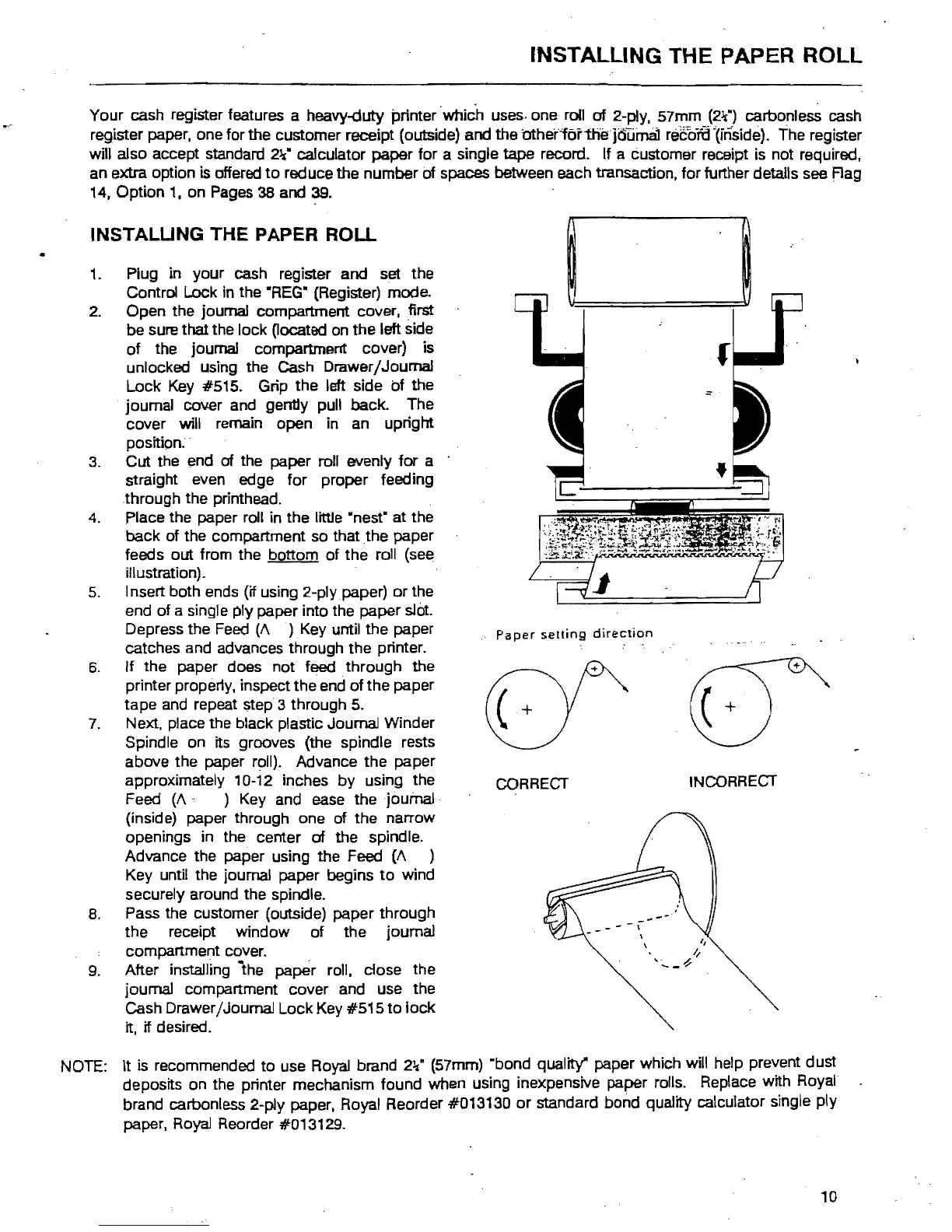
4. Place the paper roll in the little "nest" at the
back of the compartment so that
the
paper
feeds out from the bottom of the roll (see
illustration).
5. Insert both ends (if using 2-plypaper)
or
the
end of a single ply paper into the paper
slot.
Depress the
Feed
(A
)
Key
until the paper
catches and advances through the printer.
6.
If the paper does not feed through the
printer propeny, inspect the end of the paper
tape
and
repeat step 3 through
5.
7.
Next. place the black plastic Journal Winder
Spindle on its grooves (the spindle rests
above the paper
r~II).
Advance the paper
approximately 10-12 inches by using the
Feed
(A'
)
Key
and ease thejoufna.l"
(inside) paper through one of the narrow
openings in the center
of
the spindle.
Advance the paper using the Feed
(A
)
Key until the journal paper begins
to
wind
securely around the spindle.
8. Pass the customer (outside) paper through
the receipt window of the journal
compartment cover.
9. After installing
the
paper roll, close the
journal compartment cover and use the
Cash Drawer jJournal Lock Key #515
to
lock
it, if desired.
NOTE:
It
is
recommended to use Royal brand
2~·
(57mm) "bond quality" paper which will help prevent dust
deposits on the printer mechanism found when using inexpensive paper rolls. Replace with
Royal
brand carbonless
2-p1y
paper. Royal Reorder #013130
or
standard bond quality calculator single ply
paper.
Royal
Reorder #013129.
Paper
setting
direction
INCORRECT
CORRECT
- \
\
10



 To Next Page