TRANSACTION ,EXAMPLES FOR OPERATING THE CASH REGISTER
,
'-'NOTE:
Tum
the
key
the--REG"--(REG'ISTER)
'posltion
fo(
registeririg
sales'
transactions.
IMPORTANT: It is not necessary
to
press the Decimal Point when ringing up a price.
REMINDER: If Clerk Numbers are programmed,
be
sure
to
TYPE
the
(CLERK
#),
then PRESS
the (CLERK) Key before ringing up a sale. .
In the examples below, Department 1 is programmed as taxable with a 6%
(TAX
1)
rate and Clerk #1
is
used.
EXAMPLE
22:
USE OF
THE
ERROR-CORRECT (VOID) KEY:
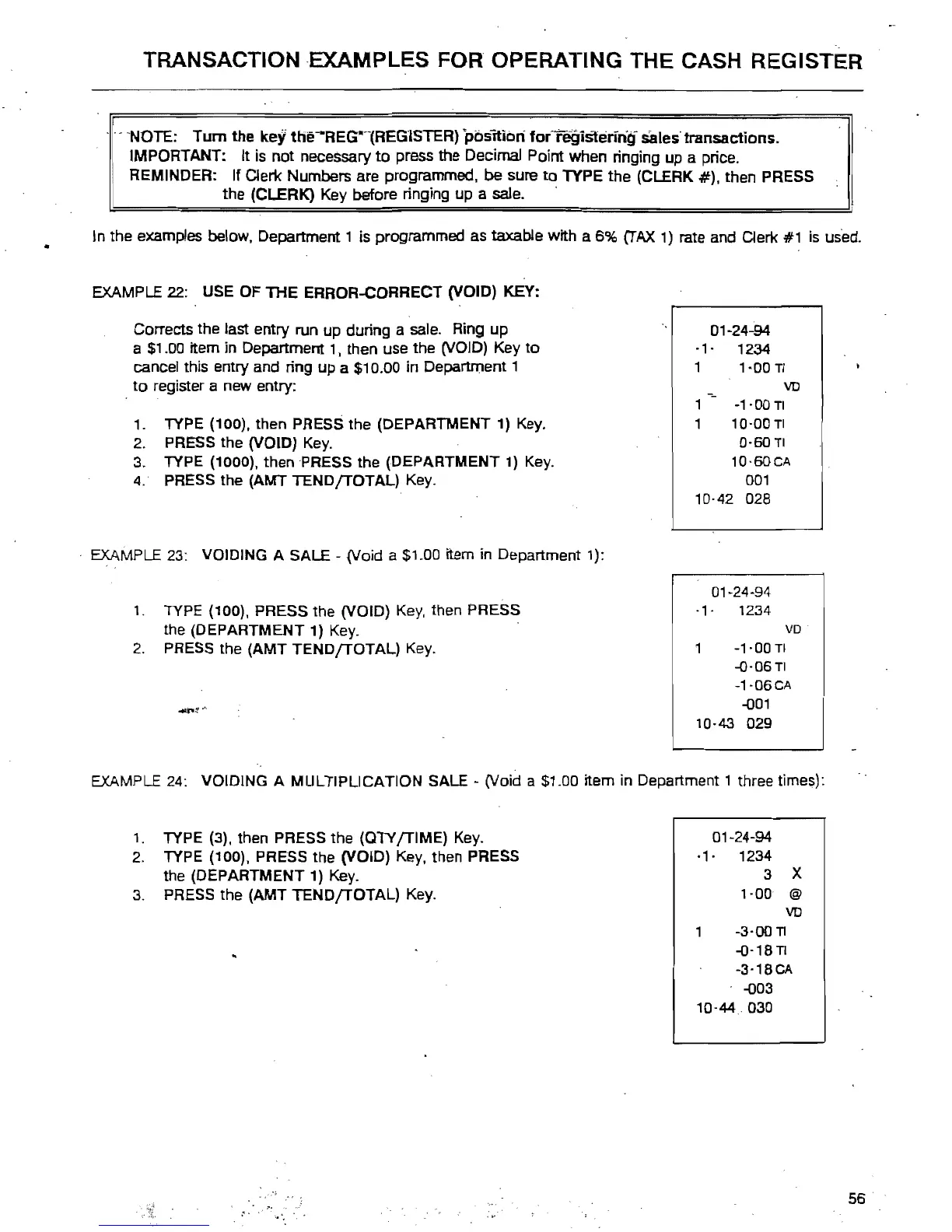
Corrects the last entry run up during a sale. Ring
up
a
$1
.00
item in Department
1,
then use the (VOID) Key
to
cancel this entry and ring up a $10.00 in Department 1
to
register a new entry:
1.
TYPE (100), then PRESS the (DEPARTMENT 1) Key.
2.
PRESS the (VOID) Key.
3. TYPE (1000), then PRESS the (DEPARTMENT 1) Key.
4.
PRESS the (AMT
TEND{TOTAL)
Key.
. EXAMPLE
23:
VOIDING A SALE - (Void a $1.00 item in Department 1):
1. TYPE (100), PRESS the (VOID) Key, then PRESS
the (DEPARTMENT 1) Key. .
2.
PRESS the (AMT
TEND{TOTAL)
Key.
01~24~94
.,.
1234
1
1-00
TI
YO
1
-1·00
TI
,
10·00
TI
0·60
TI
10'60CA
001
10·42 028
01-24-94
·1· 1234
VD
1
~1'00
TI
-0·06
TI
-1·06CA
-001
10·43
029
EXAMPLE 24: VOIDING A MULTIPLICATION SALE
~
(Void a $1.00 item in Department 1 three times):
1.
TYPE (3), then PRESS the (OTY
{TIME)
Key.
2.
TYPE (100), PRESS the (VOID) Key, then PRESS
the (DEPARTMENT
1)
Key.
3.
PRESS the (AMT
TEND{TOTAL)
Key.
o1·24~94
·1·
1234
3 X
',00
@
YO
-3·00TI
-O·18n
-3'18CA
-003
10·44
030
56



 To Next Page