TRANSACTION EXAMPLES FOR OPERATING
THE
CASH REGISTER
NOTE:
Tum
the
key
the
"REG" (REGISTER)
position
fOr
registering
sales transactions.
- --'lMPURTANT:c--lf
is
not
-iiecessarytcr press the DeCimal Point when ringing;iirJ'a price:-
~
.. - "
""-~";--
=-=--"'c
_=
__
,=-=CC-=-_1
REMINDER: If Clerk Numbers are programmed. be sure
to
TYPE the (CLERK
#).
then PRESS
the (CLERK) Key before ringing
up
a sale. -
In the examples below. Department 1 is programmed as taxable with a 6% (TAX
1)
rate and Department 2 is
programmed
for
no
tax and
Oerk
#1
is used.
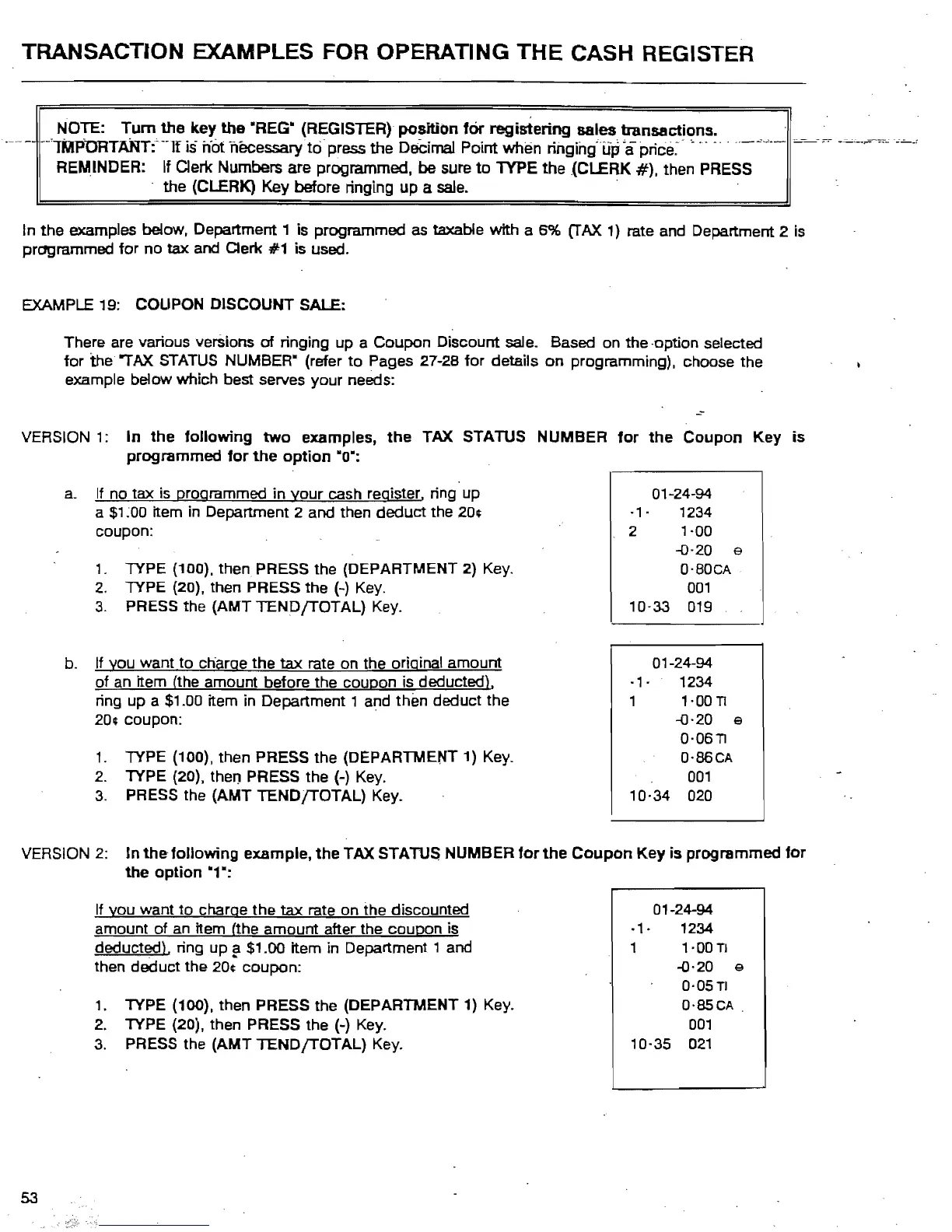
EXAMPLE
19: COUPON DISCOUNT SALE:
There are various versions
of
ringing up a Coupon Discount sale. Based on
the
-option selected
for
the
~AX
STATUS NUMBER" (refer
to
Pages 27-28
for
details
on
programming). choose the
example below which best serves your needs:
VERSION
1:
In
the
following
two
examples.
the
TAX STATUS NUMBER
programmed
for
the
option
"0":
a.
If no tax
is
programmed in
your
cash register. ring up
a
$1
;00 item in Department 2 and then
deduct
the 20¢
coupon:
1.
lYPE
(100).
then
PRESS the (DEPARTMENT 2)
Key.
2.
lYPE
(20). then PRESS the (-)
Key.
3.
PRESS the (AMT
TENDfTOTAL)
Key.
b. If you want to charge the
tax
rate on the original amount
of
an
item (the amount before the coupon is deducted),
ring up a
$1.00 item in Department 1 and
thEm
deduct the
20¢ coupon:
1.
lYPE
(100). then PRESS the (DEPARTMENT 1)
Key_
2.
lYPE
(20), then PRESS the (-)
Key.
3.
PRESS the
(AMT
TENDfTOTAL)
Key.
for
the
Coupon
Key
is
01-24-94
·1·
1234
2
',00
-0-20 e
a'BOCA
001
10-33
019
01-24-94
·1·
1234
1
1'00T!
-0·20
e
O·OST!
O'86CA
001
10·34
020
VERSION
2:
In
thefoJiowing
example.
the
TAX STATUS NUMBER
for
the
Coupon
Key
is
programmed
for
the
option
"1":
If you want
to
charge the
tax
rate on the discounted 01-24-94
.,.
1234
deducted), ring up a $1.00 item
in
Department 1 and
amount
of
an
item (the amount after the coupon is
1 1'00TJ
"
..
then deduct the 20¢ coupon:
-0·20
e
0·05
TI
1.
lYPE
(100). then PRESS the (DEPARTMENT 1) Key. O·SSCA.
2.
lYPE
(20). then PRESS the (-) Key.
001
10·35
021
3.
PRESS the (AMT
TENDfTOTAL)
Key.
53



 To Next Page