KEYBOARD FUNCTIONS
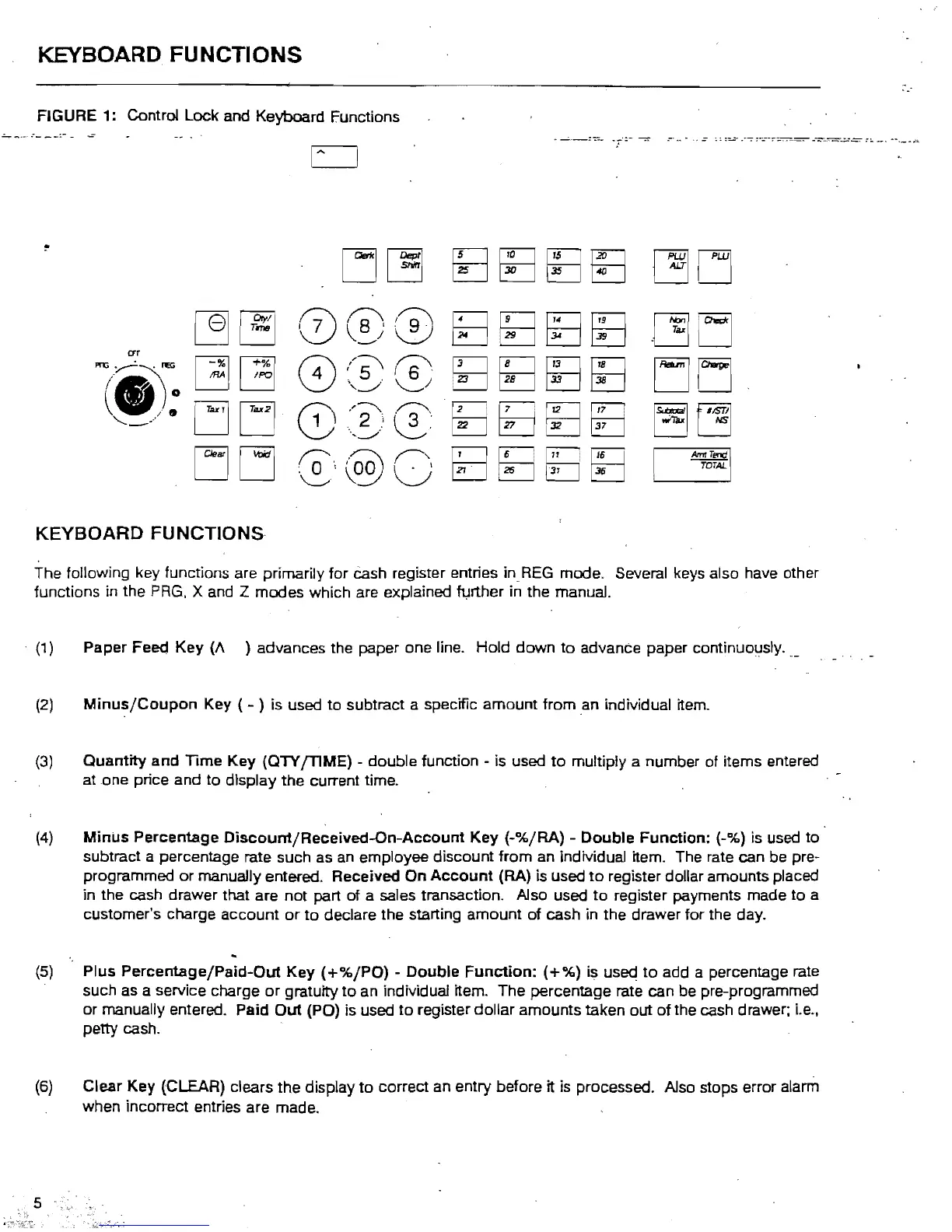
FIGURE 1: Control Lock and Keyboard Functions
.:....,.
....
--
.~-
--:-
-
..:
crr
~TeNl
TOTAL
KEYBOARD
FUNCTIONS
The following key functions are primarily for
Cash
register entries
in
REG
mode. Several keys also have other
functions in the
PRG,
X and Z modes which are explained further in the manual .
. (1) Paper Feea Key (/\ ) advances the paper one line. Hold down
to
advanCe paper continuoljsly.
(2)
Minus/Coupon
Key ( - ) is used
to
subtract a specific amount from an individual item.
(3)
Quantity and Time Key (QTY
[TIME)
- double function - is used
to
multiply a number of items entered
atone
price and
to
display the current time.
(4)
Minus
Percentage
Oiscount/Received-On-Account
Key
(-%/RA) - Double Function: (-%) is used
to
subtract a percentage rate such
as
an employee discount from an individual item. The rate can be pre-
programmed
or
manually entered. Received
On
Account
(RA) is used
to
register dollar amounts placed
in the cash drawer that are not part of a sales transaction. Also used
to
register payments made
to
a
customer's charge account
or
to
declare the starting amount of cash in the drawer for the day.
(5)
Plus Percentage/Paid-Out Key
(+%/PO)
- Double
Function:
(+%)
is
used
to
add a percentage rate
such as a service charge or gratuity to an individual item. The percentage rate can
be
pre-programmed
or manually entered. Paid
Out
(PO) is used
to
register dollar amounts taken out
of
the cash drawer;
i.e.,
petty cash.
(6)
Clear Key (CLEAR) clears the display
to
correct
an
entry before it is processed. Also stops error alarm
when incorrect entries are made.



 To Next Page