PROGRAM CONFIRMATION REPORT
. The Program Confirmation Report allows you to check your programming results. .
__
'.
..
..:.-.:.:...
__
-._
_
••
__
":
~-_.
___
,-:-.,:
.
_:"_
.....
~___
_
,_';_--=-~'-::::;'~:..;-:.::.:='
••
_.;;..~.~.'._-
.
..,.;;:
••
:,~~:"".;:x:.v-:
•.
_~~~!.?l....
~_#.---"'!"'
____
-_
TO
TAKE
A PROGRAM CONFIRMATION REPORT
·PRG" + (999999) + (AMT TEND {TOTAL)
1.
Tum
the key
to
the
·PRG" (PROGRAM)
position.
2_
If a PRG/Z Manager Password has been programmed. TYPE the (PASSWORD
#),
then PRESS
the (CHECK) Key, or
if you did not program a PRG/Z Manager Password, go to Step
3.
3.
TYPE (999999). then PRESS the (AMT TENDJTOTAL)
Key.
.
,
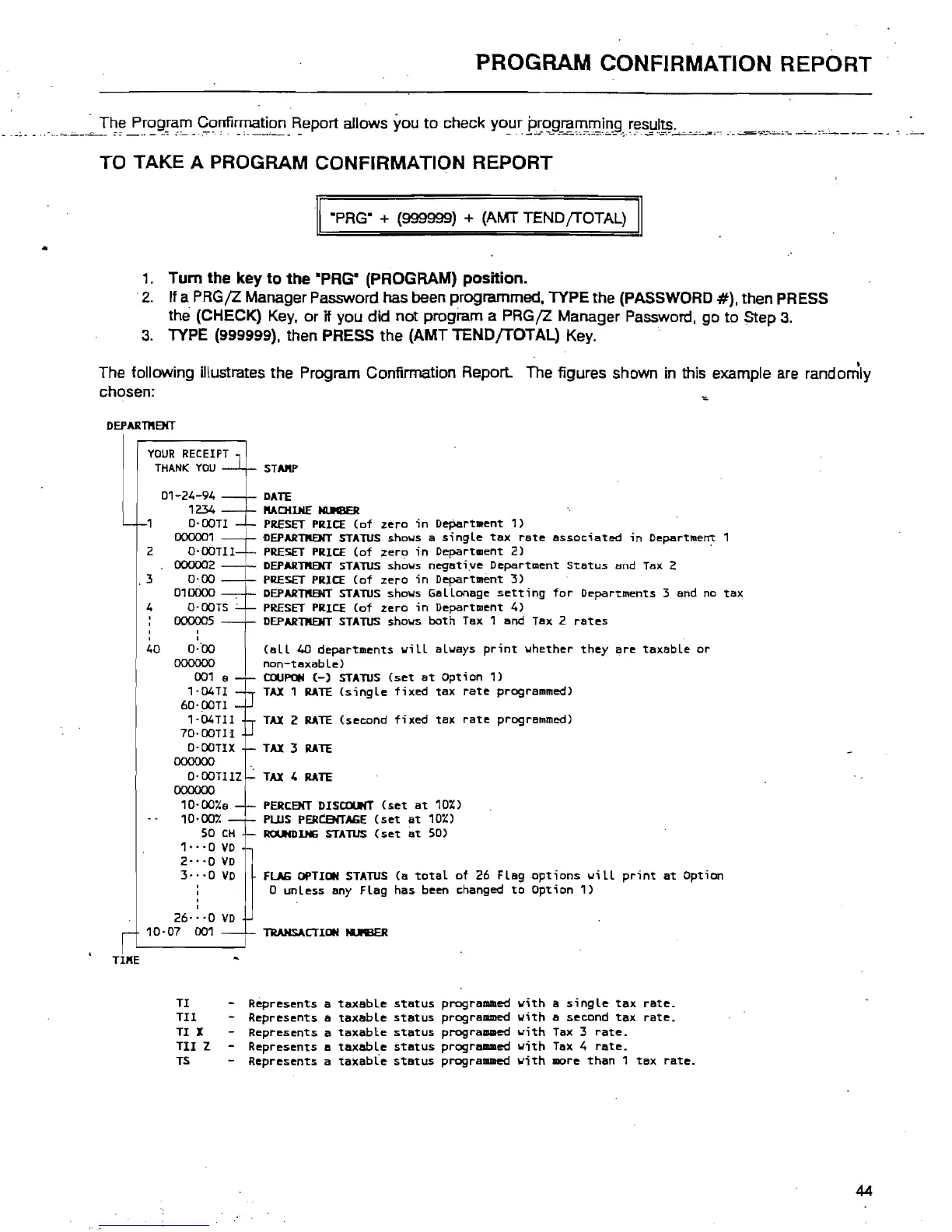
The following illustrates the Program Confirmation Report. The figures shown in this example are randomly
chosen:
DEPARTftBIT
YOUR
RECEIPT
THANK
YOU
01-24-94
1234
O-OOTI
STAftP
DATE
ltAOIDtE
NI.JII8ER
,
PRESET
PRICE
(of
zero
;n
Department
1)
00000.
1
---t-
DEPARTKENT
STATUS
shows
a singLe
tax
rate
associated
in
Department 1
2 O-OOTll-t-
PRESET
PRICE
(of
zero
in
Department
2)
000002
,3
0-00
010000
4
O-OOTS
-
000005
•
,
40
O-tlO
00000o
001
a
1-04Tl
60-00Tl
1
-04Tll
70-00Tll
O·OOTIX
00000o
O-OOTllZ
00000o
10·00lCa
10·007.
SO
CH
1
..
·0
VD
2"'0
VO
3·
-
-0
VD
26
..
·0
VO
10-07
001
TII'IE
TI
TIl
-
TI X -
TIl
Z -
TS
-
'DEPARTKENT
STATUS
shows
negative
Department
Status
and
Tax
2
PRESET
PRICE
(of
zero
;n
Department
3)
DEPARTKENT
STATUS
shows
GaLLonage
setting
for
Departments 3 and
no
tax
PRESET
PRICE
(of
zero
in
Department
4)
DEPARTKENT
STATUS
shows both
Tax
1 and
Tax
2
rates
(aLL
40
departments
wiLL
always
print
whether
they
are
taxabLe
or
non-taxable)
COUPON
(-)
STATUS
(set
at
Option
1)
TAX
1
RATE
(single
fixed
tax
rate
programmed)
TAX
2
RATE
(second
fixed
tax
rate
programmed)
TAX
:3
RATE
TAX
4
RATE
PERCBIT
DISCOUNT
(set
at
10%)
PLUS
PERtENTAGE
(set
at
10%)
ROUNDlHG
STATUS
(set
at
SO)
FlAG
OPTION
STATUS
(a
total
of
26
FLag
options
will
print
at
Option
o unLess any
FLag
has been changed
to
Option
1)
TRANSACTION
N.ftIER
Represents
a
Represents
a
Represents
a
Represents
a
Represents
a
taxable
status
programmed
with
a
single
tax
rate.
taxable
status
programmed
with
a second
tax
rate.
taxable
status
programmed
with
Tax
3
rate.
taxabLe
status
progrll/llllled
with
Tax
4
rate.
taxable
status
programmed
with
more
than
1
tax
rate.
44



 To Next Page