i
FLAG
OPTIONS
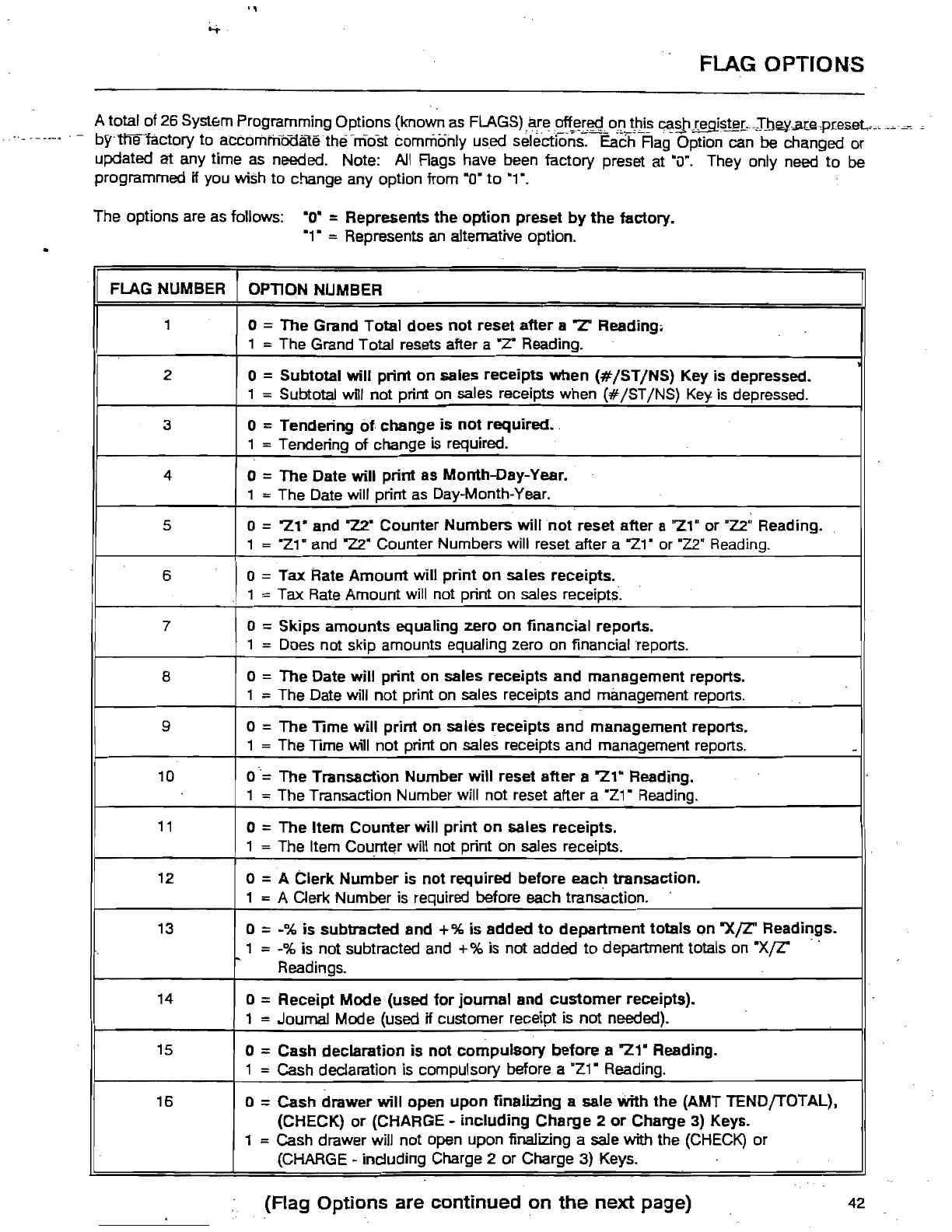
A total of
26
Syst&m
Programming Options (known
as
FLAGS)
,a!e~~!,f~<.t
0IL~'2i!>
~~I~~~r,-~I.tJe¥..a(e"preseL.,,"
- bY"tl'ieractory to aCCorilmooaliHhEfniost commonly used selections. Each Rag Option
can
be changed or
updated at any time
as
needed. Note:
All
Rags have been factory preset at
·OR.
They only need to
be
programmed Hyou wish to change any option from ·0"
to
·1".
The options are
as
follows:
·0·
= Represents the
option
preset
by
the
factory.
·1" =Represents
an
alternative option.
FLAG NUMBER
OPTION NUMBER
1
o = The Grand Total does
not
reset after a "Z' Reading.
1 = The Grand Total resets after a
.Z"
Reading.
2
o =Subtotal Will print on sales receipts when
(#/ST/NS)
Key is depressed.
1 = Subtotal
wRl
not print
on
sales receipts when
(#
/ST INS)
Key
is
depressed.
3
o =Tendering
of.
change is
not
required
..
1 = Tendering of change
is
required.
4
o =The Date Will print as Month-Day-Year.
1 = The Date will print
as
Day-Month-Year.
5
o = "Z1· and 72." Counter Numbers will
not
reset after a
"Z1"
or
"1.2"
Reading.
1 =
·Z1·
and
"22"
Counter Numbers will reset after a "21· or
-Z2"
Reading.
6
o = Tax Rate
Amount
will print
on
sales receipts.
1 = Tax
Rate
Amount will not print on sales receipts.
7
o = Skips amounts equaling zero
on
financial reports.
1 = Does not skip amounts equaling zero
on
financial
·reports.
8
a = The Date will print on sales receipts and management reports.
1 = The Date will not print
on
sales receipts and management reports.
9
a =The Time will print on sales receipts and management reports.
1 = The
TIme
will not print
on
sales receipts and management reports.
-
10 a
"=
The Transaction Number will reset after a "21" Reading.
1 =The Transaction Number will not reset after a "Z1-
Reading.
11
o =The Item Counter will print on sales receipts.
1 = The Item
Co~ntE!r
will not print on sales receipts.
12
o =A Clerk Number is not required before each transaction.
1 = A Clerk Number
is
required before each transaction.
13
o =
~%
is
subtracted and + %
is
added
to
department totals on
"XfZ'
Readings.
1 = -% is not subtracted
and
+%
is not added to department totals on
·X(Z"
Readings.
14
o = Receipt Mode (used
for
journal and
customer
receipts).
1 =Journal Mode (used if customer receipt is not needed).
15
o =Cash declaration
is
not
compulsory
before a "21" Reading.
1 = Cash declaration is compUlsory before a ·Z1" Reading.
16
a =Cash drawer will open upon finalizing a sale With the (AMT TENDfTOTAL),
(CHECK)
or
(CHARGE -
including
Charge
2
or
Charge
3)
Keys.
1
= Cash drawer will not open upon finalizing a sale with the
(CHECK)
or
(CHARGE
~
including Charge 2
or
Charge
3)
Keys.
(Flag Options are continued
on
the
next
page)
42



 To Next Page