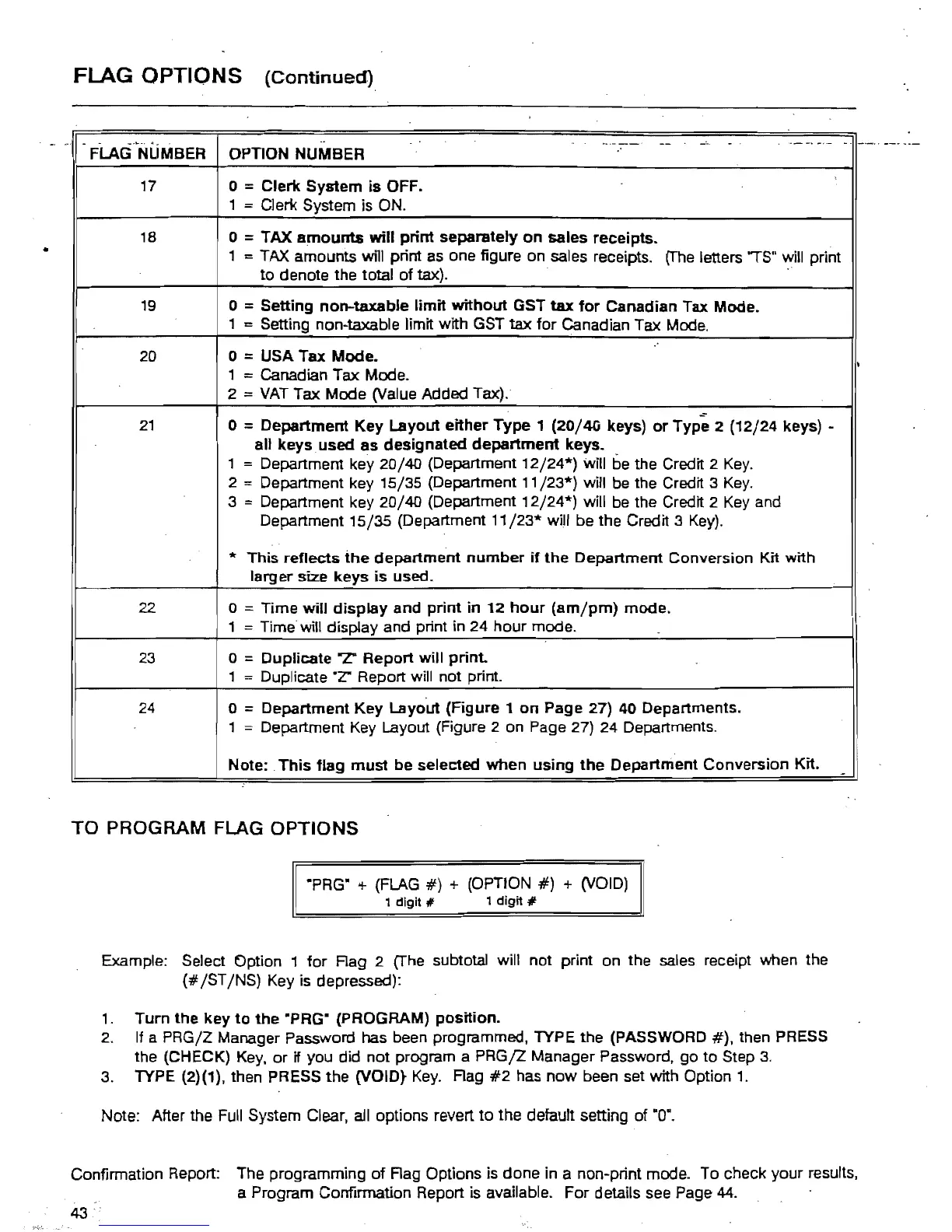
FLAG OPTIONS
(Continued)
."
.
_
....
-.
".
FLAG NUMBER
..
--
-~
. .
--
-.
-,- -
OPTION NUMBER
17
o =Clerk System
is
OFF.
1
=
Cieri<
System is ON.
18
o =TAX
amounts
will
print
separately
on
sales receipts.
1
==
TAX
amounts
wl1i
print as one figure
on
sales receipts.
(The
letters
'is''
will print
to denote the total of
tax).
19
o = Setting non-taxable
limit
without
GST
tax
for
Canadian Tax Mode.
1
==
Setting non-taxable limit with GST
tax
for Canadian Tax Mode.
20
21
o =USA Tax Mode.
1
= Canadian Tax Mode.
2
=
VAT
Tax Mode (Value Added Tax).
~
o =Department
Key
Layout either
Type
1
(20/40
keys)
or
Type 2 (12/24 keys) -
all keys used as deSignated
department
keys. .
1
= Department key 20/40 (Department
12/24*)
will be the Credit 2
Key.
2 = Department key 15/35 (Department 11/23*) will
be
the Credit 3
Key.
3 = Department key 20/40 (Department
12/24*)
will be the Credit 2
Key
and
Department 15/35 (Department
11/23*
will be the Credit 3
Key).
I
...
This
reflects
the
department
number
if
the
Department Conversion Kit with
larger size keys
is
used.
22
o =Time
will
display
and
print
in
12
hour
(am/pm)
mode.
1
= Time will display and print in 24 hour mode.
23
o = Duplicate
'7:
Report will print.
1
==
Duplicate .Z" Report will not print.
24
o = Department
Key
Layout (Figure 1
on
Page 27) 40 Departments.
1
= Department Key Layout (Figure 2 on Page 27) 24 Departments .
Note: .
This
flag
must
be
selected
when
using
the
Department Conversion Kit.
-
:
TO
PROGRAM FLAG
OPTIONS
·PRG" + (FLAG
#)
+ {OPTION
#}
+ (VOID)
1
digit
It
1
digit
#
Example: Select Option 1
for
Rag 2 (The subtotal will not print on the sales receipt when the
(#
/ST
/NS) Key is depressed):
1.
Turn
the key
to
the
"PRG" (PROGRAM)
position.
2.
If
a PRG/Z Manager Password has been programmed, TYPE the (PASSWORD
#),
then PRESS
the (CHECK)
Key,
or if you did not program a
PRGjZ
Manager Password, go to Step
3.
3. TYPE (2)(1), then PRESS the (VOID}
Key.
Rag
#2
has
now
been set with Option
1.
Note: After the Full System Clear, all options revert
to
the default setting of ·0·.
Confirmation Report: The programming of Rag Options is done in a non-print mode. To check your results,
a Program Confirmation Report is available. For details see Page
44.
43



 To Next Page