TRANSACTION EXAMPLES FOR OPERATING THE CASH REGISTER
NOTE:
Tum
the
key
tt1e
"REG" '(REGiSTER) positfc)'iiTor-regiSterihg'sales
transactions.
IMPORTANT: It is
not
necessary
to
press the Decimal Point when ringing
up
a price.
REMINDER: H Clerk Numbers are programmed,
be
sure
to
lYPE
the
(CLERK
#),
then PRESS
the (CLERK) Key before ringing
up
a sale.
In the examples below, Department 1 is programmed as taxable
with
a 6% (TAX 1) rate and Clerk
#1
is used.
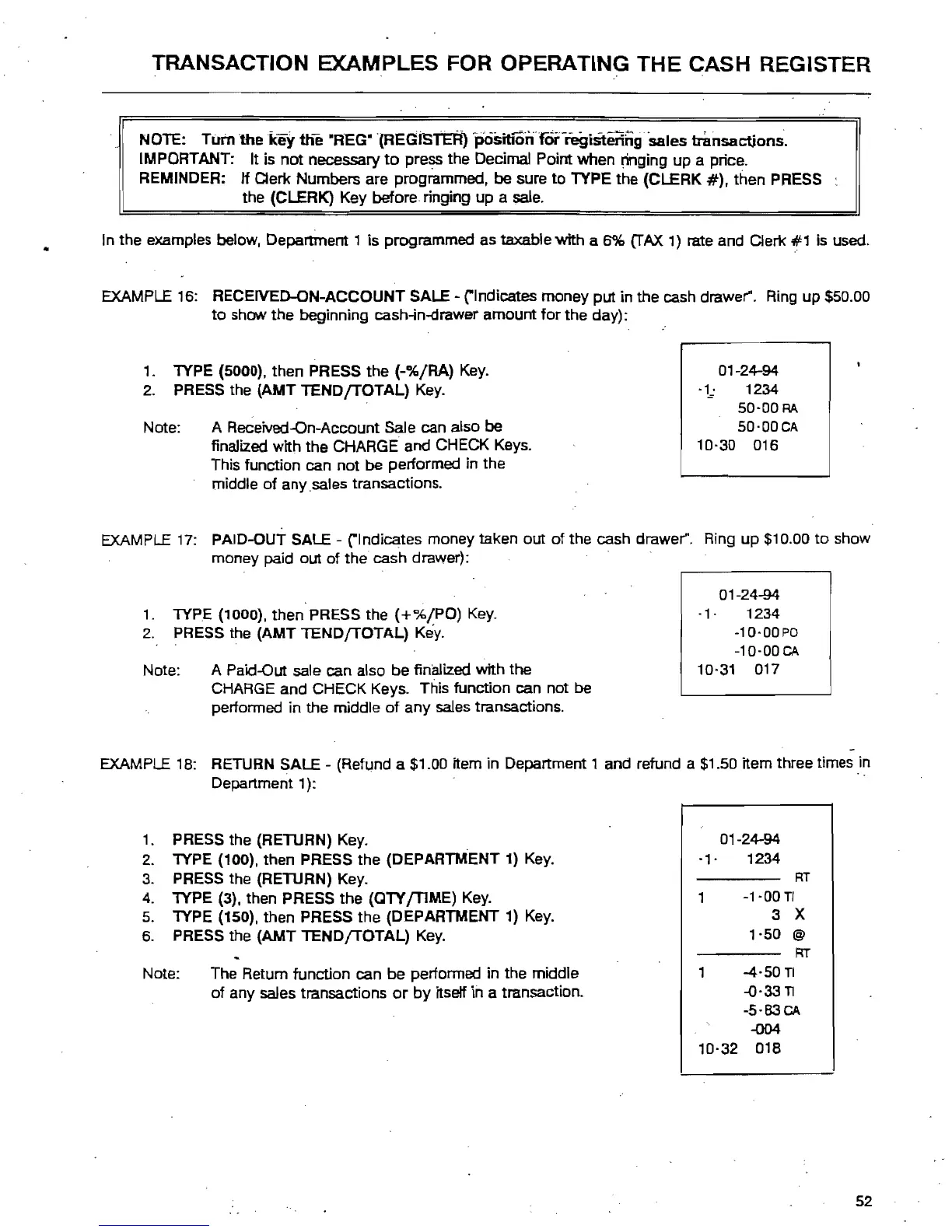
EXAMPLE 16: RECEIVED-ON-ACCOUNT SALE - ("Indicates money
put
in the cash drawer". Ring
up
$50.00
to
show
the
beginning cash-in-clrawer
amount
for
the
day):
1.
lYPE
(5000), then PRESS
the
(-%/RA)
Key. 01-24-94
2.
PRESS the
(AMT
TENDfTOTAL)
Key.
·1·
:-
1234
50-00
RA
50·00CA
Note: A Received-On-Account Sale can also
be
10·30
016
finalized with
the
CHARGE
and
CHECK Keys.
This function can
not
be performed in the
middle
of
any
,sales transactions.
EXAMPLE
17: PAID-OUT SALE - ("Indicates money taken out
of
the cash drawer". Ring
up
$10.00
to
show
money paid
out
of
the
cash drawer):
01-24-94
·1·
1234
1.
lYPE
(1000). then PRESS the
(+%/PO)
Key.
-10'00PD
-10·00
CA
Note: A Paid-Out sale can also
be
finalized with
the
2.
PRESS the
(AMT
lEND{TOTAL)
Key.
10·31 017
CHARGE and CHECK Keys. This function can not
be
performed in the middle
of
any
sales transactions.
-
EXAMPLE 1
B:
RETURN SALE - (Refund a $1.00 item in
Department'
and
refund a $1.50 item three times in
Department'):
' ,
01-24-94
1.
PRESS the (RETURN) Key.
-,.
1234
2.
lYPE
(100), then PRESS the (DEPARTMENT 1) Key.
RT
3.
PRESS the (RETURN) Key.
-1-00
TI
4.
lYPE
(3), then PRESS
the
(QlY
{TIME)
Key.
3 X
5.
lYPE
(150). then PRESS the (DEPARTMENT 1) Key.
6.
PRESS the
(AMT
TEND
{TOTAL)
Key.
'-50
@
RT
1
-4-50TI
of
any sales transactions
or
by
itsetf in a transaction.
Note: The Return function can
be
performed in
the
middle
-0-33
TI
-5·83CA
-004
10-32 018
52



 To Next Page