TRANSACTION EXAMPLES FOR OPERATING THE CASH REGISTER
-NOTE:
Turn
the
key'tfle
loREG"'(REGlSTER}
positiotf
for
regiSfenrig
sales'
tra-nsaCtions_
IMPORTANT: It is not necessary
to
press
the
Decimal Point when ringing
up
a price.
REMINDER: If Clerk Numbers are programmed.
be sure to TYPE the (CLERK
#),
then PRESS
the
(CLERK) Key before ringing
up
a
sale_
In
the
examples below, Department 1 is programmed as taxable with a 6%
(TAX
1)
rate and Clerk
#1
is
used_
•
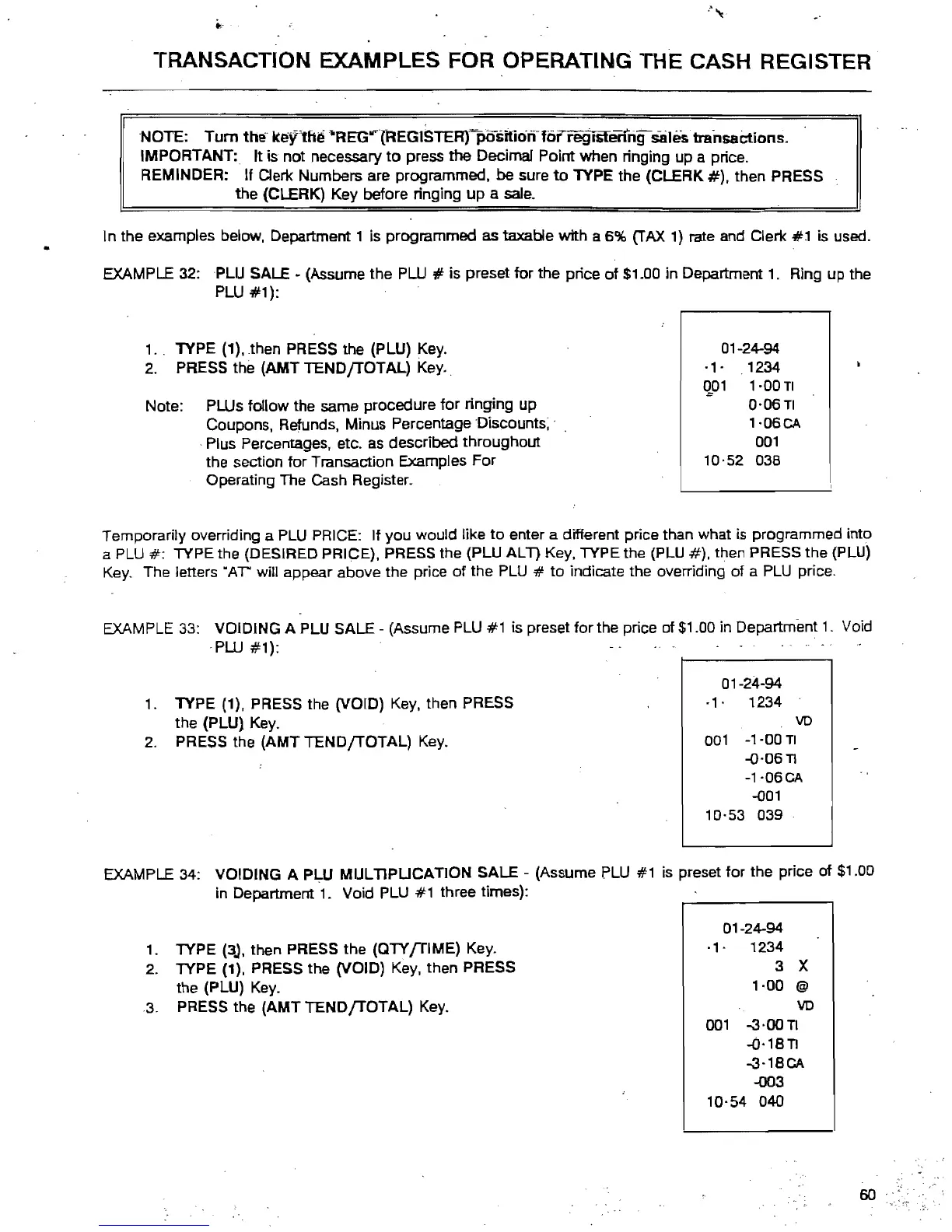
EXAMPLE 32: PLU SALE
~
(Assume
the
PW
# is preset
for
the price
of
$1_00
in Department
1.
Ring up the
PLU
#1):
1.,
TYPE (1).
then
PRESS the (PLU) Key.
01-24-94
-1'
,1234
~01
1·00TI
Note: PLUs follow the same procedure
for
ringing up
2.
PRESS the
(AMT
TENDfTOTAL)
Key.,
0-06TI
Coupons. Refunds, Minus Percentage Discounts; ,
1-06CA
-Plus Percentages, etc. as described throughout
001
the section
for
Transaction Examples
For
10·52
038
Operating The Cash Register.
Temporarily overriding a PLU PRICE: If you would like
to
enter a different price than what
is
programmed into
a PLU
#:
TYPE the (DESIRED PRICE), PRESS the (PLU
ALl)
Key, TYPE the (PLU
#),
then PRESS the (PLU)
Key. The letters
"AT' will appear above the price
of
the PLU #
to
indicate the overriding of a
PLU
price.
EXAMPLE 33: VOIDING A PLU SALE - (Assume PLU #1 is
presetforthe
price
of$1.00
in Department
1.
Void
-PLU
#1):
1.
TYPE (1), PRESS the (VOID) Key, then PRESS
the (PLU) Key.
2.
PRESS the
(AMT
TENDfTOTAL)
Key_
01-24-94
·1·
1234
VD
001
-1-00
TI
-0-06
TI
-1-06CA
-001
10-53 039
EXAMPLE 34: VOIDING A PLU
MULTIPUCATION
SALE
- (Assume FLU #1 is preset for the price
of
$1.00
in Department
1.
Void PLU #1 three times):
1.
2.
3.
TYPE
(3.).
then PRESS the
(QTYfTIME)
Key.
TYPE (1), PRESS the (VOID) Key, then PRESS
the
(PLU) Key.
PRESS the
(AMT
TEND
fTOTAL)
Key_
01-24-94
-1'
1234
3 X
1-00
@
VD
001
-3-00
TI
-0·18
TI
-3-18CA
-003
10-54
040
60 "



 To Next Page