EasyManua.ls Logo

Royal 482NT - PLU Confirmation Report; Take PLU Confirmation Report

Default Icon
83 pages
Print Icon
To Next Page IconTo Next Page
To Previous Page IconTo Previous Page
Loading...
PLU CONFIRMATION REPORT'
. The
PLU
Confirmation Rpport allows you
to
check all
PWs
programmed,
-"=--
-;:..!.....-.-~
-
.~.
- ::,;
TO TAKE A PLU CONFIRMATION REPORT
II
·PRG" +
(PW)
II
1.
Tum
the
key
to
the
·PRG" (pROGRAM)
position.
2.
If a
PRGjZ
Manager Password has been programmed, TYPE the (pASSWORD
#).
then PRESS
the (CHECK)
Key,
or
if you did not program a
PRGjZ
Manager Password, go
to
Step
3.
3.
PRESS the (PLU)
Key.
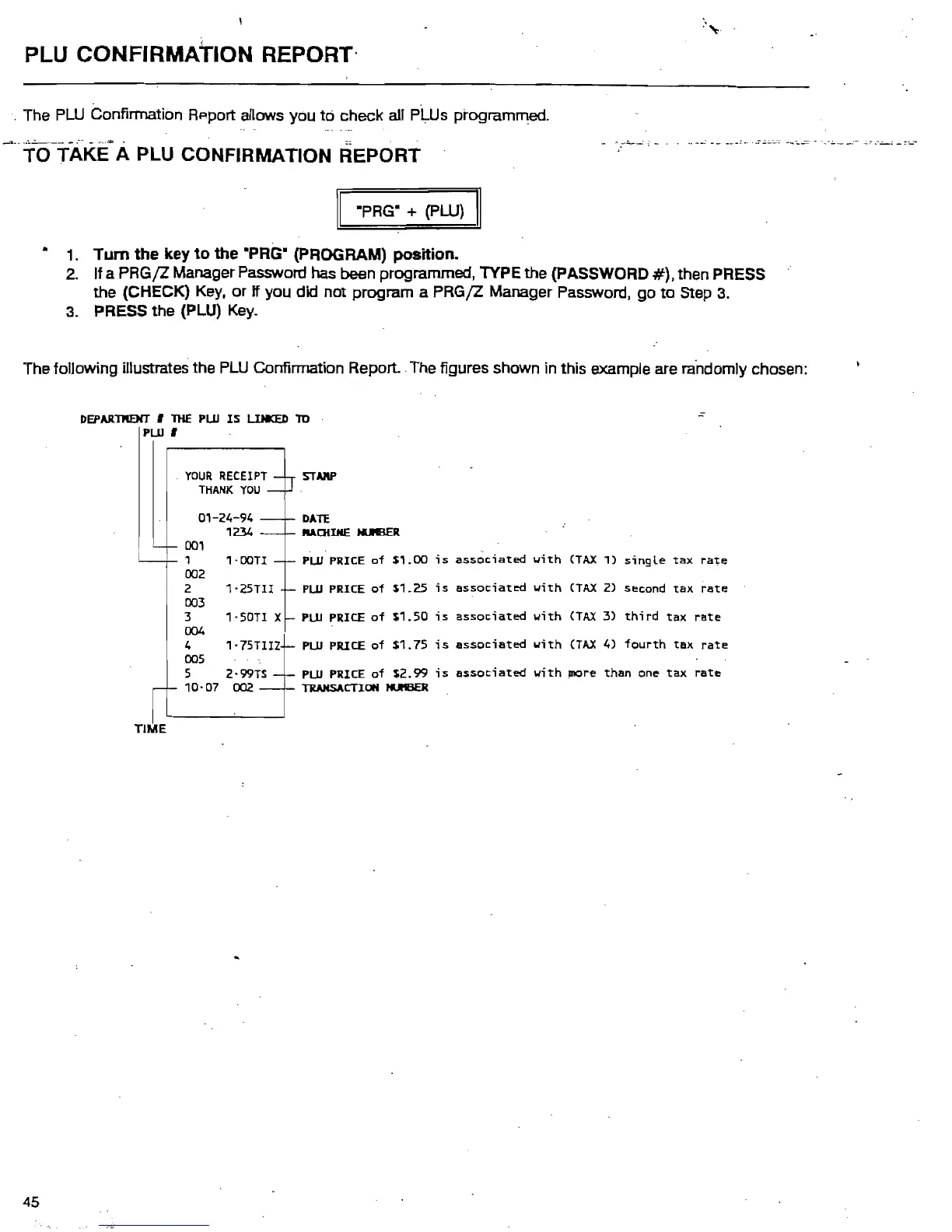
The following illustrates the
PLU
Confirmation
Report
The figures shown
in
this example are ra'ndomly chosen:
DEPARntarr ,
THE
PUl
IS
LlHKED
TO
PUl
,
.
YOUR
RECEIPT STNIP
THANK
YOU
01-24-94
DATE
1234
JlllAOilHE
IUElER
001
1
1'OOT1
PUl
PRICE
of
$1.00
is
associated
with
(TAX
1)
single
tax
rate
002
2
1'25Tl1
PUl
PRICE
of
$1.25
is
associated
with
(TAX
2)
second
tax
rate
003
3 1·50T1 X
PLU
PRICE
of
$1.50
;s
associated
with
(TAX
3)
third
tax
rate
004
4 1·75T1IZ
PLU
PRICE
of
$1.75
is
associated
with
(TAX
4)
fourth
tax
rate
005
5 2·99TS
PLU
PRICE
of
$2.99
is
associated
with
more
than
one
tax
rate
10-07 002
TRANSACTION
tUI3ER
TIME
45

Table of Contents

Related product manuals