AFTER
QUICK
START
PROGRAM CONFIRMATION REPORT
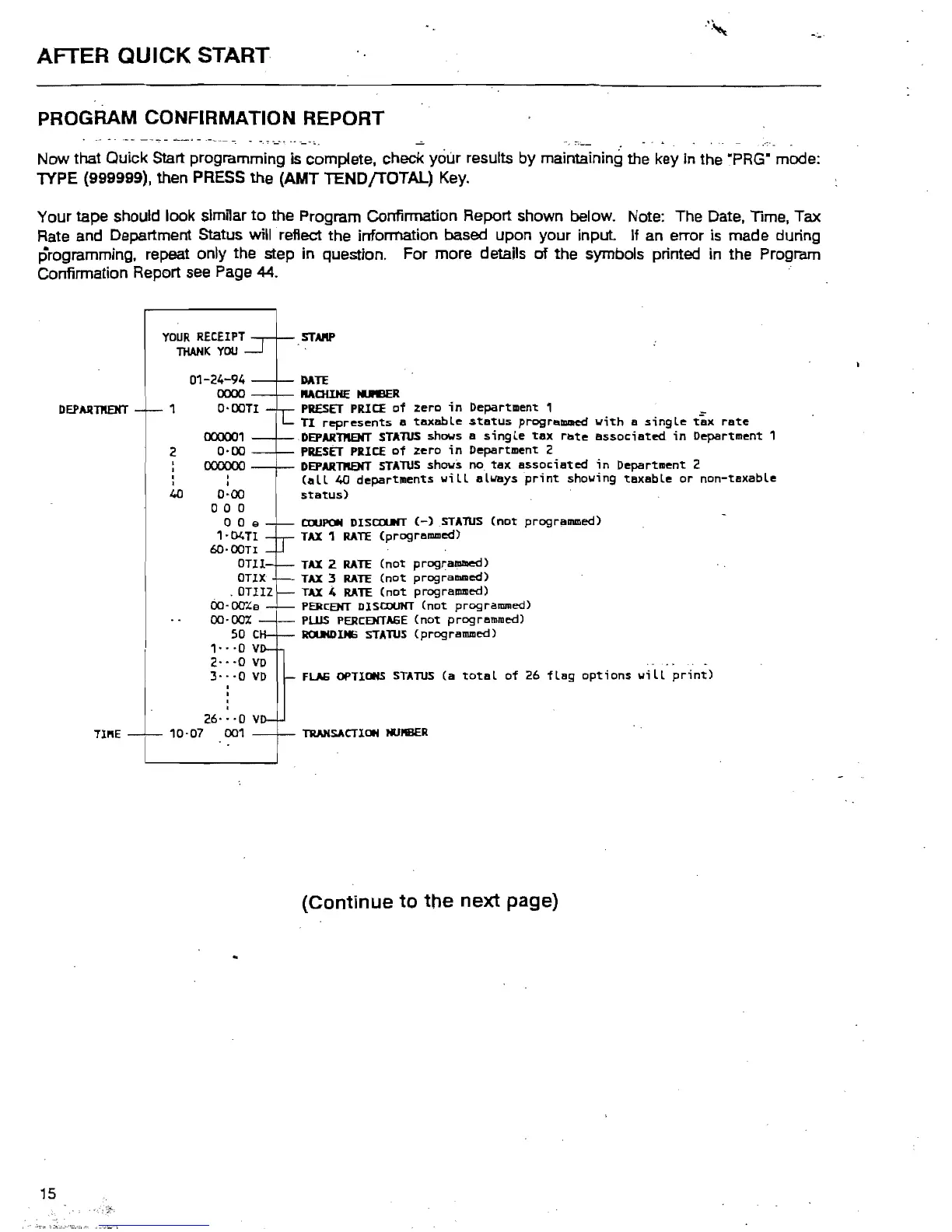
Now that Quick Start programming is complete, check your results by maintaining the key in the ·PRG" mode:
1YPE (999999), then
PRESS
the (AMT TENDfTOTAL)
Key_
Your tape should look similar
to
the Program Confirmation Report shown below. Note: The Date, Time, Tax
Rate
and Department Status will reflect the information based upon your
input
If
an
error
is
made during
programming, repeat only the step
in
question. For more details
of
the symbols printed
in
the Program
Confirmation Report
see
Page
44.
YOUR
RECEIPT
THANK
YOU
STARP
DATE
MOUHE
!DEER
PRESET
PRICE
of
zero
in
Department
1 _
TI
represents
a
taxable
status
programmed
with
a
single
tax
rate
DEPARntarr STAlUS shows a
single
tax
rate
associated
in
Department
1
PRESET
PRICE
of
zero
in
Department
2
DEPARTPIENT
STAlUS
shows
no
tax
associated
in
Department
2
(all
40
departments
will
always
print
showing
taxable
or
non-taxable
status)
c.rtJPON
DISaufT
(-)STAlUS
(not
programmed)
TAX
1
RATE
(prograllUlled)
TAX
2
RATE
(not
programmed)
TAX
3
RATE
(not
progralllllled)
TAX
.4
RATE
(not
progrslllllled)
PERCEHT
DISCOUNT
(not
programmed)
PlUS
PERCEHTAGE
(not
programmed)
ROUKDlH6
STATUS
(programmed)
. .
FLAG
OPTIONS
STATUS
(a
total
of
26
flag
options
will
print)
TlUlHSACTIOH
HUflBER
(Continue
to
the
next
page)
1
2
DEPARntarr
,
I
I
I
40
01-24-94
0000
o-oon
000001
0-00
00000o
•
I
0-00
a a 0
a 0 e
'-04Tl
6O-00TI
OUI
OUX
.OUIZ
OO·ocr"e
00-00%
50 C
,-
-·0
v
2·_·0
VD
3·-·0
VD
26·
-
-0
v
10-07
001
TlI'lE



 To Next Page