44
MPS4232
Section 5: Software
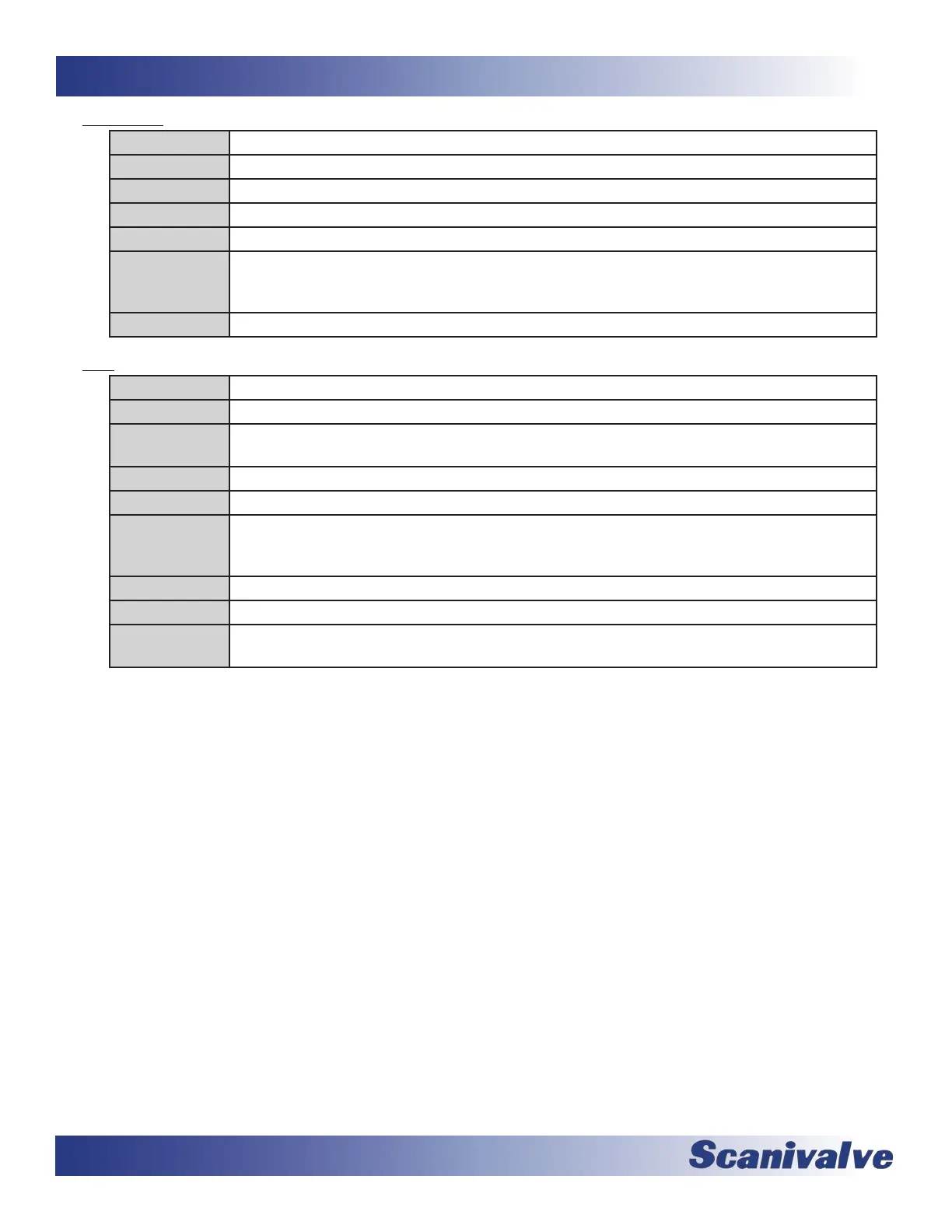
COMMAND MODEL
TYPE Get
DESCRIPTION Returns the set model name and number.
SYNTAX GET MODEL
RETURNS The model name of the device
EXAMPLE GET MODEL
MPS4232
>
NOTES This variable is set at the factory and cannot be changed in the eld.
COMMAND SCAN
TYPE Funcon
DESCRIPTION Commands the MPS to being sampling values from the internal sensors and outputs data to the
designated target. The MPS will enter SCAN mode.
SYNTAX SCAN
RETURNS The scan data, followed by a prompt when the scan is completed.
EXAMPLE SCAN
::: [Scan Data] :::
>
NOTES Output is based on formang. Please see MPS Data Output Denions for more informaon.
NOTES If PTP is enabled, the MPS may used PTP me as a trigger to start scanning if congured to do so.
NOTES If TRIG == 1, the MPS will enter SCAN mode but will not output data unl a trigger is received. See
the TRIG command for more informaon.



 To Next Page