86
MPS4232
Appendix
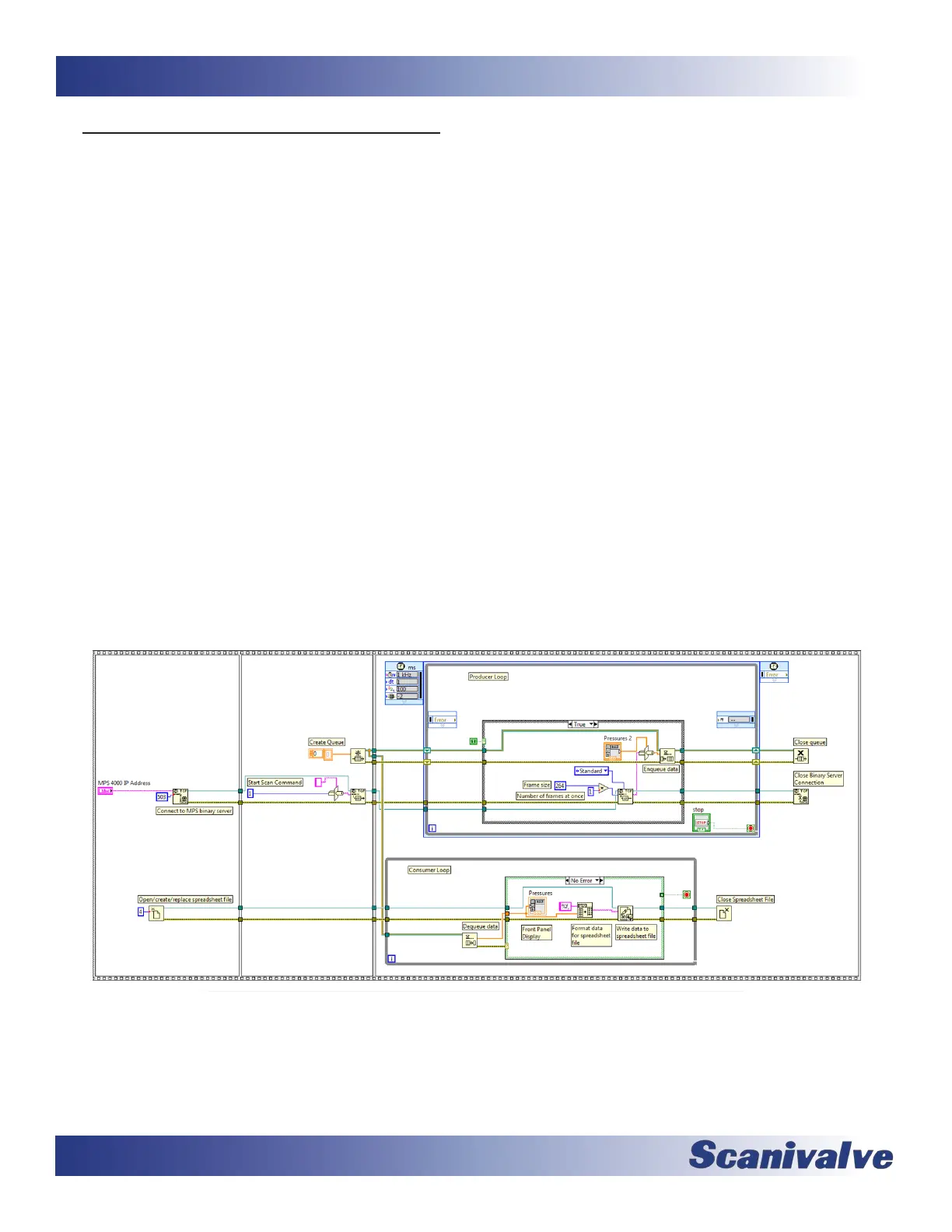
Below is an example LabVIEW® VI to show how to interface with the MPS4200 binary server. The frame structure to the le
connects to the MPS4200 binary server with port 503 and prompts the user to enter a le name for the text le that will
hold the scan data in CSV format. This example assumes that the SIM variable in the MPS4232 is set to 64 (0x40). If SIM is set
to 0, the binary packet is 34 single elements per frame or 136 bytes.
The next frame structure to the right creates a queue and starts the scan by wring a binary “1“ to the binary server. A
queue is used between the producer loop and the consumer loop to handle dierences between sampling rates and wring
rates. The next frame structure to the right supports the produce loop and the consumer loop.
The producer loop reads the data from the MPS4200 binary server. The MPS data is formaed such that the VI cast funcon
can convert it directly to 66 single elements per frame or 264 bytes. This example runs the produce loop at 1ms, but this
could be run at a slower period when the rate of the MPS is slower.
Mulple frames of data from the MPS may be read at once, however this will cause mulple frames of data in one array. For
instance if 4 frames of data are desired with one read, the number of bytes to read is (4 X 264) or 1056 bytes. This allows
the period of the producer loop to be reduced but the spreadsheet will then have 4 frames of data in one row. Addional
LabVIEW funcons, or spreadsheet post processing funcons, are required to split out each data frame when mulple
frames are read.
In tests with the produce loop set at a period of 1ms, and the read size set equal to 1 frame, data rates to 850 Hz are
possible.
The consumer loop reads data from the queue, displays it to the front panel, converts the data to a string formaed for a
CSV le, and writes the data to a CSV le. When an error is received from the queue, because the queue was closed from the
producer loop, the consumer loop exits and closes the CSV le.
Scanivalve has created a standalone MPS4200 program tled MPSLink, that will interface with up to 8x MPS4200 modules,
scan and collect data at the maximum rate, and will covert all data to a single .CSV le. This program is available for down-
load on the Scanivalve website, under Soware Downloads. Included in the download are all VI’s that were used to create
the program. These VI’s can be useful examples when developing custom LabVIEW® soware.



 To Next Page