24
MPS4232
Section 3: Operation
The Scan page is used for conguring the scan data, displaying scan data to the screen, or collecng scan data to a le (ASCII
or Binary).
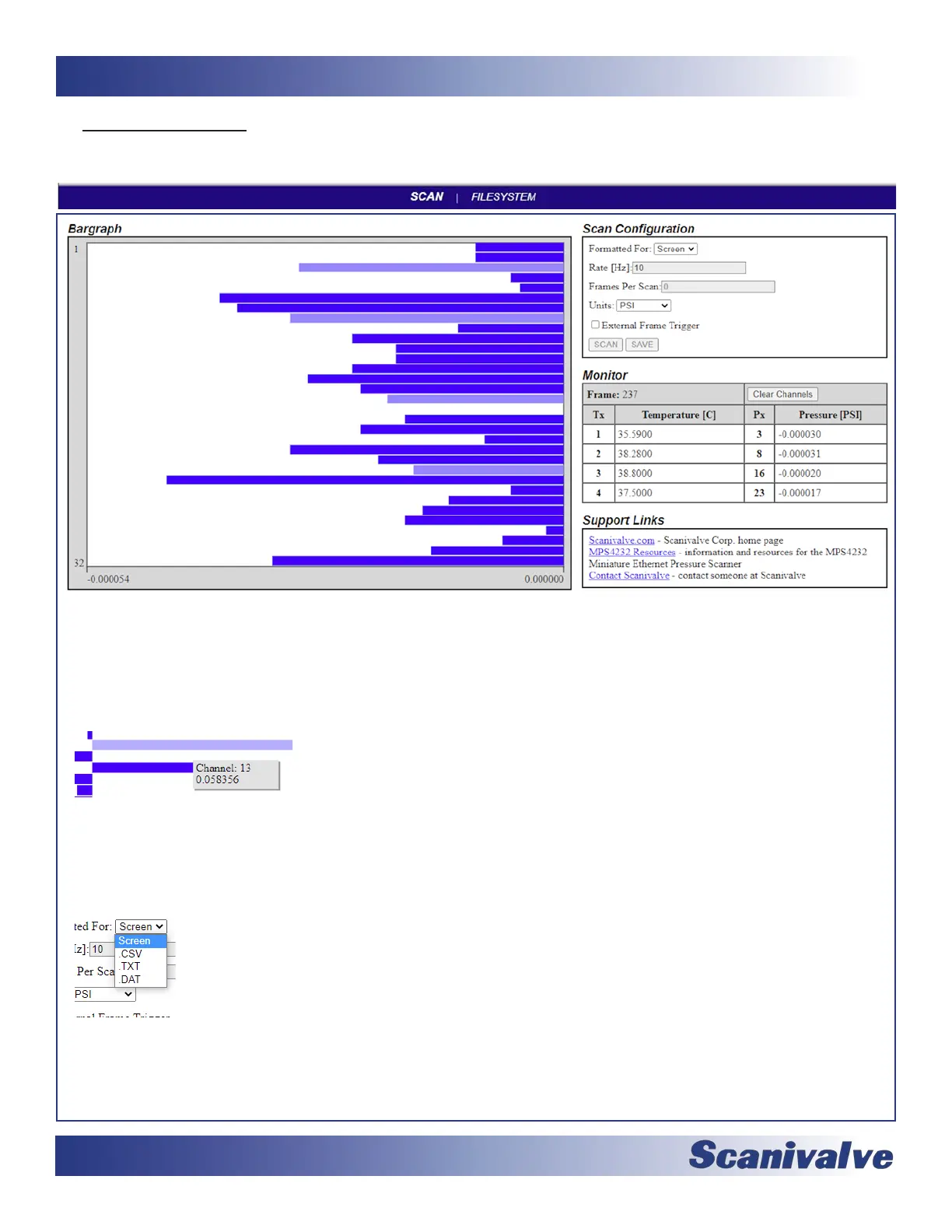
BARGRAPH -- This area of the Scan page can display pressure data for each channel in the MPS when scanning. Data will only
be displayed if “Formaed For:” is set to “Screen.”
The X-Axis will auto-scale based on the highest pressure value from the channels, and will always display a “0.000”.
The max and min values will always scale 20% higher than the highest measured pressure value from any channel.
The units are based on the “Units:” seng.
The bar graph will only update at 2Hz, regardless of the set Rate in the MPS. Each of the blue bars represents one
channel, starng with channel 1 at the top of the graph and channel 32 at the boom.
Hovering the mouse over a bar will display the channel number and pressure value (based
on the “Units:” seng).
Clicking on a bar (channel) will highlight this channel (light blue) and report that channel and pressure value in the
right hand table in the Monitor Secon.
SCAN CONFIGURATION -- This area of the Scan page allows for the scan conguraon variable to be set when collecng data
in the web server.
Formaed For: This selecon will direct the collected data to a desnaon in the selected format.
-- Screen. This will display the scan data in the web server Bar Graph and Monitor table.
-- CSV. This will collect and format the data in ASCII CSV format. The le will be auto-downloaded.
-- TXT. This will collect and format the data in ASCII scrolling format. The le will be auto-downloaded.
-- DAT. This will collect and format the data in Binary format. The le will be auto-downloaded and must be
converted in a separate soware program (such as ScanTel).
Note: Screen and ASCII formats are limited to scan rates of 100Hz or less. Binary is limited to 1000Hz.
Rate [Hz]: This the scan rate, expressed in Hz.
Frames Per Scan: This is the seng for frames per scan (FPS variable). “0” cannot be used when scanning to a le.
Units: This sets the Engineering Units used for the pressure data.
External Frame Trigger: This will enable the use of an external frame trigger. See external triggering for more
informaon.



 To Next Page