MX-M264U ADJUSTMENTS AND SETTINGS 5 – 33
ADJ 14 Scan image off-center
adjustment
(Manual adjustment)
NOTE: Normally if the adjustment is executed by ADJ 3 (automatic
adjustment), there is no need to execute this adjustment.
Only when the manual adjustment is required, execute this
adjustment.
In other words, this manual adjustment is executed when a
satisfactory result is not obtained from the automatic
adjustment (ADJ 3).
14-A Scan image off-center adjustment (Manual
adjustment) (Document table mode)
This adjustment must be performed in the following cases:
* When the scanner (reading) section is disassembled.
* When the scanner (reading) unit is replaced.
* When a U2 trouble occurs.
* When the scanner control PWB is replaced.
* When the EEPROM on the scanner control PWB is replaced.
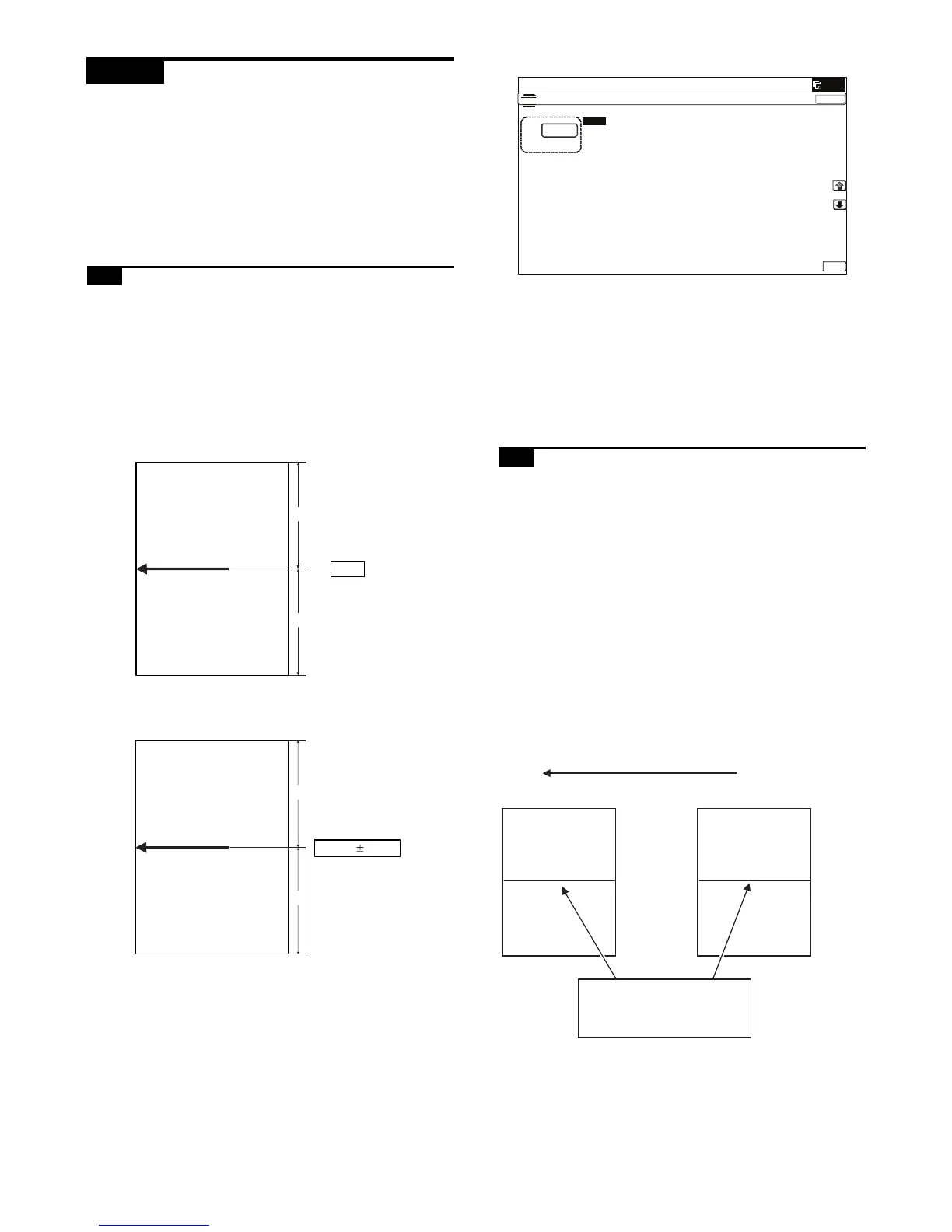
1) Make a copy of the adjustment chart (made by yourself) in the
adjustment mode (document table).
2) Check the copy image center position.
If A - B = 1.0mm, the adjustment is not required.
If the above condition is not satisfied, perform the following
procedures.
3) Enter the SIM 50-12 mode.
4) Select the adjustment mode OC with the scroll key.
5) Enter the adjustment value with 10-key, and press [OK] key.
The entered value is set.
When the set value is increased, the main scanning print posi-
tion is shifted to the front side by 0.1mm.
6) Go to the copy mode, and make a copy.
Repeat the procedures of 1) - 6) until the above condition is satis-
fied.
14-B Scan image off-center adjustment
(Manual adjustment) (RSPF mode)
This adjustment must be performed in the following cases:
* When the scan control PWB is replaced.
* When the EEPROM on the scan control PWB is replaced.
* When the scanner (reading) section is disassembled.
* When the scanner (reading) section is replaced.
* When U2 trouble occurs.
* When the RSPF section is disassembled.
* When the RSPF unit is replaced.
CAUTION: To execute this adjustment, it is required that the ADJ
14A Scan image off-center adjustment (Document table
mode) must have been properly adjusted.
1) Prepare the adjustment chart.
Draw a line at the center of the front surface and the back sur-
face of A4 (11" x 8.5") paper in parallel with the paper transport
direction.
B
A=B
A
B'
A' - B' = 1.0mm
A'
(100%)
ǂǂǂ6,08/$7,21ǂǂ12
&/26(
7(67
25,*,1$/&(17(52))6(76(783





 To Next Page