Preparing for Installation
1. Refer to the checklist provided above before beginning the installation process. For detailed information,
refer to the appropriate, referenced section in this document.
2. Select a suitable operation environment. The site should be clean, dry, and not subject to shock or
vibration. Ensure that the environment is free from wire ends, knockout tabs, and other debris.
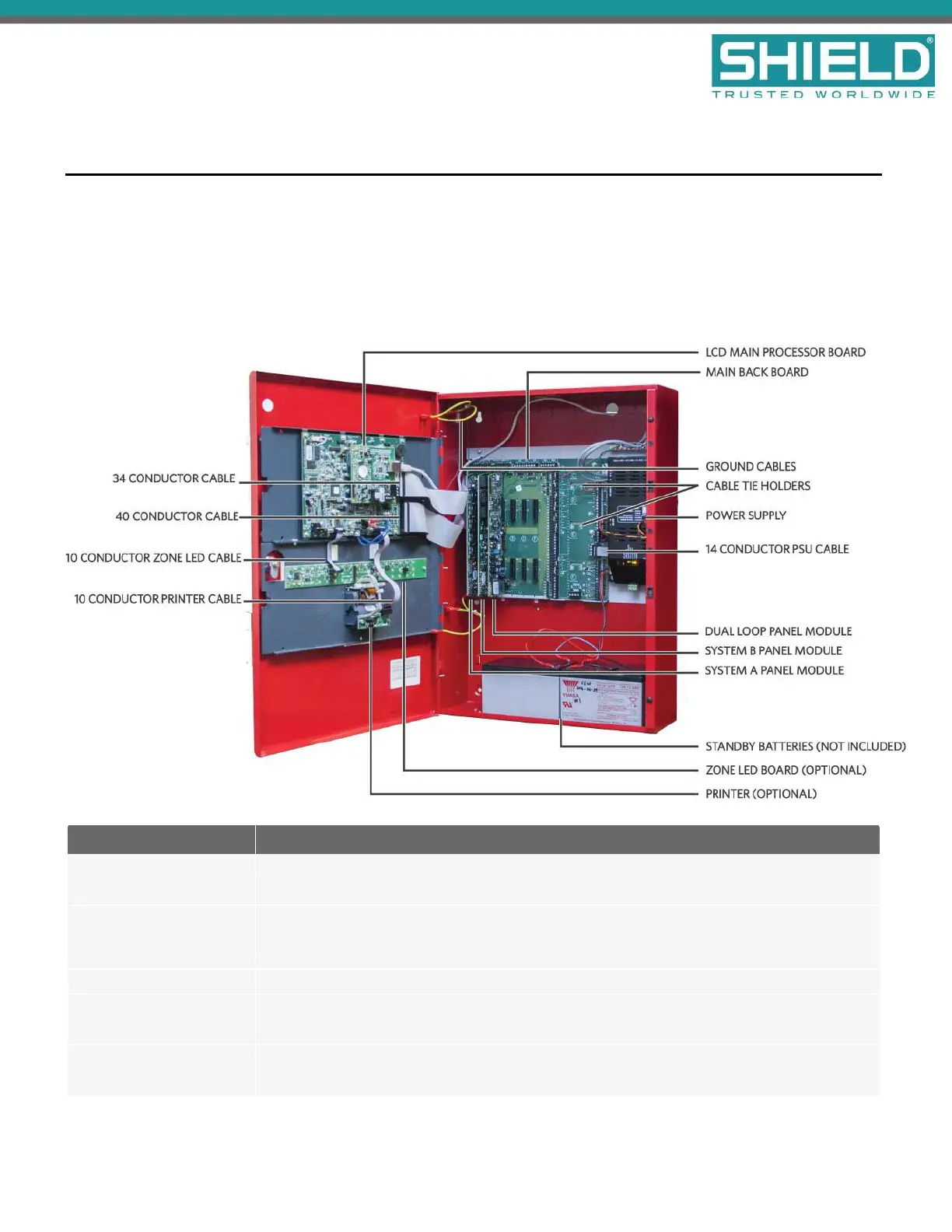
3. Familiarize yourself with the panel and components.
Item Description
Power Supply
Depending on the model, the Aura Fire Alarm ControlPanel will have either a 5.25 Amp or
10.25 Amp power supply.
Main Back Board
The Main Back Board contains slots for six circuit boards, and accepts the System A Panel
Module, System B Panel Module, Dual Loop Panel Module(s), and various optional panel
modules.
LCD Main Processor Board The LCD Main Processor Board provides operation of the panel GUI.
System A Panel Module
System A Panel Module is required for operation of the fire alarm control panel. All models of
the Aura Fire Alarm ControlPanel contain one System A Panel Module.
System B Panel Module
System B Panel Module is required for operation of the fire alarm control panel. All models of
the Aura Fire Alarm ControlPanel contain one System B Panel Module.
Installation
SHIELD Fire, Safety & Security Ltd
Aura Fire Alarm Control Panel Installation Manual
Version 1.00 |June 2019 |MAN-1431VS
Page 17



 To Next Page