MV-32/64 Multiviewer www.snellgroup.com Installation
Issue 1 Rev 11 Page 18 © 2014 Snell Limited
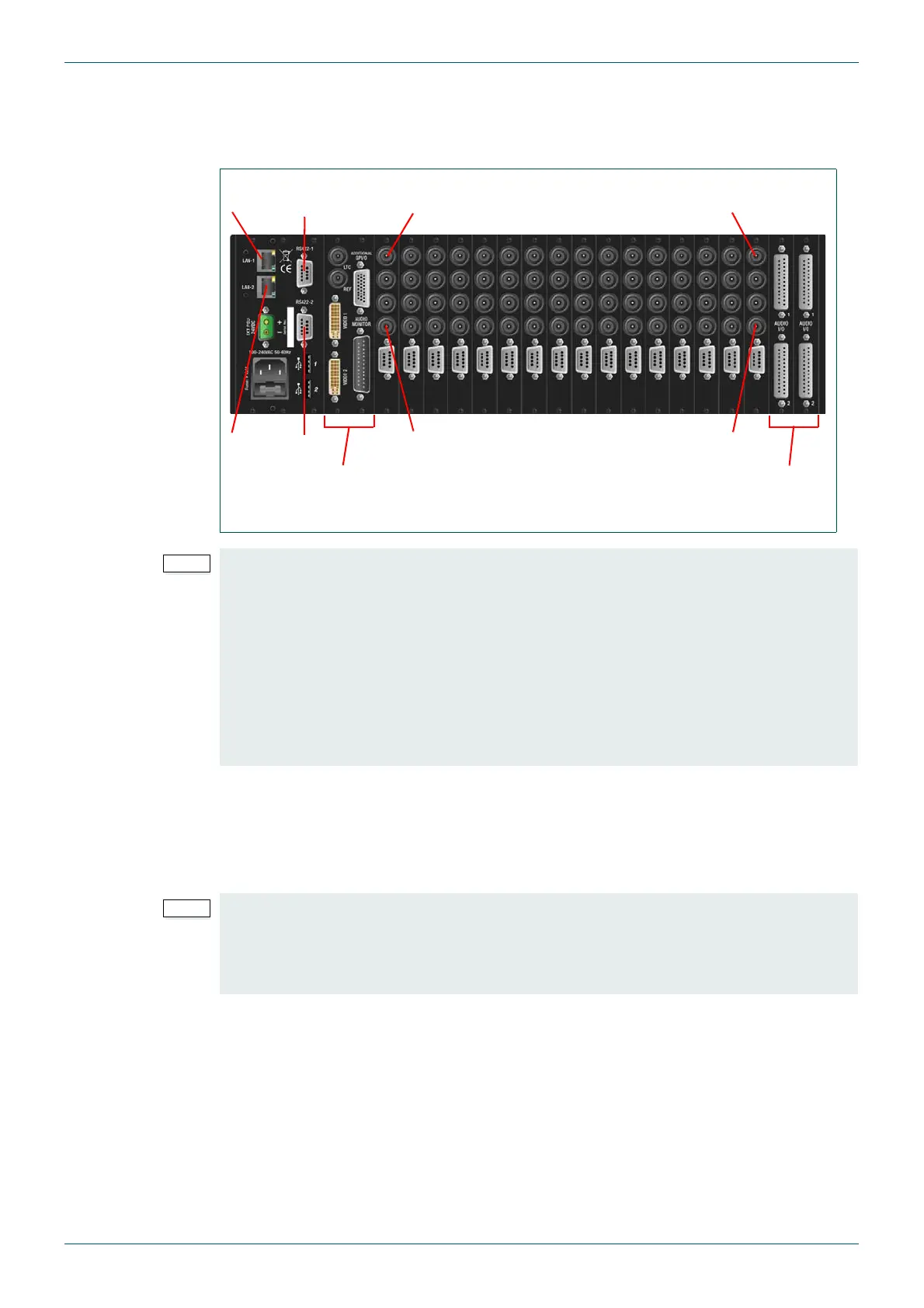
3.3.2 Example: MV-64 Multiviewer Rear Panel Connections
The MV-64 multiviewer shown below is fully equipped with single width video rear panels and
two audio cards.
3.4 Input card configurations
The MV-32/MV-64 multiviewer may be fitted with up to sixteen MV-VIP3*, MV-VIP3D*
MV-VIP1* or MV-VIP2* video input cards. See section 2.1.4 for details on card and frame
firmware compatibility.
Frame configuration options also include video loop-through and external audio I/O cards,
which will reduce the total capacity available for video input cards.
MV-VIP3 and MV-VIP3D video cards support the following standards:
• Composite video PAL/NTSC, CVBS - 1Vpp (limited to 2)
• SDI - SMPTE 259M
• HD-SDI up to SMPTE 292M 3G
Fig 5. Example MV-64 Multiviewer 3U Frame Rear Connector I/O.
• Slots 1 and 2 are not compatible with audio cards. If audio cards are installed a
minimum of one video card must be fitted in slot 1 with a loop through rear panel.
This allows the first audio card to be fitted in slot 3.
• Slots 17 and 18 are reserved for Audio cards but can’t be used until slots 1 to 16
have been filled, see Appendix D.1.1.1 for further details.
• A maximum of 8 audio cards (any mix of input and output) can be fitted in an MV-64
multiviewer.
• Composite video input signals can only be connected to the bottom two BNC
connectors of the rear panel for MV-VIP3 & MV-VIP3D cards.
Video
Input 4
Video
Input 1
Video
Input 64
Video
Input 61
CPU/Buffer Cards
(LAN 1 & RS422-1)
Slots 17 & 18 reserved for
Audio Cards (optional)
LAN 1, RS422-1
LAN 2, RS422-2
(Not Used)
*The MV-VIP3 and MV-VIP3D cards cannot be mixed with MV-VIP1 or MV-VIP2 cards in
the multiviewer frame because they use different versions of firmware.
If MV-VIP3 or 3D cards are to be fitted in a multiviewer frame that contains MV-VIP1 or
MV-VIP2 cards they must first be removed and replaced with MV-VIP3 or 3D cards.
See section 2.1.4 for details on card and frame firmware compatibility.



 To Next Page