MV-32/64 Multiviewer www.snellgroup.com Operation
Issue 1 Rev 11 Page 49 © 2014 Snell Limited
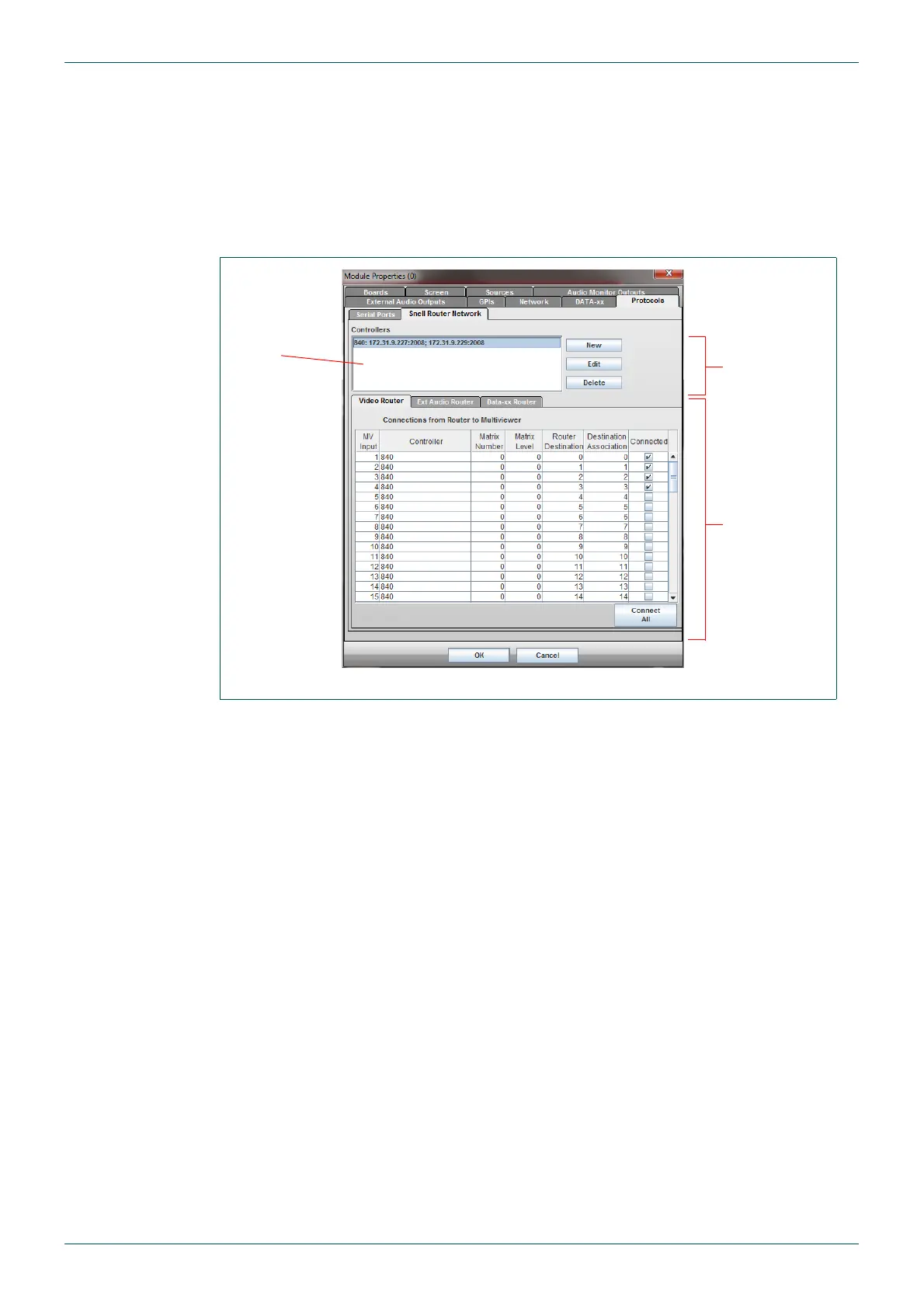
4.11.11 Protocols - Snell Router Network Tab
This tab is used for configuring the IP connections to Snell router controllers and the physical
connections from Snell routers to the multiviewer.
When communication with a Snell router is established, the first row of UMDs in each video
window will acquire the applicable source names of the router according to the source that is
feeding the destinations connected to the multiviewer. As cross-points are changed in the
router, the UMDs will be updated.
The Controller list box at the top of the tab displays the details of any configured routers. The
New, Edit and Delete buttons are used to set up Snell controllers that use an IP connection to
communicate with the MV.
If the serial port is used then the Snell router protocol needs to be selected in the Serial Ports
tab and the relevant serial port speed and settings configured there (see section 4.11.10).
A combination of serial port controlled and IP controlled controllers is possible. The Serial
Port option is always available to select in the Controller column, as described in
section 4.11.11.2.
Fig 37. Module Properties - Protocols - Snell Router Network Tab.
See Table 27.
New, Edit
& Delete
buttons
- see Table 26.
Controller
List box



 To Next Page