MV-32/64 Multiviewer www.snellgroup.com Connection to Other Equipment
Issue 1 Rev 11 Page 92 © 2014 Snell Limited
5.4.2 Setup the Kahuna 360 Protocol
The Kahuna 360 TSL UMD (output only) protocol is setup in the Engineering Configuration
– Protocols menu.
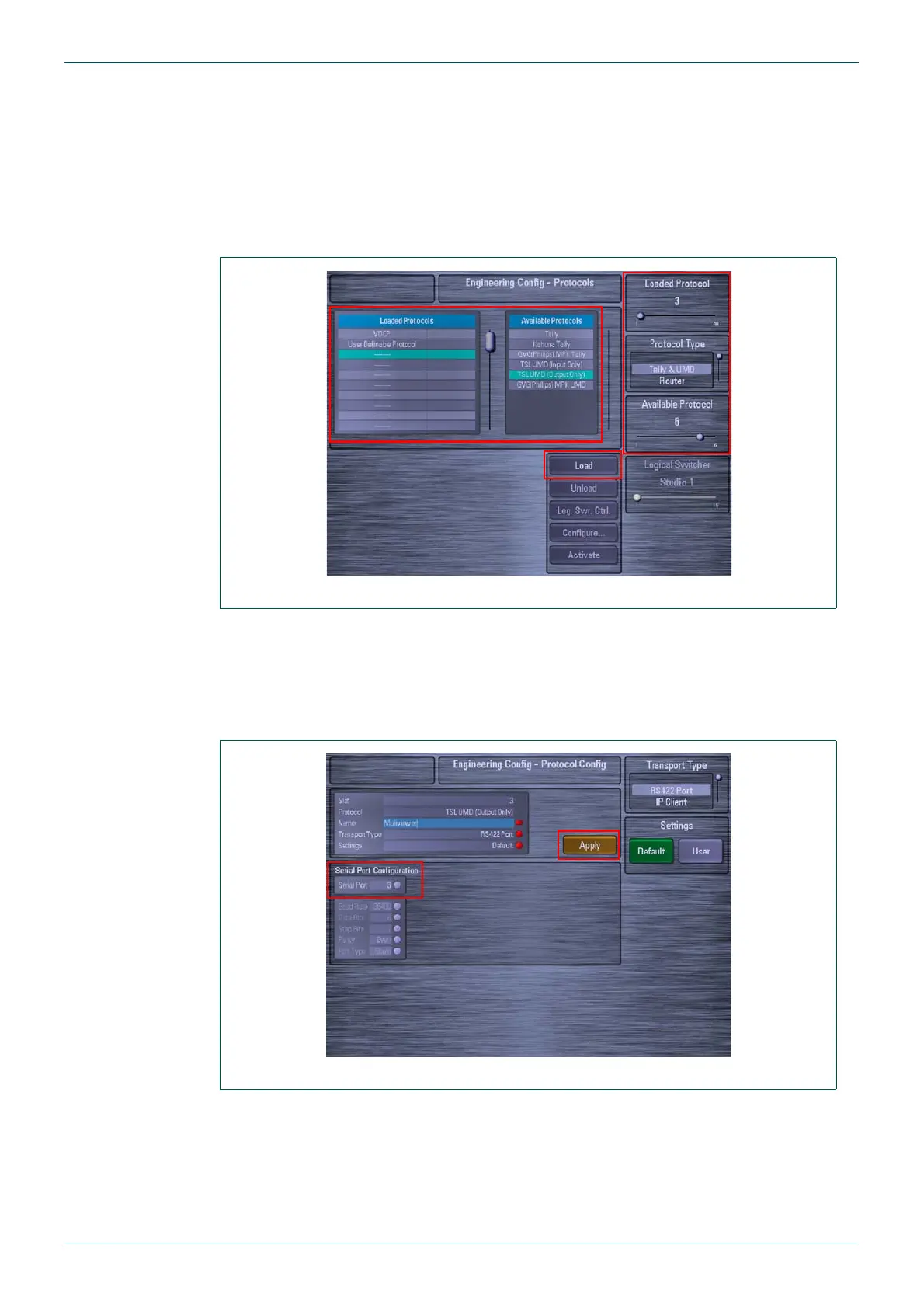
1. Use the Loaded Protocols parameter to select a free slot in the table, then use the
Protocol Type parameter to select “Tally & UMD”. Use the Available Protocols
parameter to select TSL UMD (Output Only) and then touch the {Load} button
(Fig 73.).
2. To select an RS422 port on the Kahuna 360 mainframe, touch the {Configure…}
button on the Engineering Config - Protocols menu (Fig 73.).
3. The Engineering Config - Protocol Config menu is displayed (Fig 74.). Touch the
Serial Port attacher and then select which port you wish to use on the mainframe and
touch the {Apply} button.
Fig 73. Engineering Configuration - Protocols Menu
Fig 74. Select RS422 Serial Port



 To Next Page