Wave User Manual 25
Version 4
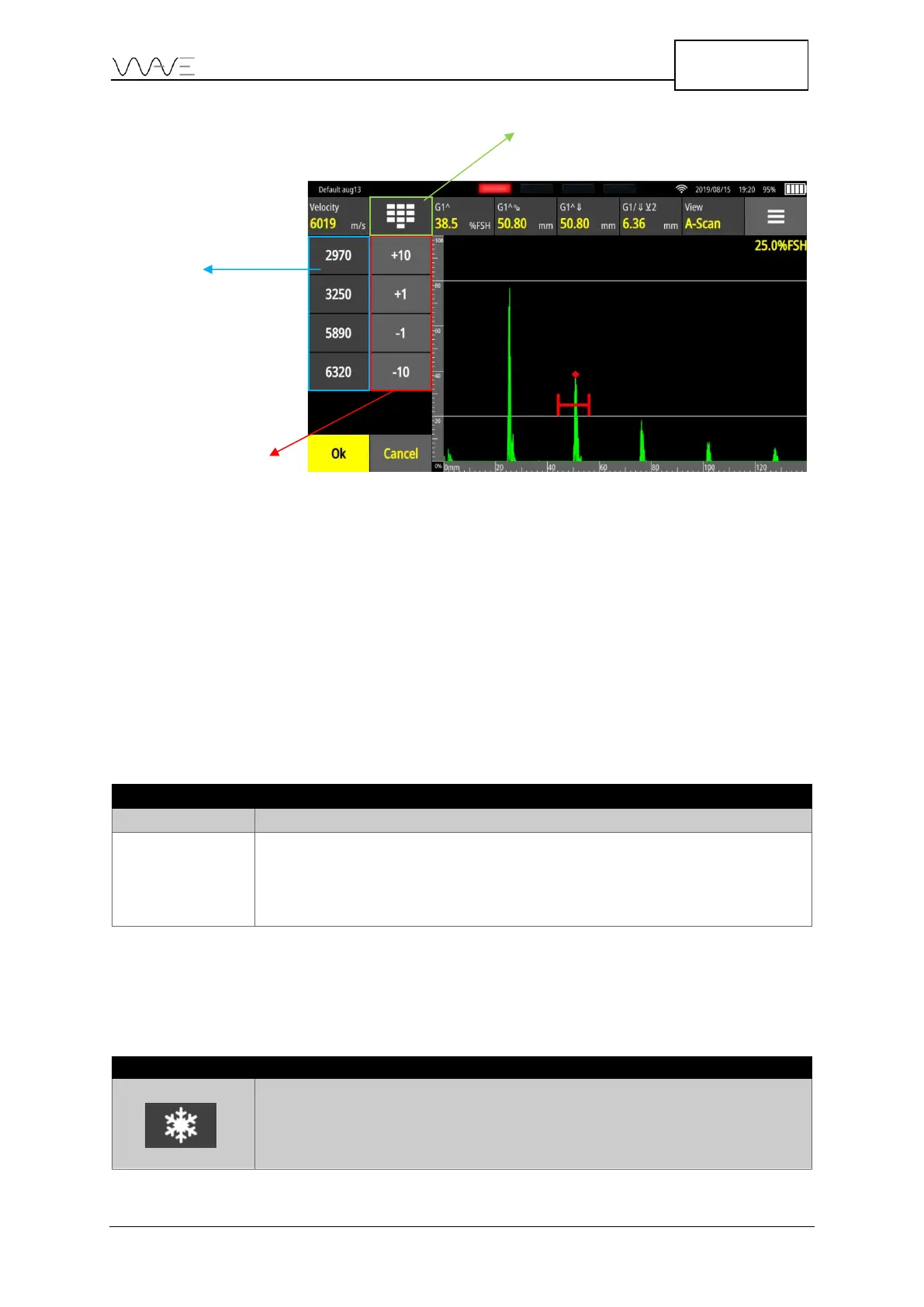
Figure 18 – Different ways to modify the value of a parameter
For example, in the above figure, simply select a new value for Velocity from the list of
pre-set values. You can also change the Velocity value by increments of ±1 or ±10.
Another option would be to make the on-screen keypad appear in order to then enter a
specific value.
6.2 Permanent On-screen Action Buttons
At the top left of the Wave’s screen, there are two (2) permanent action buttons,
regardless if the unit is in full screen or not. These are described below.
Table 5 - On-screen action button
Change gain, from 0 dB to 110 dB
Resets A-Scan to normal (“zoom out”) mode. The button is enabled
(non-greyed out) when the A-Scan is zoomed. The A-Scan will be
zoomed after zooming in on a gate (by double-tapping on the gate)
or after zooming in part of the A-Scan.
6.3 Freeze
The table below describes the behaviour of the Freeze button.
Table 6 - Freeze button behaviour
Freezes the A-Scan. Once frozen, all gates remain active and can be moved
around. All measurements show live values according to new gate positions
and different measurements can be selected.



 To Next Page