10 | Connection STOBER
116
02/2019 | ID 442728.05
10.5 Drive controller
The following section contains detailed information about the terminals and the correct
connection of the drive controller.
Information
For UL-compliant operation: The connections marked with PE are intended solely for the
functional grounding.
10.5.1 Overview
1
3
2
4
5
7
6
8
5
3
4
2
1
X12
X103
X101
2
1
4
5
6
3
15
17
18
16
11
14
9
10
12
13
86
5
7
X22
X20A
X2A
X2B
X20B
8
7
7
8
D
D
X201
X200
X4A
X4B
PE
V
W
U
PE
V
W
U
5
3
4
2
1
6
5
X700
X9
X11
X300
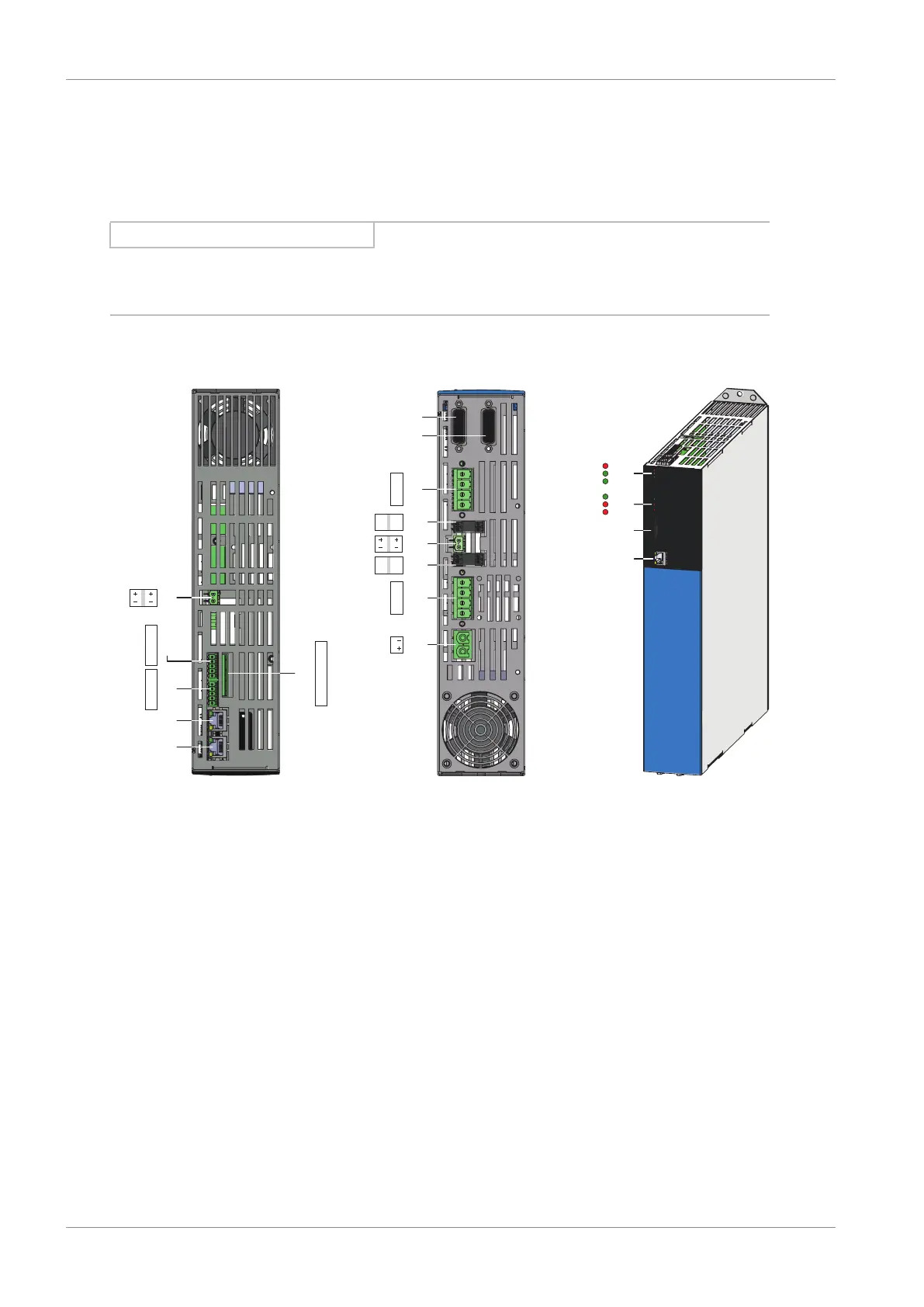
Fig.30: Connection overview using the example of the SI6A162
Top of the device Bottom of the device Front of the device
1 X11: 24V
DC
supply 7 X4B: Encoder B (only for
double-axis controllers)
15 3 diagnostic
LEDs for communication
and safety technology
2 X10³: BE6 – BE9 8 X4A: Encoder A 16 3 diagnostic LEDs for
drive controller
3 X12: STO via terminals
(only for SR6 option)
9 X20B: Motor B (only for double-
axis controllers)
17 X700: SD slot
4 X101: BE1 – BE4 10 X2B: Brake B (pin 5/6)
andtemperature sensor B (pin
7/8); (only for double-axis
controllers)
18 X9: Ethernet service
interface
5 X201: EtherCAT Out/
PROFINET
11 X300: Brake 24V
DC
supply
6 X200: EtherCAT In/
PROFINET
12 X2A: Brake A (pin 5/6)
andtemperature sensor A (pin
7/8)
13 X20A: Motor A
14 X22: DC link connection



 To Next Page