13 | Diagnostics STOBER
180
02/2019 | ID 442728.05
13.2.5.2 PROFINET network connection
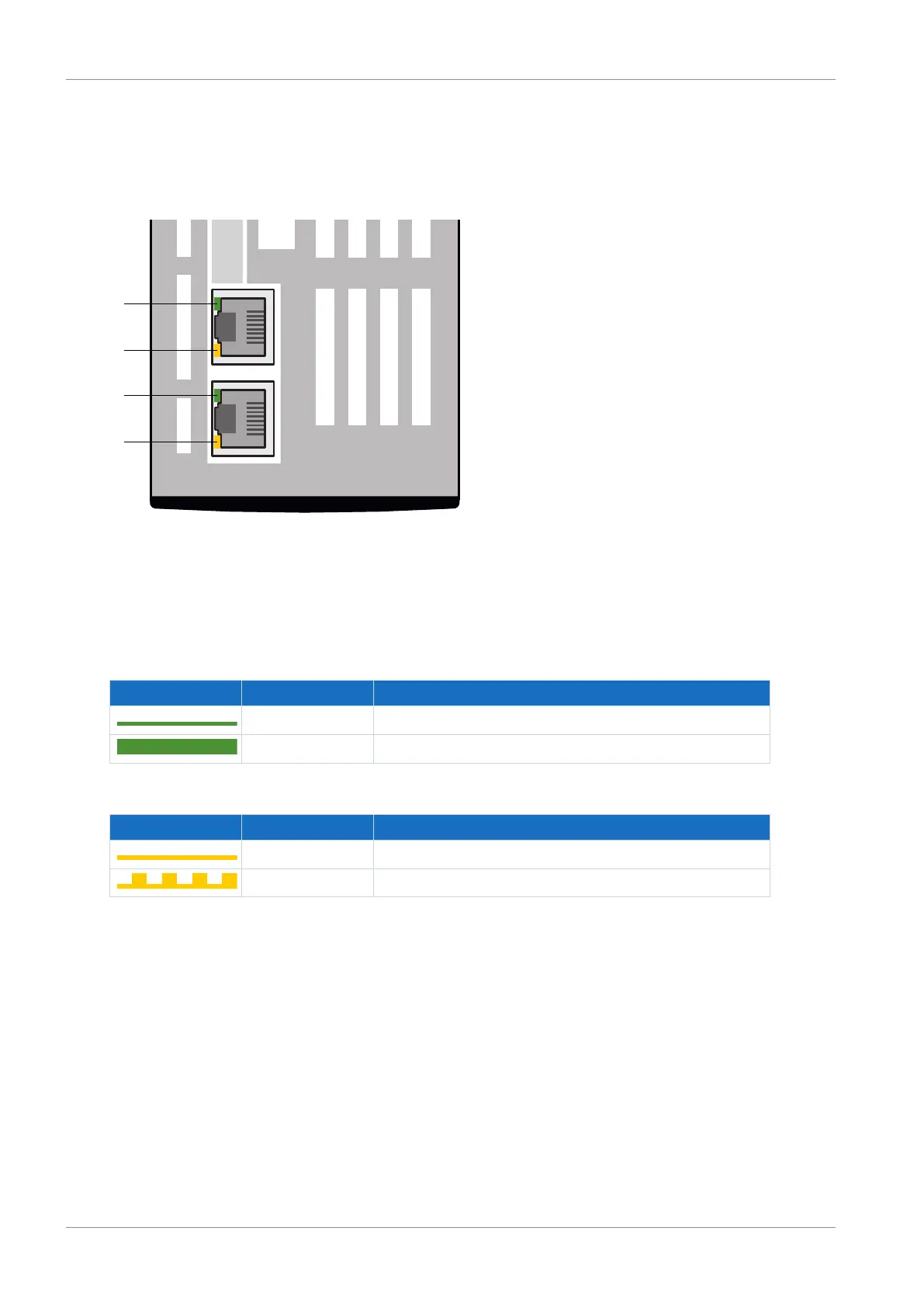
The Act. and Link LEDs at X200 and X201 on the top of the device indicate the state of the
PROFINET network connection.
Link Link
2
4
3
1
X200 X201
Act Act
Fig.41: LEDs for the state of the PROFINET network connection
1 Green: Link at X201
2 Yellow: Activity at X201
3 Green: Link at X200
4 Yellow: Activity at X200
Green LED Behavior Description
Off No network connection
On Network connection exists
Tab. 182: Meaning of the green LEDs (Link)
Yellow LED Behavior Description
Off No data exchange
Flashing Active data exchange with IO controller
Tab. 183: Meaning of the yellow LEDs (Act.)



 To Next Page