32
19. To make a different type of pipette, refer to the program sheet and use one of the six pre-
installed programs in your puller (Program # 0-5). If your application or glass and
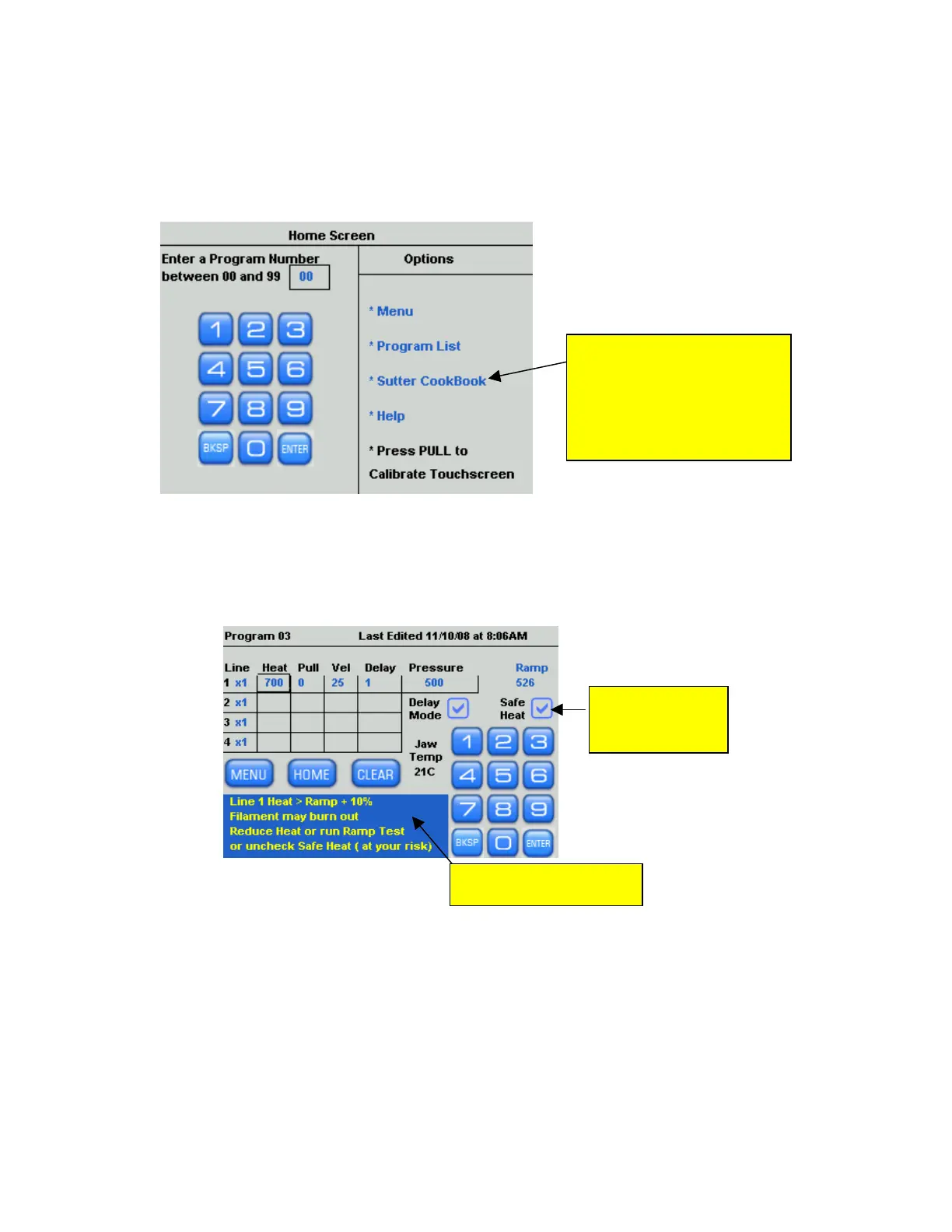
filament combination are not found on the Program Sheet, use the Sutter Cookbook
feature found in the menu on the left side of the “Home” screen to search for, and install,
the appropriate program settings.
Use Sutter Cookbook
feature to search and
install programs ideal for
your filament, glass, and
application.
Figure 4-15. Making a different type of pipette using the Sutter Cookbook.
20. The Safe Heat Mode helps to prevent burning out the filament. If you install a heat
setting that is 10% over or under the ramp test value, see example below, a Safe Heat
Warning will appear in the text box and disallow that heat setting. Change the heat
setting to avoid damaging or burning out the filament.
Safe Heat
Mode <ON>
Safe Heat Warning!
Figure 4-16. Placing puller into Safe Heat Mode.
P-1000 FLAMING/BROWN MICROPIPETTE PULLER SYSTEM OPERATION MANUAL – REV. 3.02 (20161118)



 To Next Page