7
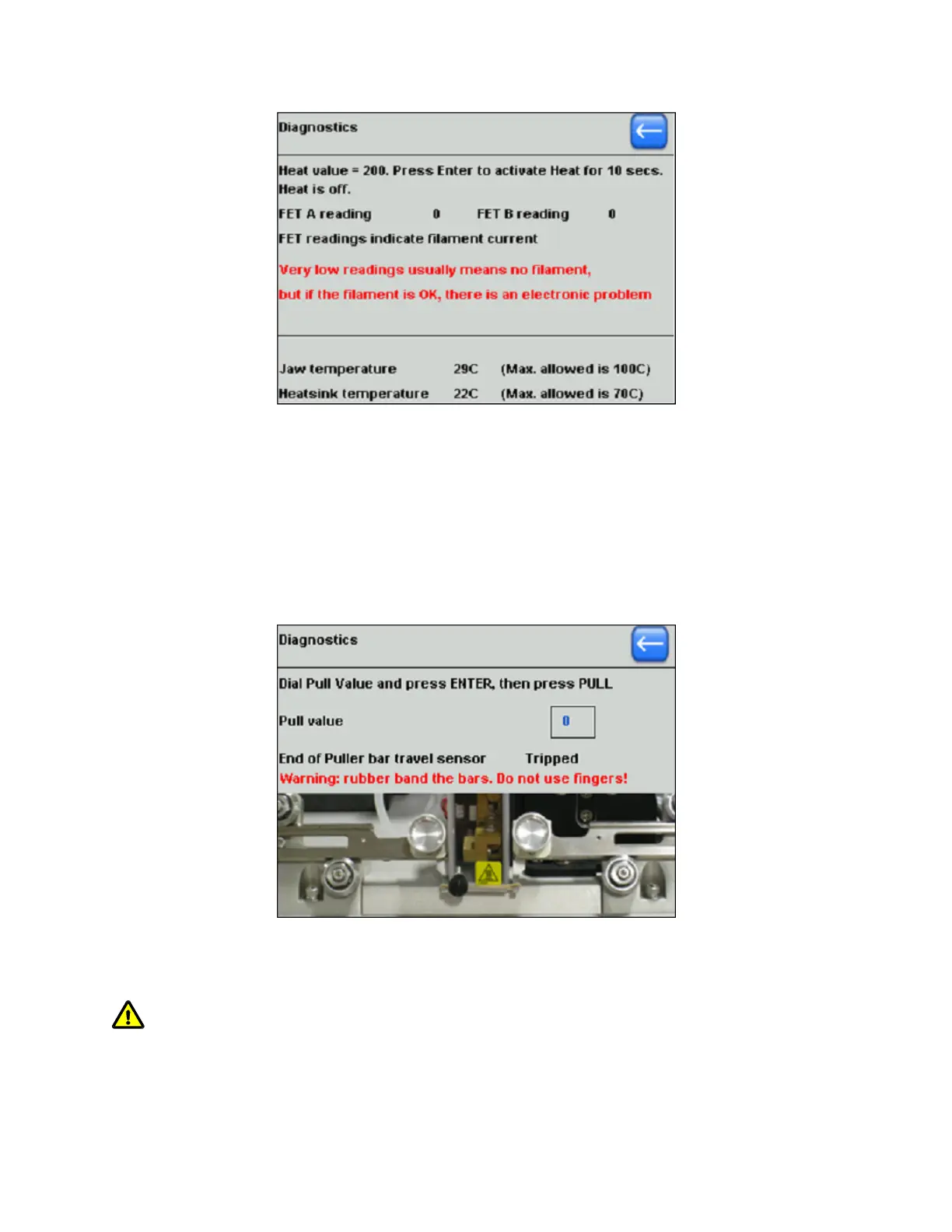
Figure 6-5. Heat system diagnostics error reporting.
The temperatures of the Puller Jaw and the internal Heatsink are continuously
displayed. If Jaw Temperature exceeds the maximum allowed, the Heat will be
automatically turned off to avoid damage to the nylon mounting block. If the internal
heatsink temperature exceeds its maximum, a RESET will occur.
6.3.3 Pull Diagnostics
The Pull diagnostics screen is reached by selecting “Pull” in the main diagnostics screen. The
pull diagnostics screen is shown in the following figure.
Figure 6-6. Pull diagnostics screen.
The Pull value is always highlighted for editing with the Dial. Press ENTER to set.
WARNING: With a Dial setting of 255 (the highest possible), a violent separation of the
Puller Bars occurs during a Pull, which can cause injury. Use a rubber band rather than your
fingers to hold the bars together for any value over 100.
P-1000 FLAMING/BROWN MICROPIPETTE PULLER SYSTEM OPERATION MANUAL – REV. 3.02 (20161118)



 To Next Page