EasyManua.ls Logo

TECHNIKA PRO SH-1060 - Chapter 3: Reviewing Images & Video Clips

TECHNIKA PRO SH-1060
78 pages
Print Icon
To Next Page IconTo Next Page
To Previous Page IconTo Previous Page
Loading...
39
Using the LCD Monitor
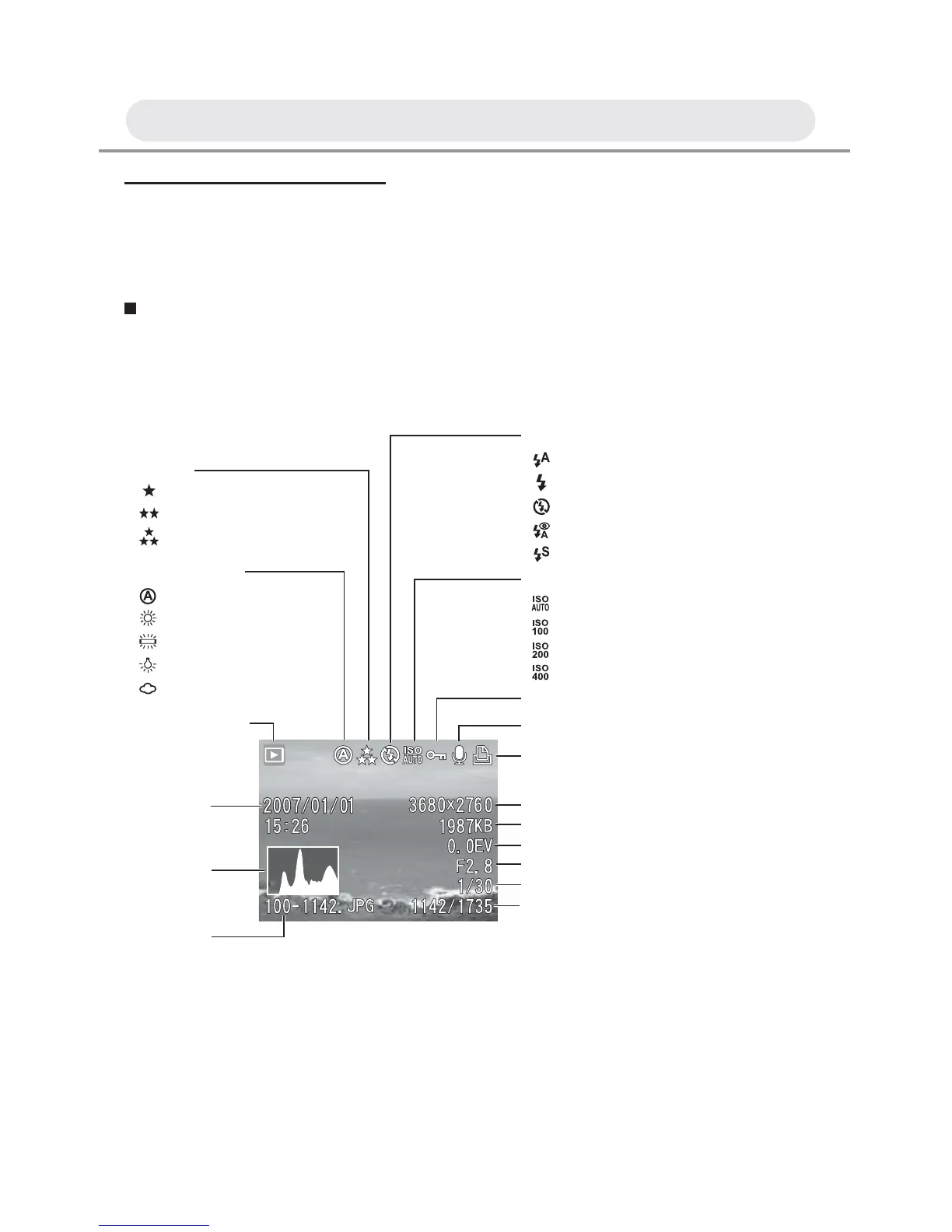
The following illustration outlines the layout and icons on the LCD
monitor in playback mode.
Playback Mode
Capture
Flash mode
Auto flash
Fill in flash
Flash off
Flash with Red-eye reduction
Slow Sync. (Only in night scene mode)
ISO
Auto
100
200
400
Protection status
Image size
DPOF setting
Voice memo indicator
File size
Exposure compensation
Aperture value
Shutter speed
Displayed image number/
Total number of images
File Name
Histogram
Recorded
date/time
Playback Mode
White Balance
Auto
Daylight
Fluorescent
Tungsten
Cloudy
Quality
Normal
Fine
Best
Chapter 3: Reviewing Images and Video Clips

Table of Contents