INTRODUCTION
31
98-05311-ENUS R2
OPERATIONDATA APPENDIX TOOLS CONSOLE
Radion 8140 Automatic Sprayer Control
SETTINGS
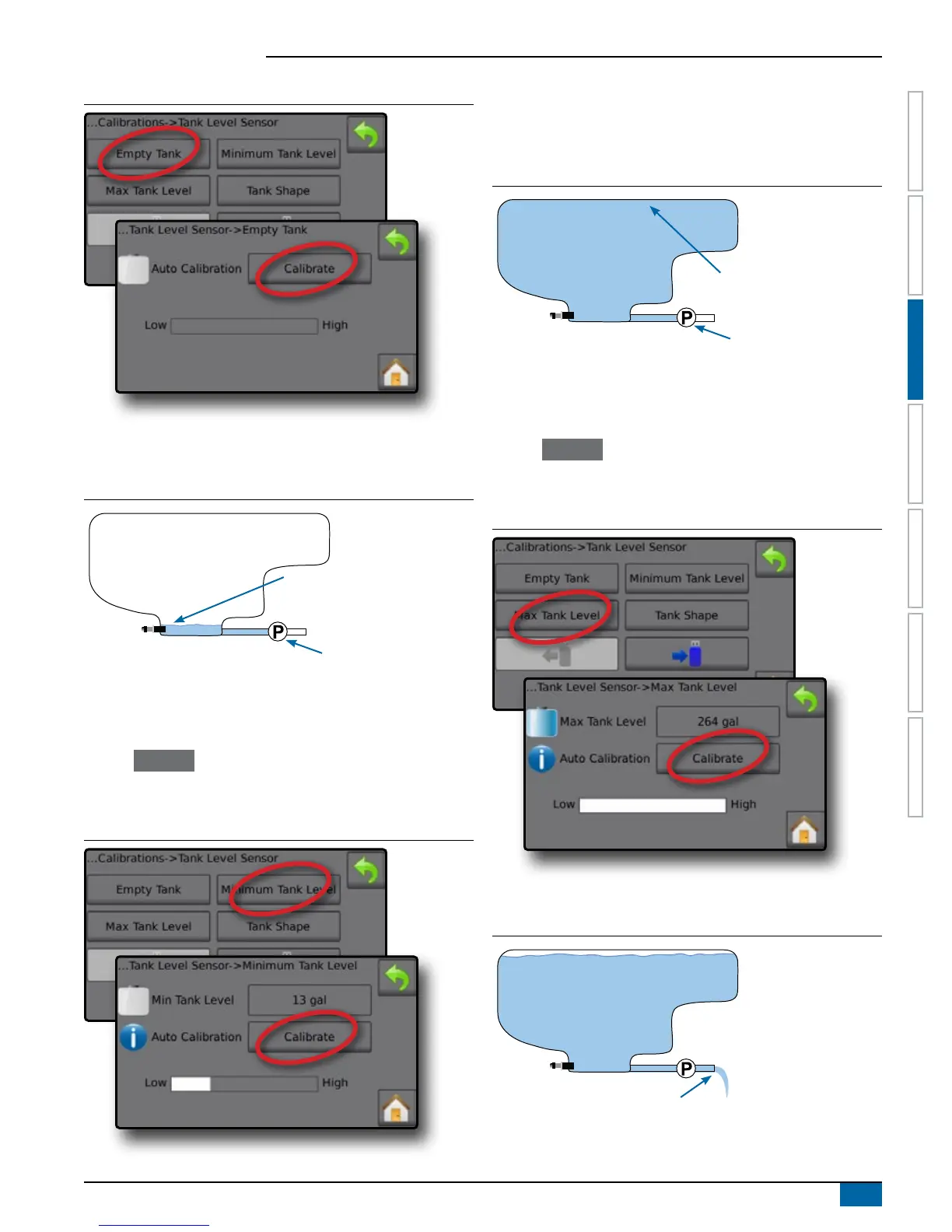
Figure 3-28: Tank Level Sensor – Empty Tank
Minimum Tank Level – Automatic Calibration
Minimum Tank Level establishes the minimum level of water on the
Tank Sensor.
Figure 3-29: Minimum Tank Level
Water covers sensor completely
(typically 5-15 l)
Pump
IMPORTANT: Make sure the tank is filled with the contents displayed
on the screen. The amount displayed is established in
Settings
-
>OEM
-
>Tank Setup
-
>Minimum Tank Content.
1. Press Calibrate to record a new calibration value and nalize the
calibration.
◄The low-high graph should display approximately 5% full
Figure 3-30: Tank Level Sensor – Minimum Tank Level
Maximum Tank Level – Automatic Calibration
Maximum Tank Level establishes the maximum level of water on the
Tank Sensor.
Figure 3-31: Maximum Tank Level
Tank lled to maximum level
Pump
IMPORTANT: Ensure the tank is filled with the contents displayed on
the screen. The amount displayed is established in Settings
-
>OEM
-
>Tank Setup
-
>Maximum tank content.
1. Press Calibrate to record a new calibration value and nalize the
calibration.
◄The low-high graph should display 100% full
Figure 3-32: Tank Level Sensor – Maximum Tank Level
Tank Shape – Automatic Calibration
Tank Shape establishes the tank shape.
Figure 3-33: Tank Shape Calibration
PUMP water at same rate to empty tank in 30-60 minutes



 To Next Page