32
INTRODUCTION
www.teejet.com
OPERATION DATA APPENDIXTOOLSCONSOLE
Radion 8140 Automatic Sprayer Control
SETTINGS
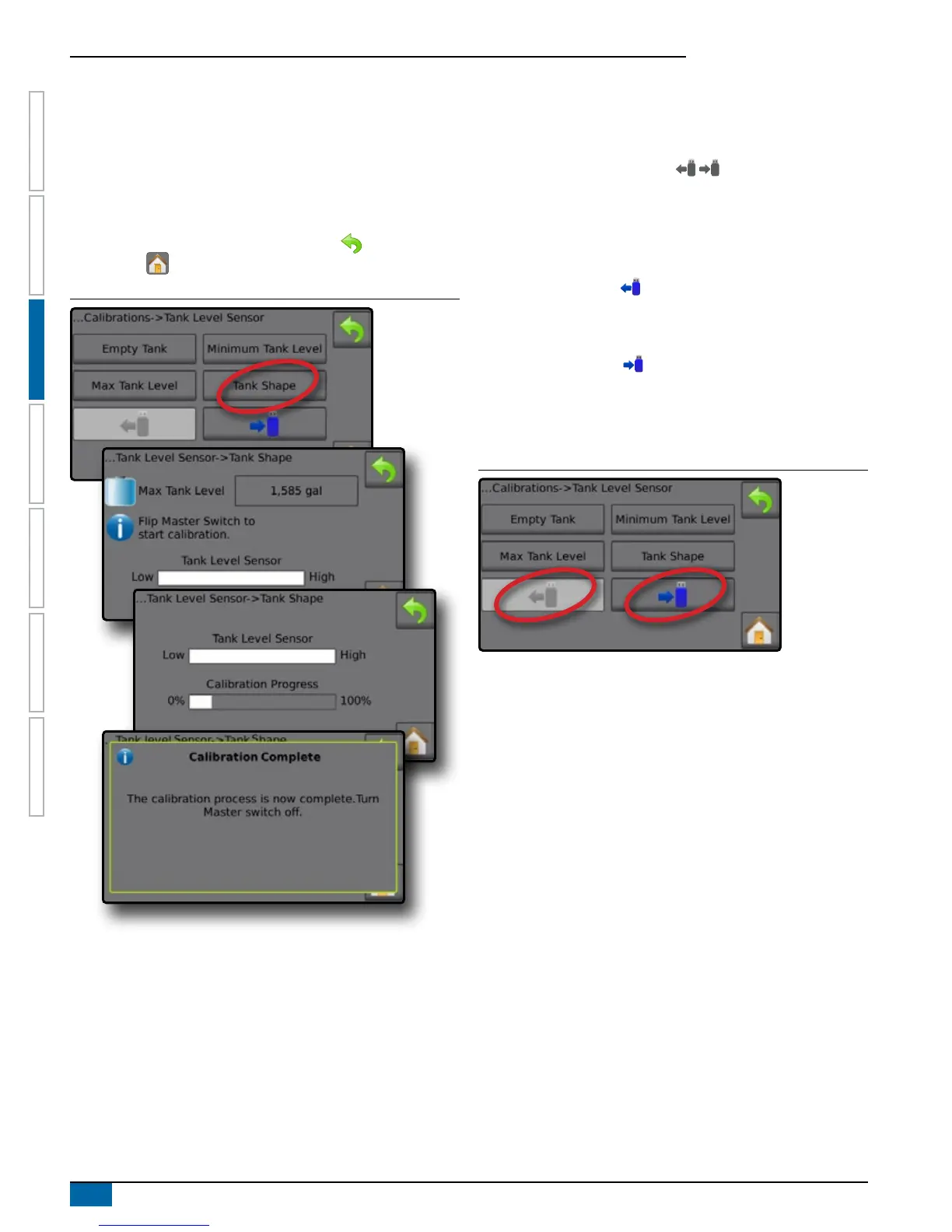
1. Flip Master Switch to start calibration.
◄Tank Level Sensor graph will go from high to low as the
calibration proceeds
◄When Calibration progress graph reaches 100%, calibration
will record a new calibration value and nalize the calibration
To pause the calibration process, ip the Master Switch.
To cancel the calibration, press RETURN arrow or press the
Home button .
Figure 3-34: Tank Level Sensor – Tank Shape
Import / Export
Tank Level Sensor calibration settings can be exported to USB drive
and recalled for future use.
NOTE: The import/export buttons are not available for
selection and are grayed out until a USB drive is inserted
properly.
To import the calibration settings:
1. Insert USB drive.
2. Press IMPORT button .
To export the calibration settings:
1. Insert USB drive.
2. Press EXPORT button .
NOTE: Only one (1) tank calibration settings file can be saved on
a USB drive at one time. If there is an existing file it will be
overwritten.
Figure 3-35: Tank Level Sensor – Import/Export



 To Next Page