Getting Started 5
82STAT~1.DOC TI-83 international English Bob Fedorisko Revised: 10/27/05 1:33 PM Printed: 10/27/05 3:30
PM Page 5 of 18
Before starting the sample problems in this chapter, follow the steps on this page to
reset the TI-82 STATS to its factory settings and clear all memory. This ensures that
the keystrokes in this chapter will produce the illustrated results.
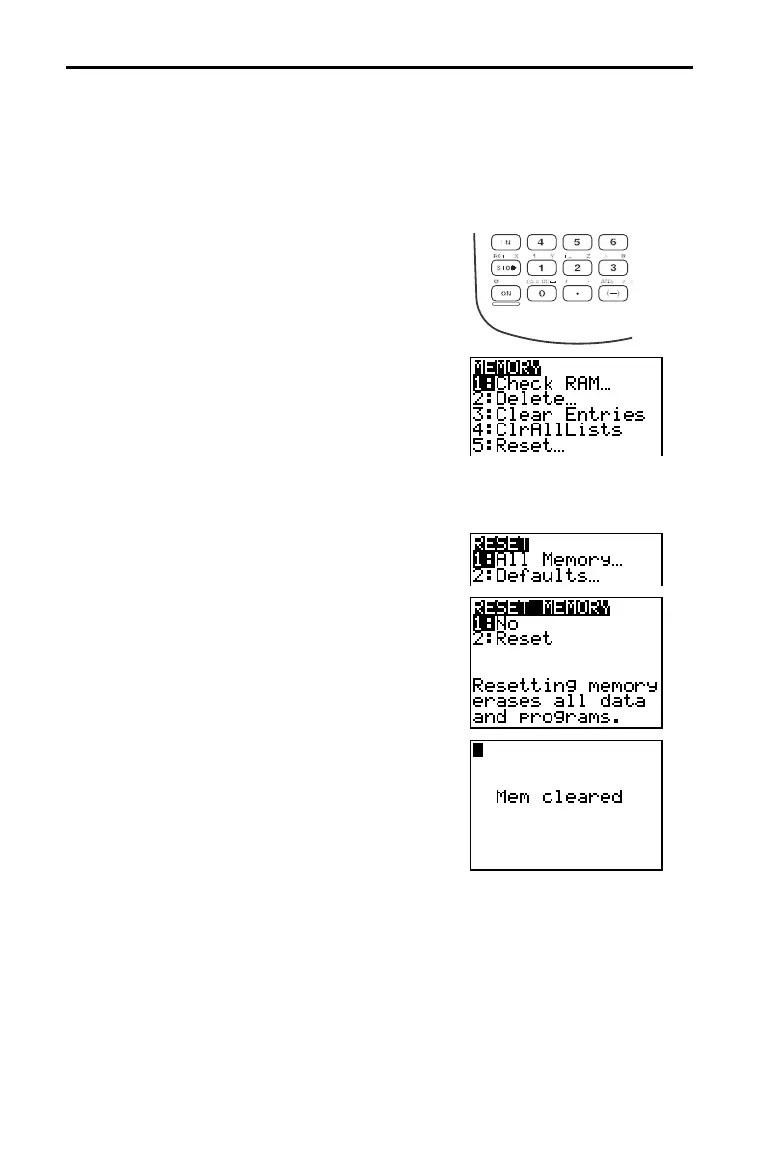
To reset the TI-82 STATS, follow these steps.
1. Press É to turn on the calculator.
2. Press and release y, and then press [MEM]
(above Ã).
When you press y, you access the operation
rinted in yellow above the next key that you
ress. [MEM] is the y operation of the Ã
key.
The
MEMORY menu is displayed.
3. Press 5 to select 5:Reset.
The RESET menu is displayed.
4. Press 1 to select 1:All Memory.
The RESET MEMORY menu is displayed.
5. Press 2 to select 2:Reset.
All memory is cleared, and the calculator is
reset to the factory default settings.
When you reset the TI-82 STATS, the display
contrast is reset.
¦ If the screen is very light or blank, press
and release y, and then press and hold }
to darken the screen.
¦ If the screen is very dark, press and release
y, and then press and hold † to lighten
the screen.
First Steps


 To Next Page
 Loading...











