Recording Data
7-4
P/N: 1023998-01
Collecting Data
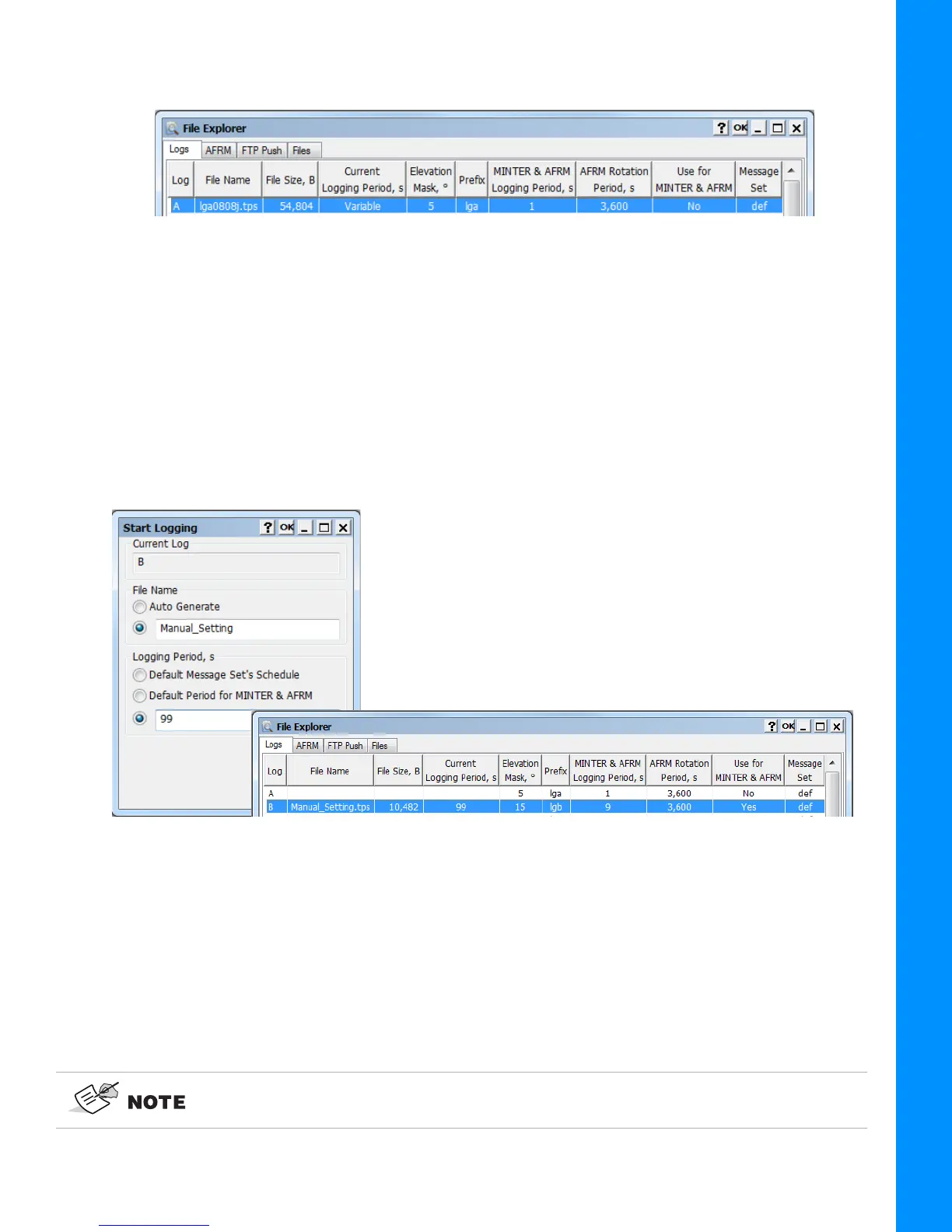
2. Click Start File Logging (Default Settings). The current logging file is displaying in the Logs
tab (
Figure 7-4).
Figure 7-4: Start File Logging With Default Settings
You can specify the logging parameters manually. To start recording data to the selected file with
arbitrary settings, do the following.
1. Right click on the desired file to open the context menu.
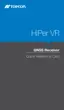
2. Click Start File Logging (Manual Settings). The Start Logging dialog is opened.
3. Specify the file name and logging period.
4. Click OK to start logging the file using the entered parameters. The current logging file is
displaying in the Logs tab (
Figure 7-5).
Figure 7-5: Start File Logging With Manual Settings
To stop recording data, highlight the desired file, do the following.
1. Right click it on the desired file to open the context menu.
2. Click Stop File Logging. The Files tab of File Explorer screen displays the list of raw data files
stored in the receiver memory.
You can also log data using MAGNET Field software. With MAGNET Field, you can
record only one raw data file at time.



 To Next Page