Printing modes
46 T2-C User Guide
Important: Setting label gap outside the minimum and maximum range can result in label
skipping or high label gaps.
Die-cut printing mode
• In diecut label material, the labels are pre-cut into shape prior to printing and there are label
gaps between the labels.
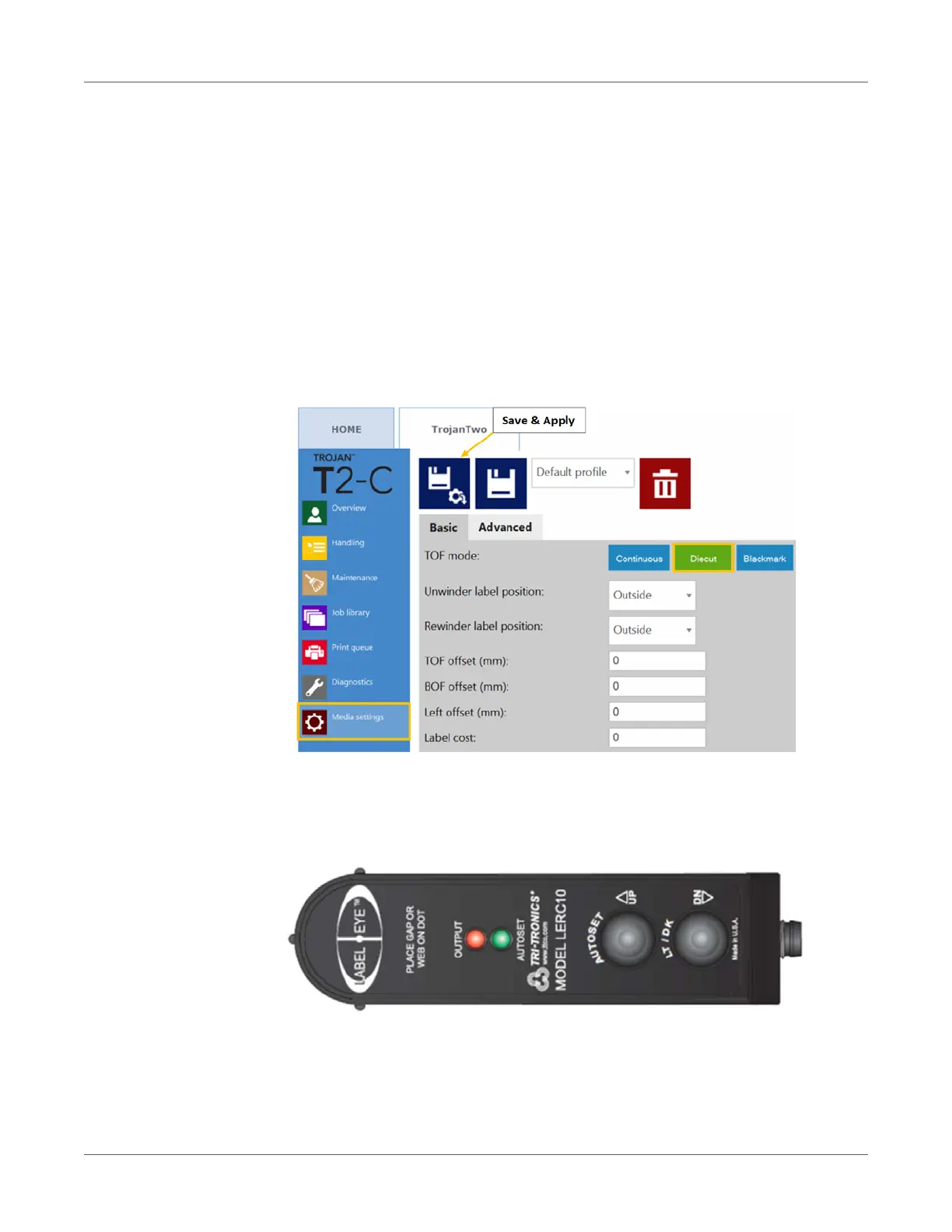
• To set the T2-C press to Diecut printing mode, go to TrojanTwo tab > Media Settings
menu and select the Diecut button in the TOF mode field. Then press the Save and Apply
button to apply the setting changes.
Note: TOF = Top of Form. The top of form algorithm describes how to detect the top of the
next label.
• In Diecut mode the built in label gap/blackmark sensor has to be calibrated to each applied
label material.
Calibrating the label gap sensor
• AUTOSET - Simply put the gap in view and push and hold the AUTOSET button for 1
second. The AUTOSET LED will remain on when the setup is complete. If the setup is not
adequate, the AUTOSET and Output LEDs will flash 3 times. This may indicate a backing
material that is too dense to penetrate.


 To Next Page