EasyManua.ls Logo

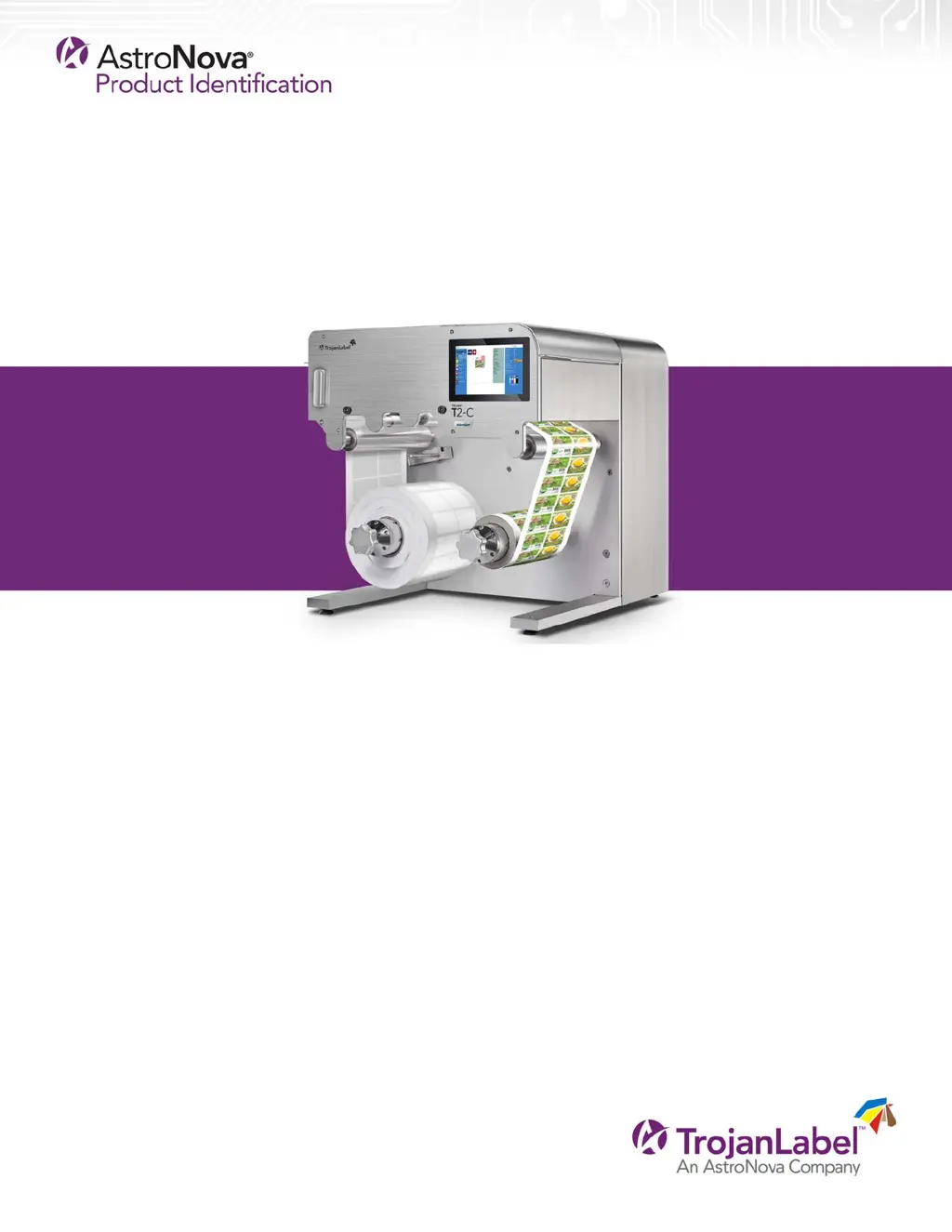
Trojan T2-C - User Manual

Trojan T2-C
128 pages
Print Icon
To Next Page IconTo Next Page
Loading...
T2-C User Guide

Table of Contents

Questions and Answers

Summary

Introduction to the T2-C Press

T2-C General Information

Provides manufacturer details and machine designation for the T2-C press.

T2-C Overview and Application

Details the machine's purpose, intended use, and technical specifications.

Setting Up the T2-C Press

T2-C Physical Setup and Placement

Instructions for unboxing, placing, and leveling the T2-C press.

T2-C Cabling: Network and Power

Guide for connecting the Ethernet and power supply cables to the T2-C.

Powering On the T2-C Press

T2-C Power On: Visible Safety Check

Ensuring the machine is clear of foreign objects before powering on.

T2-C Power On Process Steps

Step-by-step guide for powering on the T2-C press.

T2-C Ink Tank and Printhead Installation

Procedure for installing ink tanks and the printhead into the T2-C.

T2-C Printhead Unpacking Guide

Instructions for safely unpacking the printhead cartridge.

T2-C Printhead Installation Procedure

Detailed steps for correctly installing the printhead into the T2-C.

Loading the Label Material

T2-C Label Roll Direction: Unwinder;Rewinder

Guidance on orienting label rolls on the unwinder and rewinder.

T2-C Threading Label Material from Scratch

Step-by-step guide for threading new label material into the T2-C.

T2-C Label Edge Sensor Adjustment

How to adjust the label edge sensor for media alignment.

T2-C Label Web Tension Calibration

Procedure for calibrating the tension of the label web.

T2-C Splicing and Changing Label Rolls

Instructions for splicing new rolls and changing label rolls.

Select and Queue Print; Start Print Job

T2-C Job Library: Select and Queue Print

How to access the Job Library to select and queue print jobs.

Pause, Resume, or Stop a Print Job

T2-C Pausing and Resuming Print Jobs

Steps to pause and resume active print jobs on the T2-C.

T2-C Stopping a Print Job

Procedure for stopping and canceling a print job.

Moving the Label Web

T2-C Label Web Movement Speed Settings

Configuration options for label web movement speed.

Printing Modes

T2-C Continuous Printing Mode

Using the T2-C with continuous label material.

T2-C Die-Cut Printing Mode

Using the T2-C with die-cut label material.

T2-C Label Gap Sensor Calibration

How to calibrate the sensor for detecting label gaps.

T2-C Blackmark Printing Mode

Using the T2-C with blackmark registration marks.

T2-C Blackmark Sensor Calibration

How to calibrate the sensor for detecting blackmarks.

T2-C Gap Size and Speed Recommendations

Recommended gap sizes for different print speeds.

Shutting Down the T2-C Press

T2-C Proper Shutdown Procedure

Instructions for safely shutting down the T2-C press.

Driver Installation and Features

T2-C Printer Driver Installation Guide

Steps to install the T2-C printer driver on your computer.

T2-C Driver Features and Functions

Overview of the capabilities and functionalities of the T2-C driver.

T2-C Driver General Settings Configuration

Guide to configuring common settings within the T2-C driver.

User Interface (UI) Navigation

T2-C UI: Right Side Status Bar Explained

Understanding the information displayed on the T2-C status bar.

T2-C UI: Overview Menu Navigation

How to navigate and interpret the T2-C Overview screen.

T2-C UI: Settings Menu Access

Accessing and managing various settings on the T2-C.

T2-C UI: Consumables Settings

Managing ink and printhead pricing for cost calculations.

T2-C UI: Network Button Configuration

Configuring network settings for the T2-C press.

T2-C UI: Updater Button for Software Updates

Accessing the T2-C software and firmware update options.

T2-C UI: User Preferences Configuration

Customizing user-specific settings and preferences for the T2-C.

T2-C UI: User Management Setup

Setting up user accounts and managing access rights.

T2-C UI: Printing Preferences Settings

Configuring various print job and maintenance preferences.

T2-C UI: Statistics Menu Overview

Viewing and analyzing print job statistics and usage data.

T2-C UI: Engine and Printhead Usage Monitoring

Monitoring print engine and printhead usage statistics.

T2-C Exporting Statistics Data

Exporting print statistics to a CSV file and viewing via browser.

T2-C Handling Menus: TrojanTwo Tab Overview

Overview of the T2-C press handling menus within the TrojanTwo tab.

T2-C UI: Handling Menu Operations

Accessing and performing web path related actions.

T2-C UI: Maintenance Menu Routines

Accessing and performing printhead and system maintenance routines.

T2-C UI: Job Library Menu Management

Storing, selecting, and managing print jobs in the Job Library.

T2-C UI: Print Queue Menu Operations

Managing the queue of print jobs waiting for processing.

T2-C UI: Diagnostics Menu Information

Accessing system, software, and firmware diagnostic information.

T2-C UI: Media Settings Configuration

Configuring media types, TOF modes, and label positioning.

T2-C UI: Advanced Media Settings

Advanced configuration options for media settings.

Updating Software and Firmware

T2-C Online Software and Firmware Updates

Procedure for updating T2-C software and firmware via the internet.

T2-C Offline Software and Firmware Updates

Procedure for updating T2-C software and firmware using a local file.

Using the Built-in Slitter for the T2-C Press

T2-C Slitter Usage and Blade Adjustment

How to use the slitter and position its blades for cutting labels.

T2-C Slitter Blade Replacement Guide

Steps for replacing worn or dull slitter blades.

Maintenance Procedures

T2-C Regular Cleaning and Checking Tasks

Routine maintenance procedures for the T2-C press.

T2-C Cleaning Other Rollers

Instructions for cleaning rollers throughout the web path.

T2-C Emptying the Waste Ink Bottle

Procedure for safely emptying the waste ink bottle.

T2-C Wiper Roller Replacement Guide

Steps for replacing the wiper roller on the T2-C.

T2-C Manual Printhead Wiping Procedure

How to perform manual cleaning of the printhead nozzles.

T2-C Aerosol Filter Cleaning and Replacement

Maintenance guide for the T2-C aerosol filter.

Preparing the T2-C Press for Transportation

T2-C Printhead Removal for Transportation

Steps to safely remove the printhead for transport.

T2-C Storing Used or Opened Printheads

Guidelines for proper storage of printheads to maintain quality.

T2-C Ink Removal: Reservoir Tanks and Filters

Procedure to remove ink from reservoir tanks and ink filters.

T2-C Waste Ink Bottle Preparation for Transport

Steps to empty and clean the waste ink bottle before moving.

T2-C Ink Tank Removal and Packaging

Instructions for disconnecting and packaging the ink tanks.

Troubleshooting Common Issues

T2-C Troubleshooting: Error States Overview

General overview of common error states and their causes.

T2-C Troubleshooting: Specific Error Codes

Troubleshooting specific error codes (e.g., Error 5, 6, 7, 8, 9, 10, 11).

T2-C Troubleshooting: On-Screen Error Messages

Interpreting and resolving common on-screen error messages.

T2-C Troubleshooting: Spontaneous Restarts

Resolving issues where the machine restarts unexpectedly.

T2-C Troubleshooting: Ink Transfer Failure

Diagnosing and resolving ink transfer problems.

T2-C Troubleshooting: Running Out of Disc Space

Resolving issues related to insufficient disk space on the T2-C.

Spare Parts Information

T2-C Spare Parts: Consumables List

List of consumable spare parts for the T2-C printer.

T2-C Spare Parts: Print Engine Components

List of spare parts for the T2-C print engine.

T2-C Spare Parts: Circuit Boards

List of spare circuit board parts for the T2-C printer.

T2-C Spare Parts: Tubes, Cables, and Other Parts

List of spare tubes, cables, and miscellaneous parts for the T2-C.

Summary

Introduction to the T2-C Press

T2-C General Information

Provides manufacturer details and machine designation for the T2-C press.

T2-C Overview and Application

Details the machine's purpose, intended use, and technical specifications.

Setting Up the T2-C Press

T2-C Physical Setup and Placement

Instructions for unboxing, placing, and leveling the T2-C press.

T2-C Cabling: Network and Power

Guide for connecting the Ethernet and power supply cables to the T2-C.

Powering On the T2-C Press

T2-C Power On: Visible Safety Check

Ensuring the machine is clear of foreign objects before powering on.

T2-C Power On Process Steps

Step-by-step guide for powering on the T2-C press.

T2-C Ink Tank and Printhead Installation

Procedure for installing ink tanks and the printhead into the T2-C.

T2-C Printhead Unpacking Guide

Instructions for safely unpacking the printhead cartridge.

T2-C Printhead Installation Procedure

Detailed steps for correctly installing the printhead into the T2-C.

Loading the Label Material

T2-C Label Roll Direction: Unwinder;Rewinder

Guidance on orienting label rolls on the unwinder and rewinder.

T2-C Threading Label Material from Scratch

Step-by-step guide for threading new label material into the T2-C.

T2-C Label Edge Sensor Adjustment

How to adjust the label edge sensor for media alignment.

T2-C Label Web Tension Calibration

Procedure for calibrating the tension of the label web.

T2-C Splicing and Changing Label Rolls

Instructions for splicing new rolls and changing label rolls.

Select and Queue Print; Start Print Job

T2-C Job Library: Select and Queue Print

How to access the Job Library to select and queue print jobs.

Pause, Resume, or Stop a Print Job

T2-C Pausing and Resuming Print Jobs

Steps to pause and resume active print jobs on the T2-C.

T2-C Stopping a Print Job

Procedure for stopping and canceling a print job.

Moving the Label Web

T2-C Label Web Movement Speed Settings

Configuration options for label web movement speed.

Printing Modes

T2-C Continuous Printing Mode

Using the T2-C with continuous label material.

T2-C Die-Cut Printing Mode

Using the T2-C with die-cut label material.

T2-C Label Gap Sensor Calibration

How to calibrate the sensor for detecting label gaps.

T2-C Blackmark Printing Mode

Using the T2-C with blackmark registration marks.

T2-C Blackmark Sensor Calibration

How to calibrate the sensor for detecting blackmarks.

T2-C Gap Size and Speed Recommendations

Recommended gap sizes for different print speeds.

Shutting Down the T2-C Press

T2-C Proper Shutdown Procedure

Instructions for safely shutting down the T2-C press.

Driver Installation and Features

T2-C Printer Driver Installation Guide

Steps to install the T2-C printer driver on your computer.

T2-C Driver Features and Functions

Overview of the capabilities and functionalities of the T2-C driver.

T2-C Driver General Settings Configuration

Guide to configuring common settings within the T2-C driver.

User Interface (UI) Navigation

T2-C UI: Right Side Status Bar Explained

Understanding the information displayed on the T2-C status bar.

T2-C UI: Overview Menu Navigation

How to navigate and interpret the T2-C Overview screen.

T2-C UI: Settings Menu Access

Accessing and managing various settings on the T2-C.

T2-C UI: Consumables Settings

Managing ink and printhead pricing for cost calculations.

T2-C UI: Network Button Configuration

Configuring network settings for the T2-C press.

T2-C UI: Updater Button for Software Updates

Accessing the T2-C software and firmware update options.

T2-C UI: User Preferences Configuration

Customizing user-specific settings and preferences for the T2-C.

T2-C UI: User Management Setup

Setting up user accounts and managing access rights.

T2-C UI: Printing Preferences Settings

Configuring various print job and maintenance preferences.

T2-C UI: Statistics Menu Overview

Viewing and analyzing print job statistics and usage data.

T2-C UI: Engine and Printhead Usage Monitoring

Monitoring print engine and printhead usage statistics.

T2-C Exporting Statistics Data

Exporting print statistics to a CSV file and viewing via browser.

T2-C Handling Menus: TrojanTwo Tab Overview

Overview of the T2-C press handling menus within the TrojanTwo tab.

T2-C UI: Handling Menu Operations

Accessing and performing web path related actions.

T2-C UI: Maintenance Menu Routines

Accessing and performing printhead and system maintenance routines.

T2-C UI: Job Library Menu Management

Storing, selecting, and managing print jobs in the Job Library.

T2-C UI: Print Queue Menu Operations

Managing the queue of print jobs waiting for processing.

T2-C UI: Diagnostics Menu Information

Accessing system, software, and firmware diagnostic information.

T2-C UI: Media Settings Configuration

Configuring media types, TOF modes, and label positioning.

T2-C UI: Advanced Media Settings

Advanced configuration options for media settings.

Updating Software and Firmware

T2-C Online Software and Firmware Updates

Procedure for updating T2-C software and firmware via the internet.

T2-C Offline Software and Firmware Updates

Procedure for updating T2-C software and firmware using a local file.

Using the Built-in Slitter for the T2-C Press

T2-C Slitter Usage and Blade Adjustment

How to use the slitter and position its blades for cutting labels.

T2-C Slitter Blade Replacement Guide

Steps for replacing worn or dull slitter blades.

Maintenance Procedures

T2-C Regular Cleaning and Checking Tasks

Routine maintenance procedures for the T2-C press.

T2-C Cleaning Other Rollers

Instructions for cleaning rollers throughout the web path.

T2-C Emptying the Waste Ink Bottle

Procedure for safely emptying the waste ink bottle.

T2-C Wiper Roller Replacement Guide

Steps for replacing the wiper roller on the T2-C.

T2-C Manual Printhead Wiping Procedure

How to perform manual cleaning of the printhead nozzles.

T2-C Aerosol Filter Cleaning and Replacement

Maintenance guide for the T2-C aerosol filter.

Preparing the T2-C Press for Transportation

T2-C Printhead Removal for Transportation

Steps to safely remove the printhead for transport.

T2-C Storing Used or Opened Printheads

Guidelines for proper storage of printheads to maintain quality.

T2-C Ink Removal: Reservoir Tanks and Filters

Procedure to remove ink from reservoir tanks and ink filters.

T2-C Waste Ink Bottle Preparation for Transport

Steps to empty and clean the waste ink bottle before moving.

T2-C Ink Tank Removal and Packaging

Instructions for disconnecting and packaging the ink tanks.

Troubleshooting Common Issues

T2-C Troubleshooting: Error States Overview

General overview of common error states and their causes.

T2-C Troubleshooting: Specific Error Codes

Troubleshooting specific error codes (e.g., Error 5, 6, 7, 8, 9, 10, 11).

T2-C Troubleshooting: On-Screen Error Messages

Interpreting and resolving common on-screen error messages.

T2-C Troubleshooting: Spontaneous Restarts

Resolving issues where the machine restarts unexpectedly.

T2-C Troubleshooting: Ink Transfer Failure

Diagnosing and resolving ink transfer problems.

T2-C Troubleshooting: Running Out of Disc Space

Resolving issues related to insufficient disk space on the T2-C.

Spare Parts Information

T2-C Spare Parts: Consumables List

List of consumable spare parts for the T2-C printer.

T2-C Spare Parts: Print Engine Components

List of spare parts for the T2-C print engine.

T2-C Spare Parts: Circuit Boards

List of spare circuit board parts for the T2-C printer.

T2-C Spare Parts: Tubes, Cables, and Other Parts

List of spare tubes, cables, and miscellaneous parts for the T2-C.

Trojan T2-C Specifications

General IconGeneral
BrandTrojan
ModelT2-C
CategoryLabel Maker
LanguageEnglish