EasyManua.ls Logo

Valleylab Force FX-C - Page 135

Valleylab Force FX-C
214 pages
Print Icon
To Next Page IconTo Next Page
To Previous Page IconTo Previous Page
Loading...
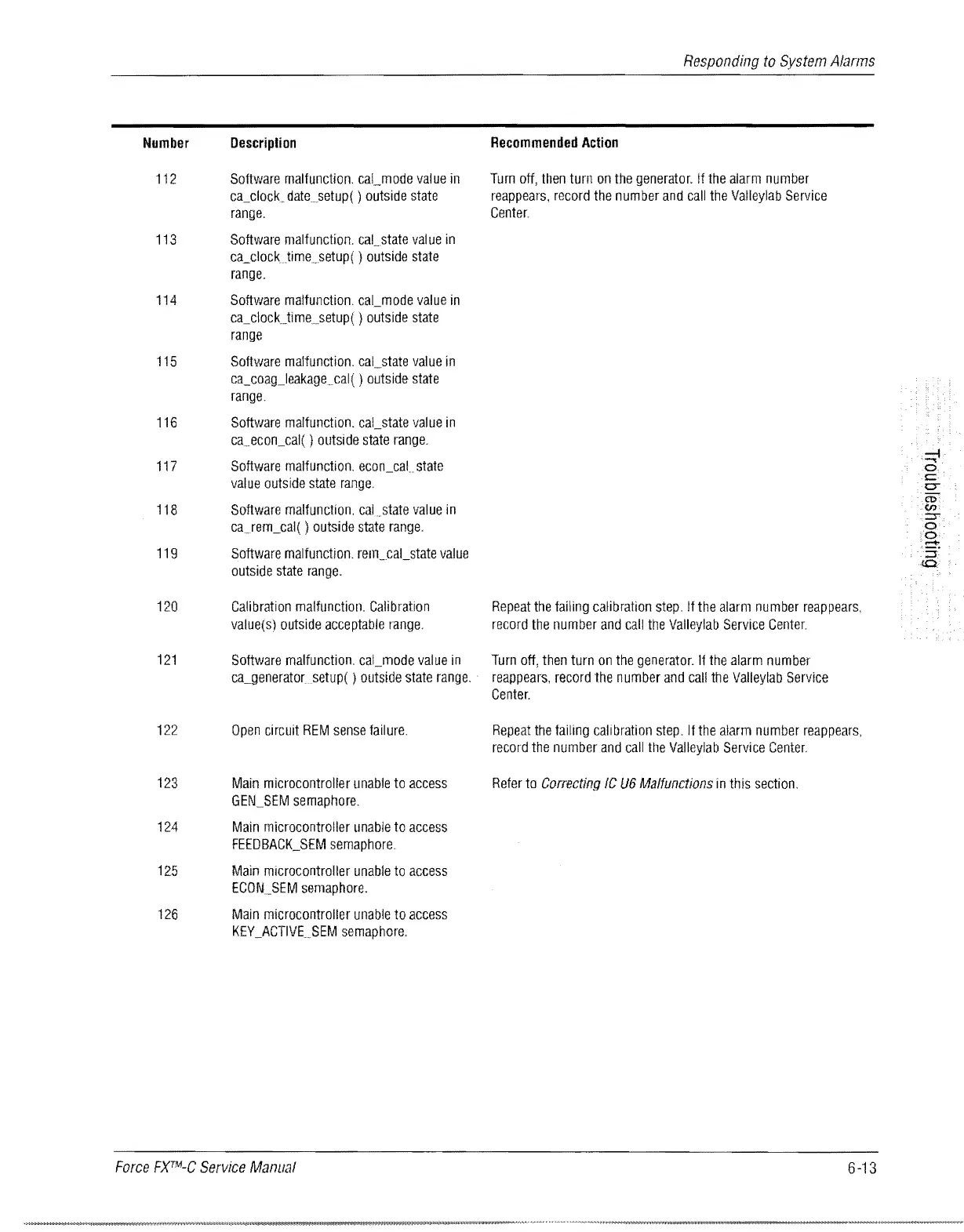
Number
112
Description
Software
malfunction.
cal_mode
value
in
ca_clock.
datesetup( )
outside
state
range.
113
Software
malfunction.
cal_state
val
ue
in
ca_clockJime
.
.setup(
)
outside
state
range.
114
Software
malfunction.
cal_mode
value
in
ca_clocUime_setup( )
outside
state
range
115
Software
malfunction.
cal_state
value
in
ca_coagJeakagecal(
)
outside
state
range
116
Software
malfunction.
caLstate
value
in
caecon_cal( )
outside
state
range.
117
118
119
120
121
122
123
Software
malfunction.
econ_cal
state
value
outside
state
range.
Software
malfunction.
cal.state
value
in
ca.rem_cal(
)
outside
state
range,
Software
malfunction.
rem
..
caLstate
value
outside
state
range.
Calibration
malfunction.
Calibration
value(s)
outside
acceptable
range,
Software
malfunction.
cal_mode
value
in
ca-lleneratorsetup( )
outside
state
range.
Open
circuit
REM
sense
failure.
Main
microcontrolfer
unable
to
access
GEN_SEM
semaphore.
124
Main
microcontrolier
unable
to
access
FEEDBACK_SEM
semaphore.
125
Main
mlcrocontroller
unable
to
access
ECON
..
SEM
semaphore.
126
Main
microcontroller
unable
to
access
KEY
_ACTIVE.SEM
semaphore,
Force
FXTM-C
Service
Manual
Responding
to
System
Alarms
Recommended
Action
Turn
off,
then
turn
on
the
generator.
If
the
alarm
number
reappears,
record
the
number
and
call
the
Valleylab
Service
Center.
Repeat
the
failing
calibration
step.
If
the
alarm
number
reappears,
record
the
number
and
call
the
Valleylab
Service
Center.
Turn
off,
then
turn
on
the
generator.
If
the
alarm
number
reappears,
record
the
number
and
calf
the
Valleylab
Service
Center.
Repeat
the
failing
calibration
step.
If
the
alarm
number
reappears,
record
the
number
and
call
the
Valleylab
Service
Center.
Refer
to
Correcting
IC
V6
Malfunctions
in
this
section.
6-13

Table of Contents

Related product manuals