Smart Plus (PHT-35LHS)
Technical Manual
VT-TECH-Smart Plus-001
COPYRIGHT© 2018 VATECH.
Chapter 4. CEPH Image Optimization
1. CEPH Sensor Calibration
1.1. Configuring CEPH Sensor
You must undergo the CEPH sensor calibration before the operation, to obtain a high-quality
cephalometric (CEPH) image. Ensure to conduct the sensor calibration regularly and in different
environmental settings such as temperature and humidity to acquire the best quality image.
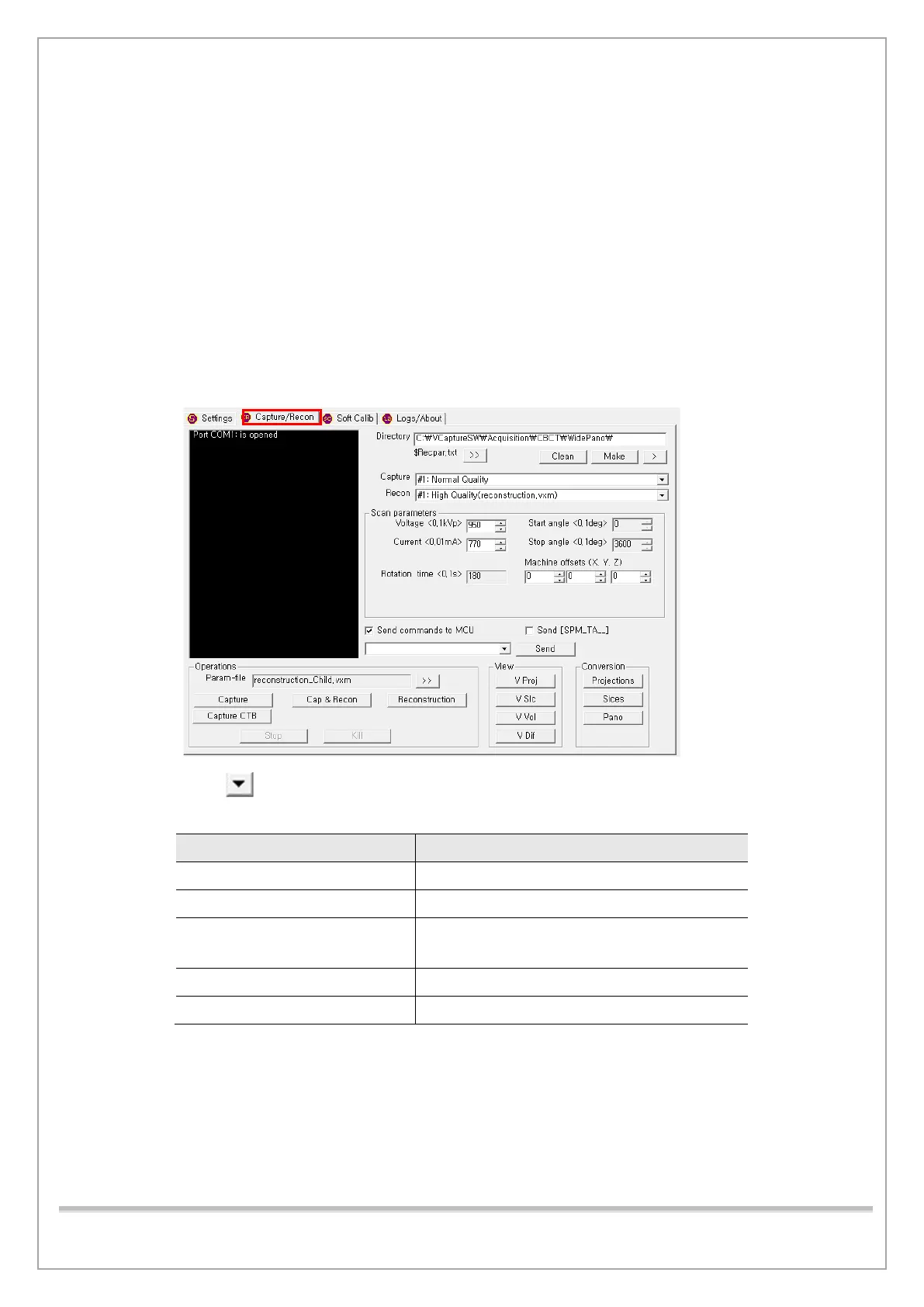
Follow the procedure below to configure the CEPH sensor for image optimization.
1) Run the C:\VCaptureSW\Acquisition\CEPH \WideCEPH \Norm\VACAP.exe file.
2) Click the Capture / Recon tab.
3) Click to select a command from the scroll-down list. Then click Send to transfer the
command to MCU. (See the table below for the CEPH sensor commands)
Commands Description
[SPM_CEPH] CEPH mode
[SPM_HSON] CEPH sensor power on
[SPM_FREQ_0160]
[SPM_FREQ_0313]
HR mode: sensor frequency setting
GR mode: sensor frequency setting
[SPM_FOVO] Colimator open
[SPM_COLM_0005] AL filter open














 To Next Page