Smart Plus (PHT-35LHS)
Technical Manual
VT-TECH-Smart Plus-001
COPYRIGHT© 2018 VATECH.
3. CBCT Collimator Alignment
Follow the procedures in this section to perform CBCT collimator alignment for left, right, top and
bottom. Ensure that you understand all instructions before start.
3.1. Left/Right Collimator Alignment (FOV: 100 x 85)
Follow the procedure below to perform left and right CBCT collimator alignment. Add 0.1 mm to the
left and right collimator positions and capture the image again after you finished alignment. When
there is no air calibration data, add 0.4 mm to the left and right collimator positions.
1) Remove the Temple Supports and Normal bite block from the unit.
2) Run CollimatorAlign.exe.
C:\VCaptureSW\Util\CollimatorAlign\CollimatorAlign.exe
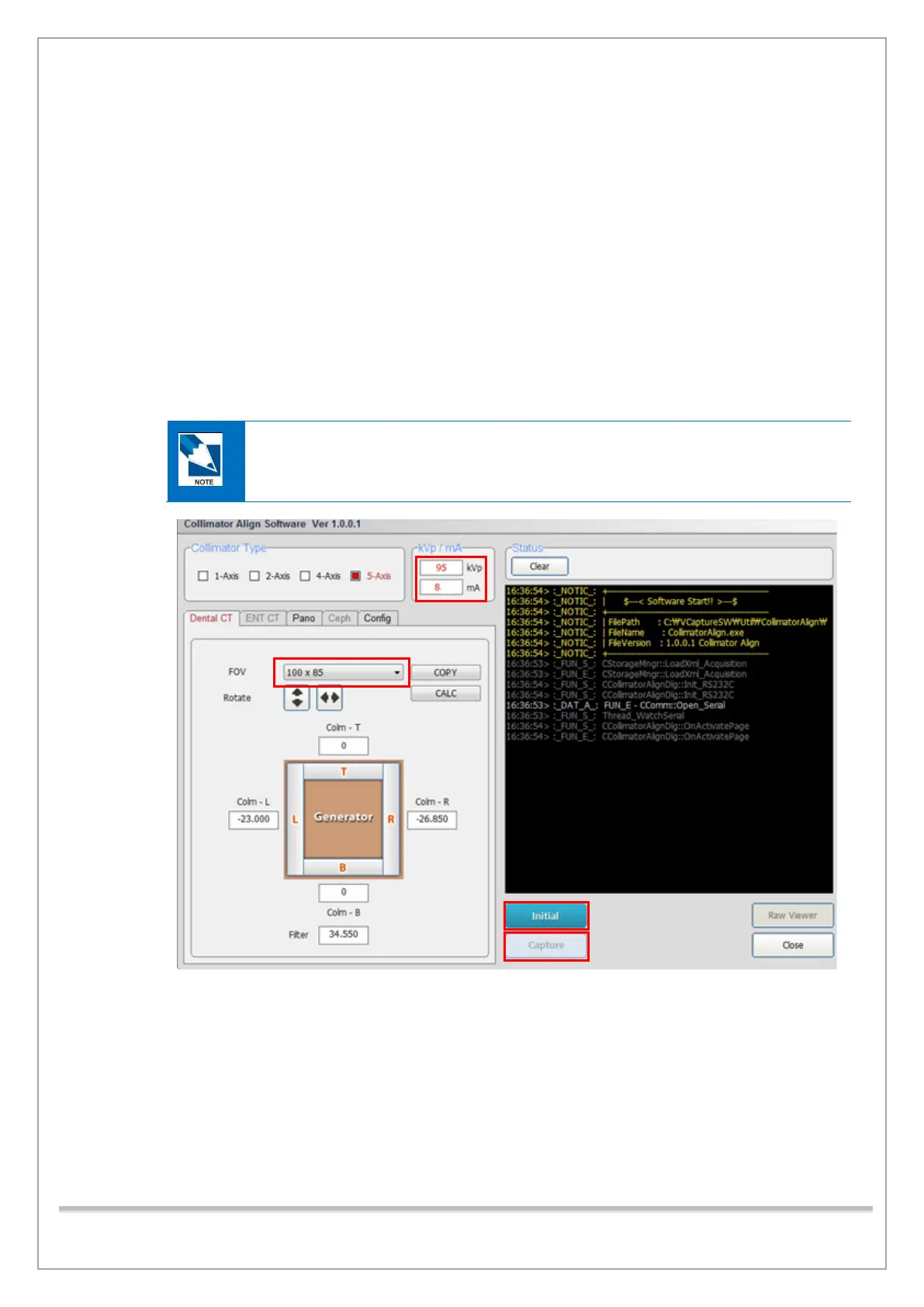
3) Type 95 kVp, 8 mA in the KVp/mA filed. Select 100 x 85 in the FOV Selection. Type “0” in the
Top and Bottom fields.
4) Click Initialize and wait until the system is initialized.
5) Click Capture when it is enabled.














 To Next Page