Control Unit MDC
VTK-TR-BA-072e-1 - User Manual MDS 358X Series
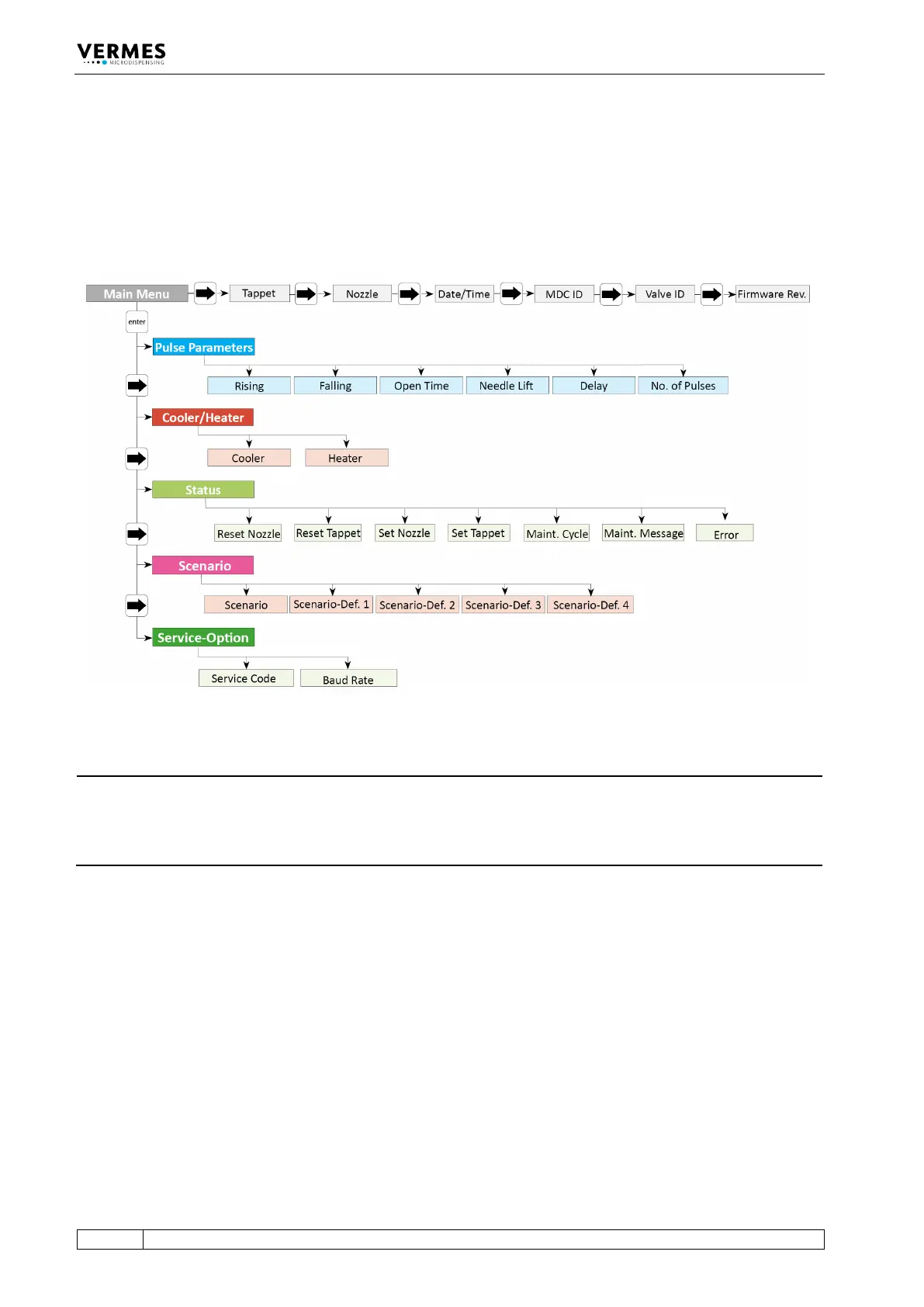
4.5.1 Main Menu
When you switch ON the MDC, you always start in the “Main Menu”. The display shows “Ready”
(position 1, see Fig. 6). With [enter] or [↓] you can reach the submenus. For the information on
the main level use [→] or [←]. All levels are “wrap-around”, i.e. you can circle around between
the items with both keys.
Fig. 5: Menu structure
INFORMATION
Automatic change back to the main menu
On this level, the display jumps automatically back to “Ready”, if you do not press any button for
longer than about 10 sec. From the submenus, the display will jump back as well, if no buttons
are pressed, but the wait is a bit longer.
In the upper right corner of the display a frequency is shown (position 2, see Fig. 6). This is the
dispensing frequency resulting from your current parameter settings. While “Scenario” is “ON”,
the word “Scenario” is shown instead (only while entering parameters in the submenu, the
frequency is always shown). Next to the frequency, on position 3, one or two letters show the
submenu you are in (PP = Pulse Parameters, CH = Cooler/Heater, S = Status, Sc = Scenario, SO =
Service-Option).



 To Next Page