Control Unit MDC
VTK-TR-BA-072e-1 - User Manual MDS 358X Series
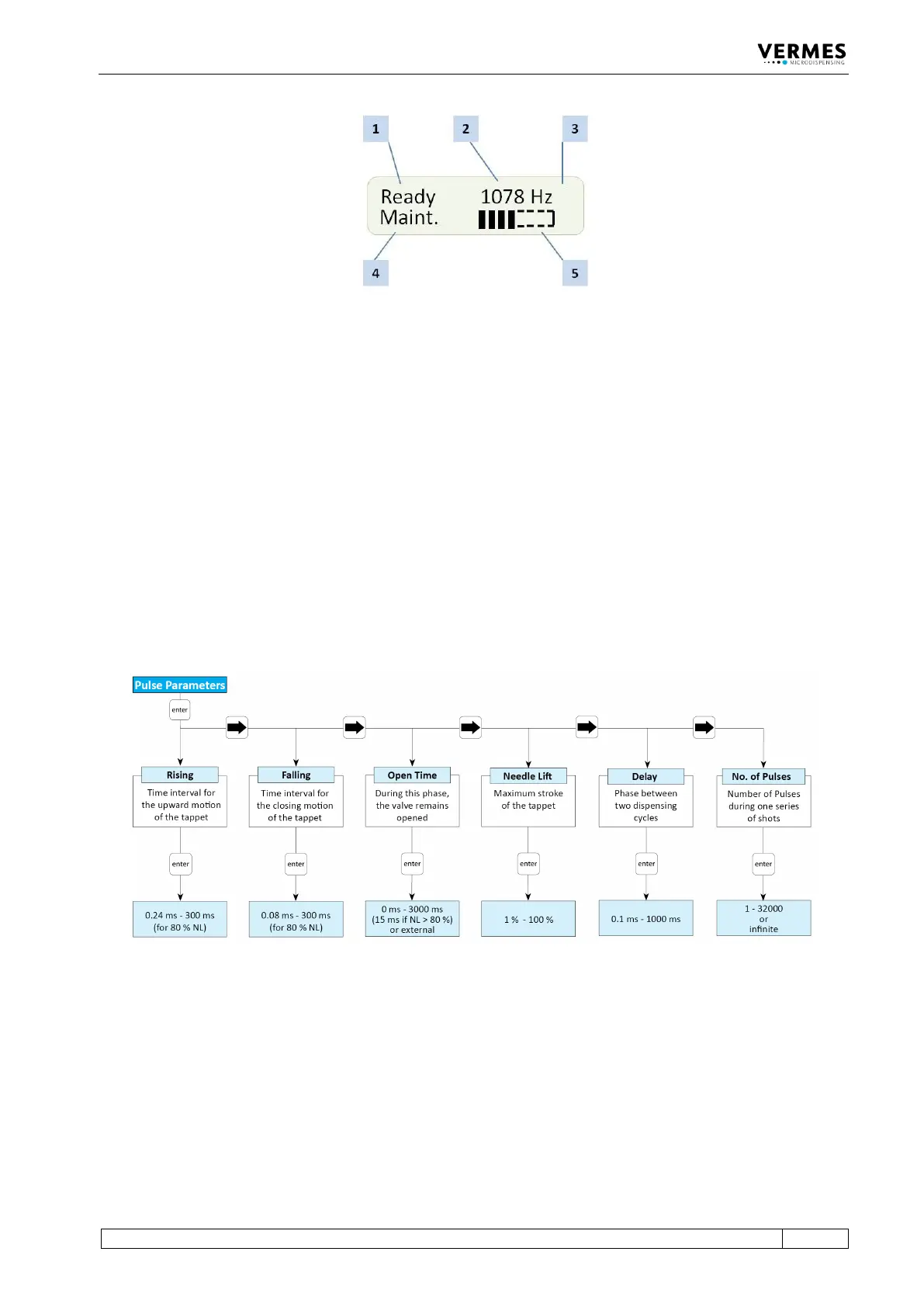
Fig. 6: Display main menu
In the lower line, a maintenance bar is shown (position 5). If all eight sections are filled,
maintenance is recommended. Though be aware that this bar is only updated when starting the
MDC!
In “Tappet” and “Nozzle” you can see the current values as well as the respective reference value.
If a heater is used, instead of “Ready” the current temperature is displayed.
4.5.2 Submenu “Pulse Parameters”
In the submenu “Pulse Parameters” you can recall and modify dispensing parameters for a
particular process. The limits for these parameters you can find in the diagram. You cannot enter
values outside these ranges. The values for rising and falling are for 80 % needle lift. If the needle
lift is smaller, the values might be lower. The dispensing frequency based on the current
parameters is shown in the main menu in the display (position 2, see Fig. 6, page 29), but only, if
“Scenario” is “OFF”.
Fig. 7: Submenu „Pulse Parameters“



 To Next Page