Control Unit MDC
VTK-TR-BA-072e-1 - User Manual MDS 358X Series
4.5 Menu Structure
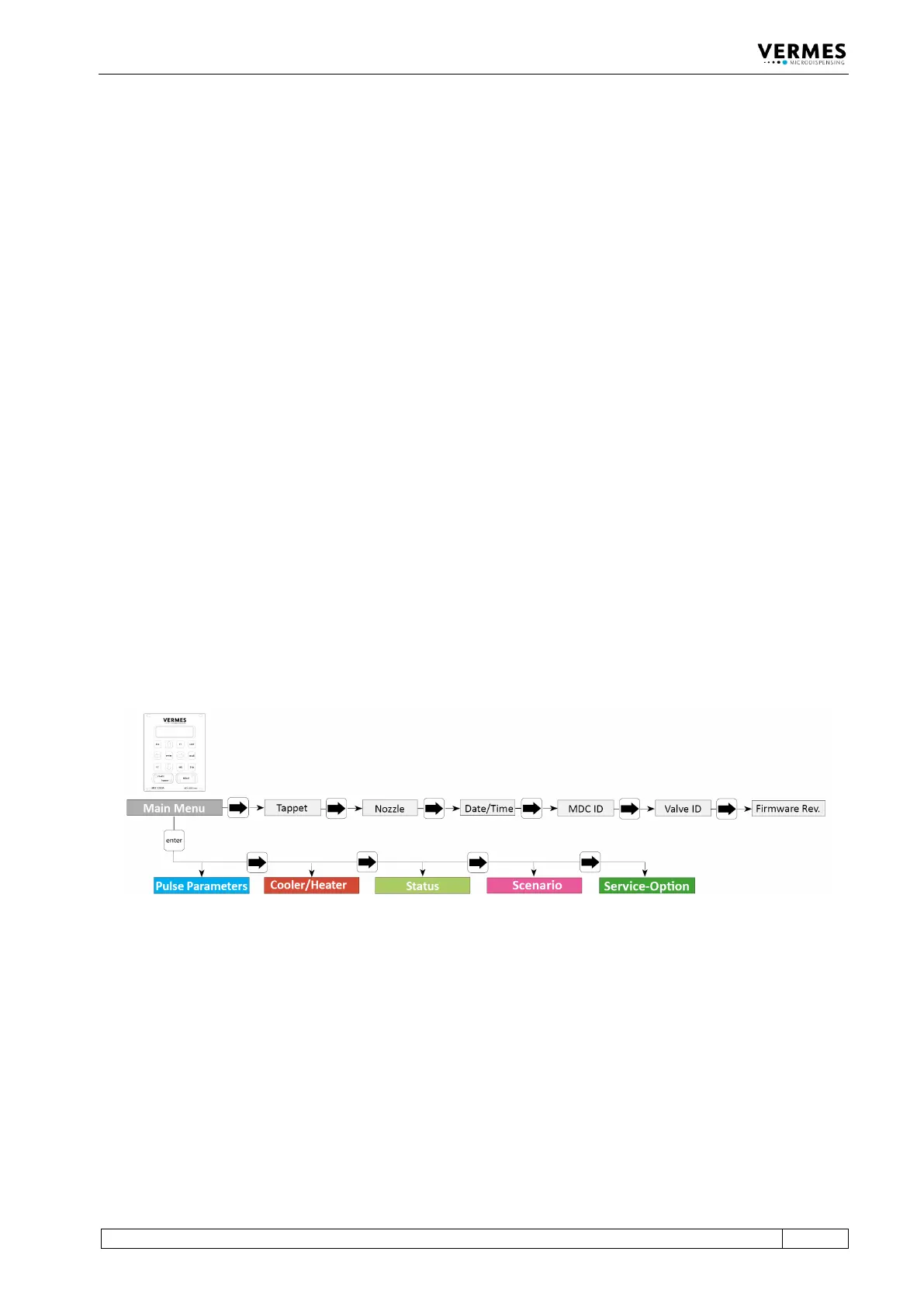
The main menu of the control unit MDC 3500 contains 5 submenus: “Pulse Parameters”,
“Cooler/Heater”, “Status”, “Scenario” and “Service-Option”. With the [enter]-key you can reach
the level of the submenus. There you can switch around with the keys [→] and [←]. Another
option from the main menu is to use [→] or [←], which allows you to gather some information
about the system, like maintenance situation or ID numbers. The items are “Tappet”, “Nozzle”,
“Date/Time”, “MDC ID”, “Valve ID” and “Firmware Rev.” “Firmware Rev.” will give you the current
revision of the firmware on your MDC. “Date” gives the current date and time (as UTC), as the
MDC has a real time clock (RTC). Menu levels are always “wrap-around”, i.e. you can move on
from the last item in a menu directly on to the first. With [esc] or [↑] you can change from a sub
menu into the next higher menu level.
The information shown in the display differs, depending on the menu level (see paragraph 4.5.1,
page 28).
• Dispensing parameters for a particular process can be recalled and modified in the submenu
“Pulse Parameters”.
• “Cooler/Heater” – select the settings for the heating and the valve cooling, if set up.
• You can use the submenu “Status” to decide on individual cycles for the replacement of
tappet and nozzle insert (see paragraph 4.5.4 "Submenu “Status”", page 34). The current state
of the system with respect to the maintenance interval can be verified by the function “Maint.
Cycle” (see paragraph 10.1 "Maintenance Indicator", page 137). With “Maint. Message” you
can decide to show maintenance messages or not. Error messages concerning the system are
shown with the function “Error”.
• In the submenu “Scenario” you can enter values for pre-defined scenarios. Here you can also
set the option to work with these scenarios.
• The submenu “Service-Option” is used to enter service codes and to change the baud rate.
Fig. 4: Main menu



 To Next Page