Operation
VTK-TR-BA-072e-1 - User Manual MDS 358X Series
You do not need the additional USB flash drive coming with the calibrator, if you work with an
MDC 3500. The USB flash drive is only for other devices.
You have to calibrate your heater twice, once at 200 °C and once at 20 °C. You always have to
calibrate at both temperatures, since the old values are deleted the moment you start a new
calibration. It does not matter, in which order you perform the calibrations, as long as you use
each calibrator exactly once.
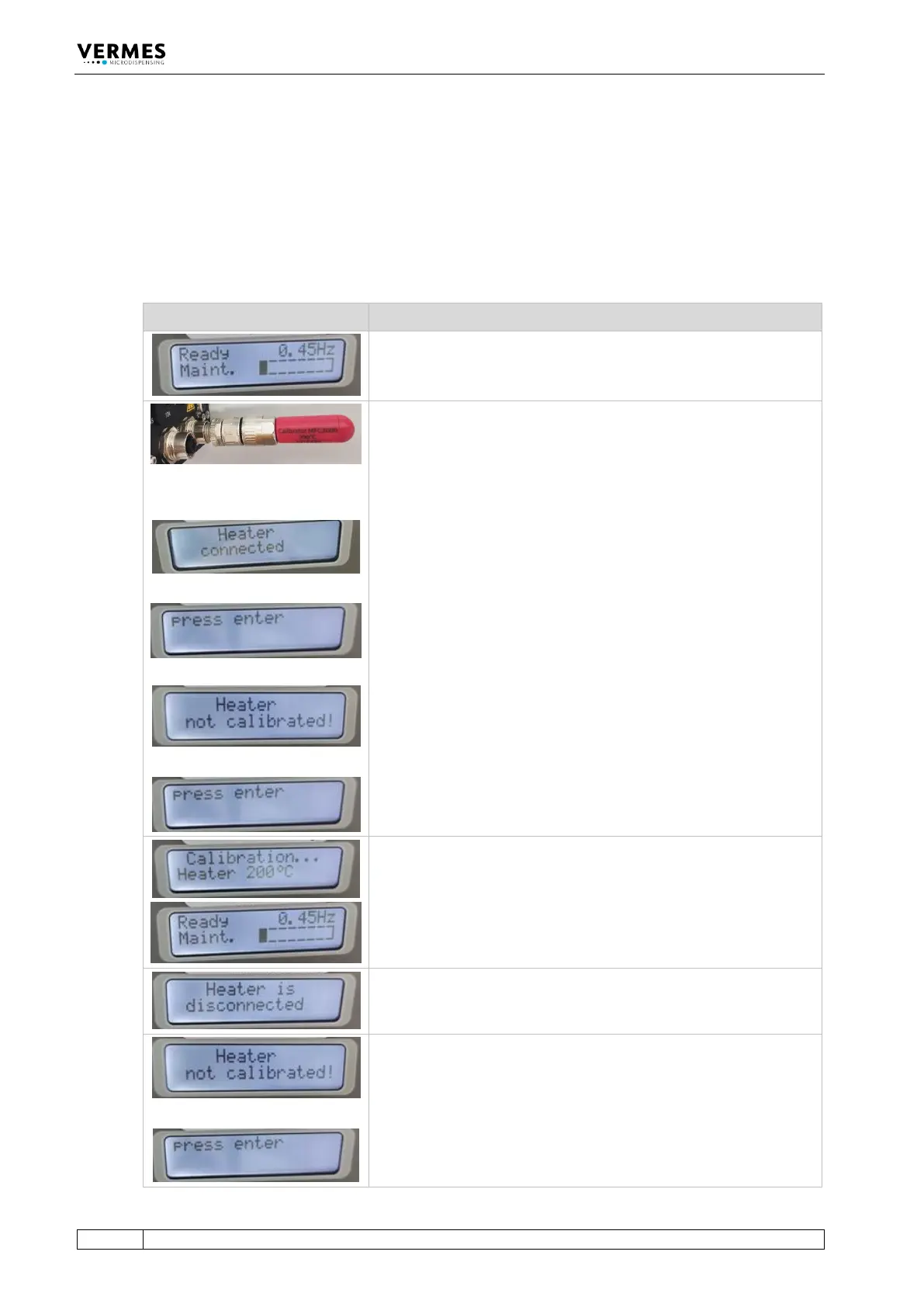
The following table shows you how to perform the calibration.
Picture Explanation
Preparation
The MDC is connected with a microdispensing valve, but not with a
heater. Start up the MDC. The starting menu appears in the display.
+
or
+
Step 1 (First Calibrator gets connected)
Connect the calibrator MFC3000 – 200°C.
Important Note!
Make sure to screw the calibrator tight enough.
There are now two possibilities.
If the MDC had been calibrated before, the message “Heater
connected” appears in the display. The display then switches
between this message and the message “Press enter”.
If the MDC had not been calibrated before, or if there was an error
during the last calibration attempt, the message “Heater not
calibrated” appears. Similar to the case above, the display switches
between this message and the message “Press enter”.
Press the [Enter]-key.
Step 2 (First calibration is running)
After several seconds, in the display appears the message
“Calibration … Heater 200°C”.
Wait until the display jumps back to the starting message.
Step 3 (First calibrator screwed off)
Screw off the calibrator. In the display, you get the message “Heater
is disconnected”.
+
Step 4 (Second Calibrator gets connected)
Connect the calibrator MFC3000 – 20°C.
Important Note!
Make sure to screw the calibrator tight enough.



 To Next Page