Home
VersaMed
Medical Equipment
iVent201
Page 145
VersaMed iVent201 - Page 145
310 pages
Manual
Save Page as PDF
To Next Page
To Next Page
To Previous Page
To Previous Page
Loading...
i
Vent201 Opera
tor's Manu
al
133
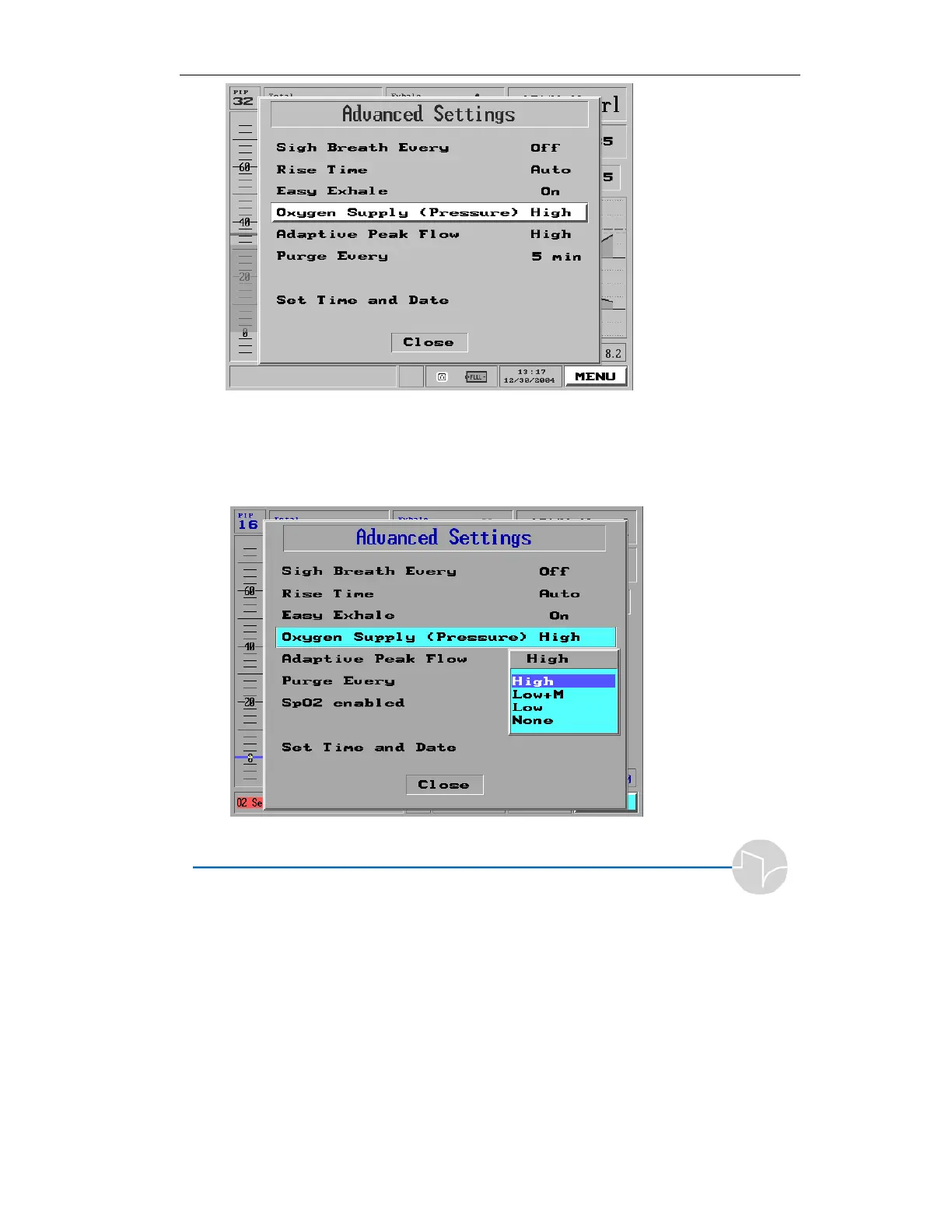
Figure 4
.
26
Oxyg
en Supply
S
ele
cted on the
Main Me
nu P
o
p-up
2.
Press the control k
nob. A pop-
up appears with the options:
High
,
Low
+M
,
Low
, and
None
.
Figure 4
.
27
The
Oxyge
n Supply
Po
p-up
144
146
Table of Contents
Main Page
Table of Contents
4
Introduction
13
How to Use this Manual
15
Looking at the Ivent
16
Cautions and Warnings
18
Symbols and Labels
20
Performance and Parameters
21
Specifications
23
Monitored Data Range, Resolution and Accuracy
23
Size and Weight
25
Ventilation Modes
26
Environmental Specifications
26
Power Supply
27
O2 Supply Specifications
27
Ventilation Performance and Controlled Parameters
28
Standards and Safety Requirements
29
Displayed Parameters
29
User Adjustable Alarms
31
Additional Alarms
31
Waveforms and Diagnostics Packages
32
Intended Use
33
Use of the Ivent201 with Mri
34
Setting up
39
Power Connection
40
External Power
40
Internal Battery
43
Oxygen Supply
48
High Pressure Oxygen Supply
48
Low Pressure Oxygen Supply
50
Breathing Circuit
51
Circuit Resistance
54
Other Connections
55
Hme
55
MDI
55
Using the Ivent with Heated Humidification (1.4 Models Only)
55
Synchronized Nebulizer Device
58
Pulse Oximeter
59
Sensor Line Maintenance
62
Patient Connection
62
Filters
63
Air Inlet Filter
63
Bacterial Filter
63
Chemical, Biological, Radiological, and Nuclear Filter
64
Operational Case
65
The Ivent 201 User Interface
66
Controls and Powering up
67
The Front Panel
67
LED Indicators
70
The Screen
71
Operating the Ivent - Setting Modes and Parameters
75
Operation
75
Power up and Weight Selection
75
O.V.t
77
Standby and Patient Ventilation
81
Changing Ventilation Mode
81
Changing Ventilation Parameters - Overview
86
Common Parameters
90
The Selection Interface
91
Adjusting Breath Rate
92
Adjusting Tidal Volume
95
Adjusting Pressure Limits in Volume Control Ventilation Modes
99
Adjusting Fio
101
Adjusting Peak Flow
103
Adjusting Pressure Support Ventilation
105
Adjusting PEEP
107
Adjusting Trigger Sensitivity
108
Adjusting Inspiratory Time
110
The Main Menu
113
Navigating the Main Menu
114
Alarm Settings
115
Changing Individual Alarm Settings
115
Auto Settings
129
Alarm Options
130
Advanced Settings
137
Sigh Breath
139
Rise Time
140
Easy Exhale
142
Oxygen Supply
144
Adaptive Peak Flow
152
Set Purge Interval
153
Pulse Oximetery
155
Synchronized Nebulizer
160
Set Time and Date
162
Restore Default Settings
165
To Restore Defaults
165
Show Graphs
169
Browse Waveforms
170
Select Range
172
Show Trends
175
Selecting Trends to Display
178
Browsing Trends
180
Show Loops
182
Show Mechanics
185
Show Log Book
186
Display
187
178
190
Maintenance
190
Adaptive Bi-Level
191
About Adaptive Bi-Level
191
Guide to Adaptive Bi-Level
192
Indications and Warning
193
Indications
193
Setup
193
Adaptive Bi-Level Alarm Settings
195
Other Alarm Options
196
Adjusting Adaptive Bi-Level Parameters
198
Adaptive Bi-Level Window
199
Easy Exhale
200
Optimizing the Patient Ventilator Interface
201
Resolving Patient Ventilator Dysynchrony
201
Alarms
205
How Alarms Work
205
Responding to an Alarm
206
Alarm Settings
208
Guide to Alarm Definitions and Priorities
211
Alarms Tests
221
The Sensor Failure Alarm
227
Patient Disconnect Alarm
230
Patient Circuit Failed Alarm
231
Care, Maintenance, and Tests
233
Cleaning and Maintenance
233
Preventive Maintenance
234
The O.V.T
235
The Maintenance Screen
236
Calibration
236
Ventilator Verification Tests
236
Configuration Screen
244
Choosing a Different Startup Screen
244
Setting the Startup Weight
245
Default Fio Setting
246
Versamed Service Functions
246
Communication Rate
247
Localization
247
Total Operating Hours
250
Appendix A: Glossary
251
Appendix B: Warranty
259
Appendix C: Operating Theory
263
Ambient Air Filter
263
CBRN Filter (Optional)
263
Low Pressure O Adapter and Filter (Optional)
263
Air/Oxygen Blending System
263
Inlet Manifold
263
Turbine Unit
264
Turbine Pressure Sensor
264
Turbine Valves
264
Over Pressure Relief Valve
264
Airway Flow and Pressure Sensors
264
Pressure Switch
264
Inlet and Outlet Mufflers
264
Appendix D: Theory of Breath Delivery
267
Breath Delivery
267
Patient Triggering
268
Breath Types
270
Adaptive Flow TM and Adaptive I-Time
271
Mandatory Volume Control Breath
274
Pressure Control Breath
275
Manual Mandatory Breath
276
Patient Pressure Support Breath
277
Patient Spontaneous Breath
278
Summary
279
Appendix E: Ventilation Modes
281
Assist/Control Mode
281
Definition
281
Available Breath Types
281
Description
281
Parameters Setting
282
Synchronized Intermittent Mandatory Ventilation Mode
283
Definition
283
Available Breath Types
283
Description
284
Parameters Setting
285
Continuous Positive Airway Pressure Mode
285
Definition
285
Available Breath Types
285
Description
285
Parameters Setting
286
Apnea Back-Up Ventilation
287
Open Loop Mode
288
Adaptive Bi-Level Mode
288
Appendix F: Hold Function and Static Mechanics Measurements
289
Front Panel Controls
289
Static Compliance Measurements
290
Static Compliance
290
Respiratory Time Constant
291
Performing a Static Respiratory Mechanics Measurement
291
Clinical Considerations
294
End Expiratory Hold
294
Performing and End Expiratory Hold Maneuver
295
Reviewing Static Mechanics and Intrinsic PEEP Measurements
296
Rr/Vt Ratio
297
Appendix G: Part Numbers and Accessories
299
Appendix H: Index
303
Other manuals for VersaMed iVent201
Service Manual
198 pages



 To Next Page