ViewRay Inc. MRIdian® system L-0009 Release 4.5 131
Chapter 5: Prescription and Patient Management
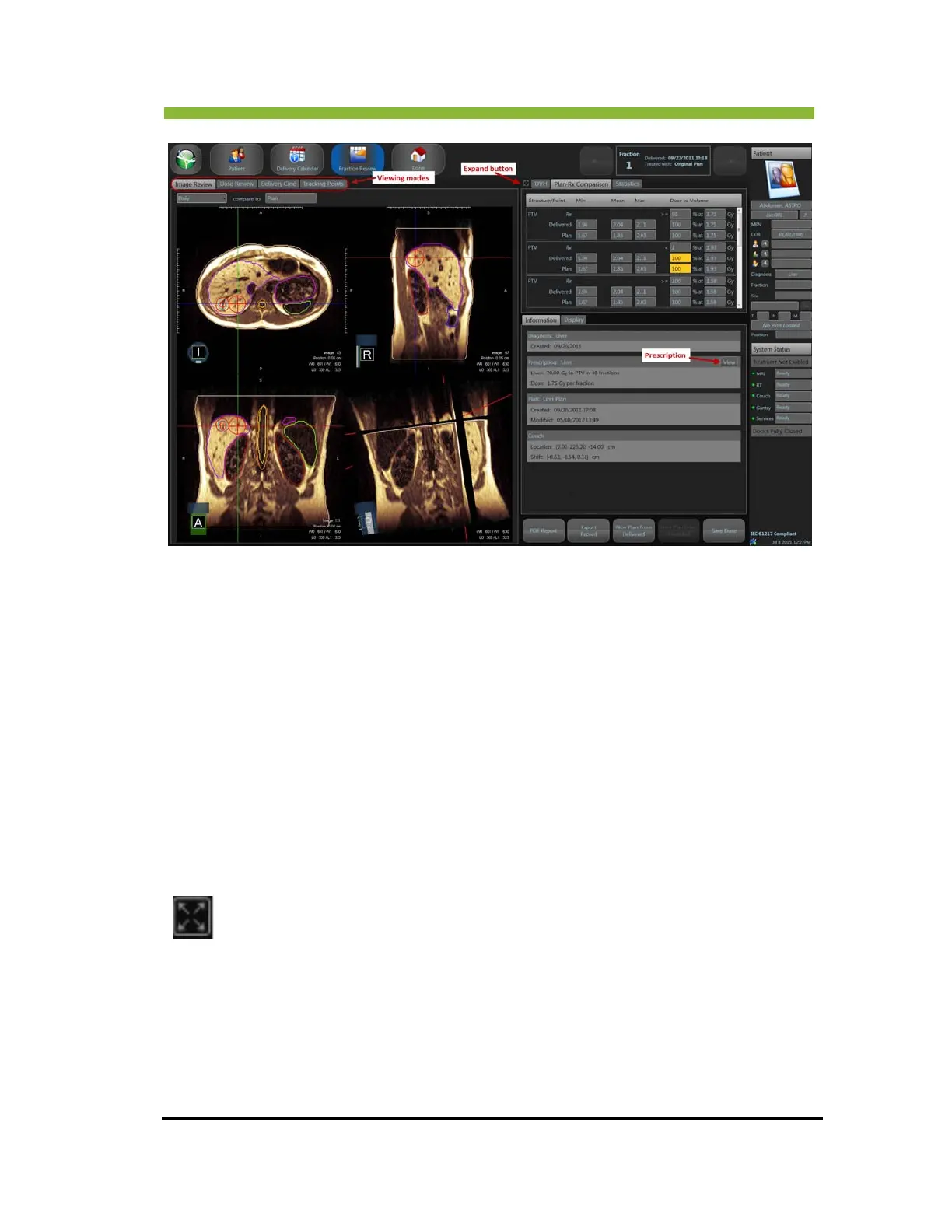
There are four viewing modes—Image Review, Dose Review, Delivery Ciné, and Tracking
Points.
Imag
e Review is the daily image for that fraction and is displayed on the fraction review
screen when it opens.
Click >
Dose Review allows comparison of plan, predicted, and delivered dose.
Click > Delivery Ciné to view a treatment delivery playback.
Click > T
racking Points to view a chart of the amplitude of deformations for the pre-set
tracking points that were recorded during treatment delivery. See “Viewing the Tracking
Points Chart” on page 133,
and, for an explanation of using and setting up tracking points, see
“Checking RealTarget Settings” on page 361. Also see “Using Tracking Points” on page 363.
The D
VH, Plan-Rx Comparison, and Statistics are on the right side of the screen. The button
on the left of the tabs is an expand button and when clicked will expand any of the
comparison screens to a full screen view.
Click the Expand button to view the DVH, Plan-Rx Comparison,
or Statistics in full
screen.
To return to normal view, Click > Expand button again.
Click the View but
ton in the Information box to view the patient’s prescription.
There is a ± 3% or ± 1 cc tolerance for volume prescription constraints, and a ± 1 Gy
t
olerance for Min, Mean and Max constraints.


 To Next Page