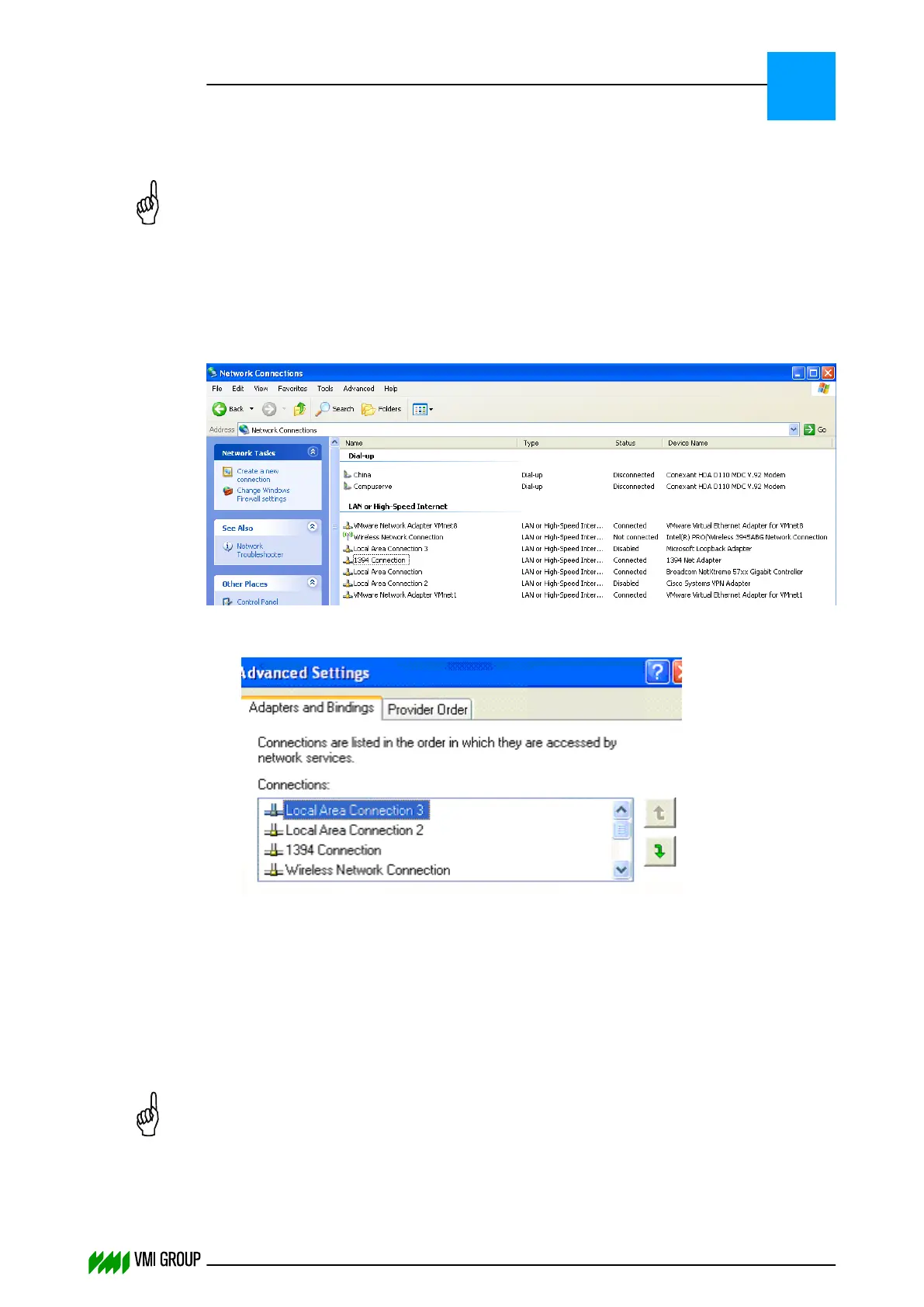
8.1.1.1 Setting the priority of the network card
NOTICE
This is only applicable for Windows XP Embedded VVS PCs.
If you have multiple network cards, make sure that the network card which is used by
VVSU has the highest priority.
The priority of the network card can be set via START > CONTROL PANEL > NETWORK
CONNECTIONS resulting in the screen below.
1. The network adapter priority can be set via the menu option
ADVANCED > ADVANCED SETTINGS.
2.
Make sure that the network adapter which is used by VVSU has the highest priority,
because the VVSU broadcast is only done on the network adapter with the highest
priority.
3. In case you have a standalone computer which is not connected to the network, you
need to install a loop-back adapter.
8.1.2 VVSU shows an error while attempting to connect to the
VVSX server
NOTICE
This is only applicable for Windows XP Embedded VVS PCs.
TROUBLESHOOTING
Communication
8
THINKING FORWARD
VMI Vision System VVS (OL82) VVSX 13.0.12.0, VVSU 3.0.6 / 4 / 2016-07-11 / pd#175592
8-4



 To Next Page