Devices
Address
1
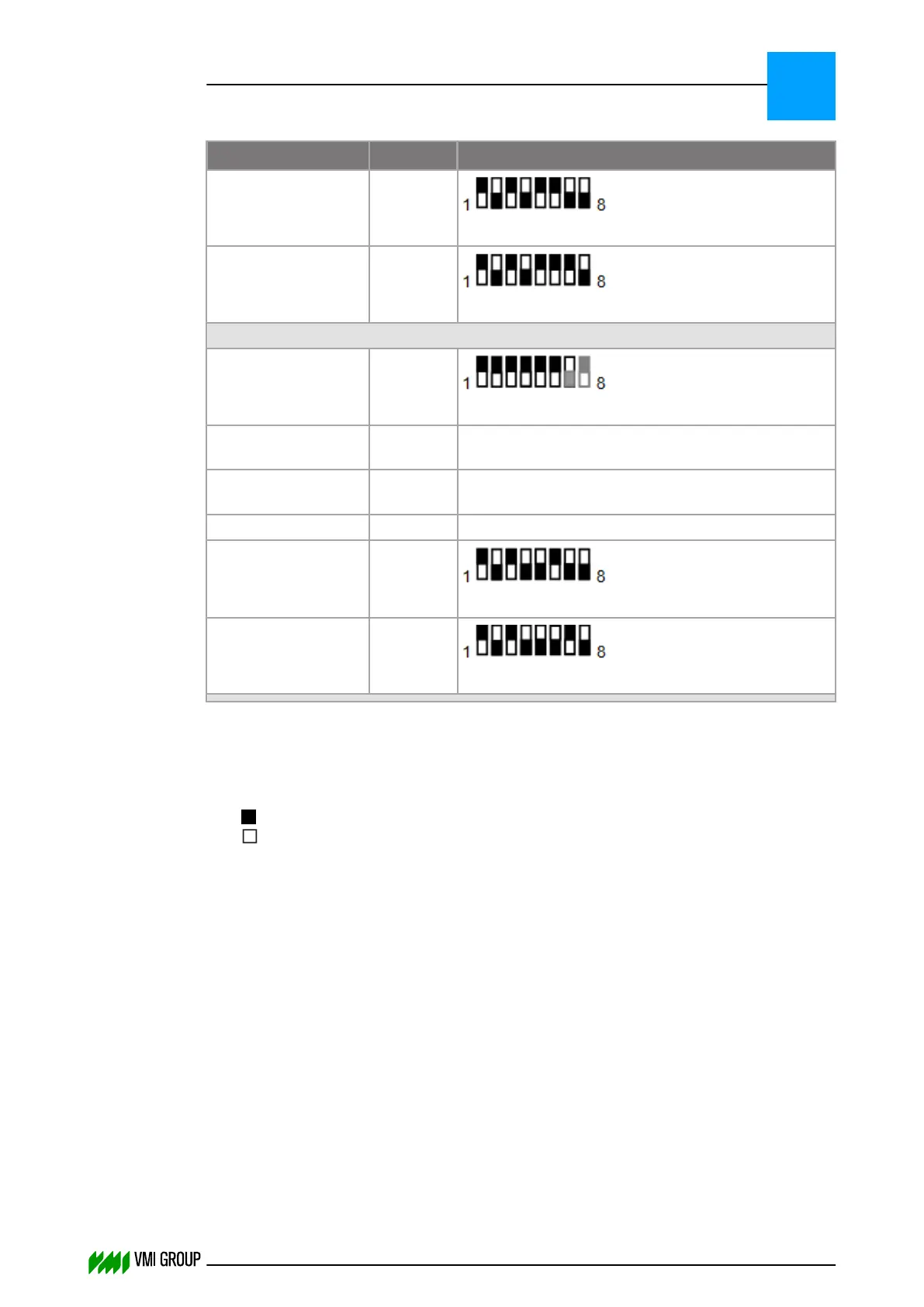
Address setting (dipswitch)
2
Actuator Breaker 3 3.5
How to set the address of actuator RK4004
Actuator Breaker 4 7.5
How to set the address of actuator RK4004
CAN channel 2
Beckhoff BK5120
(Tread)
3.F
How to set the address of Beckhoff BK5120
Camera Carcass
(right)
0.1 How to set the address of the camera
Camera Carcass
(left)
1.1 How to set the address of the camera
Camera Tread 3.1 How to set the address of the camera
Actuator Carcass 2.5
How to set the address of actuator RK4004
Actuator Tread 4.5
How to set the address of actuator RK4004
Notes:
1. The first digit is the group number. The second digit is the device number.
2. Dipswitch setting:
= ON
= OFF
3.2.6.2 How to set the address of actuator RK4004
The address can be set as follows:
● Using Java Canmon
● Directly on the actuator controller
INSTALLATION AND CONFIGURATION
Configuration
3
THINKING FORWARD
VMI Vision System VVS (OL82) VVSX 13.0.12.0, VVSU 3.0.6 / 4 / 2016-07-11 / pd#175592
3-16



 To Next Page