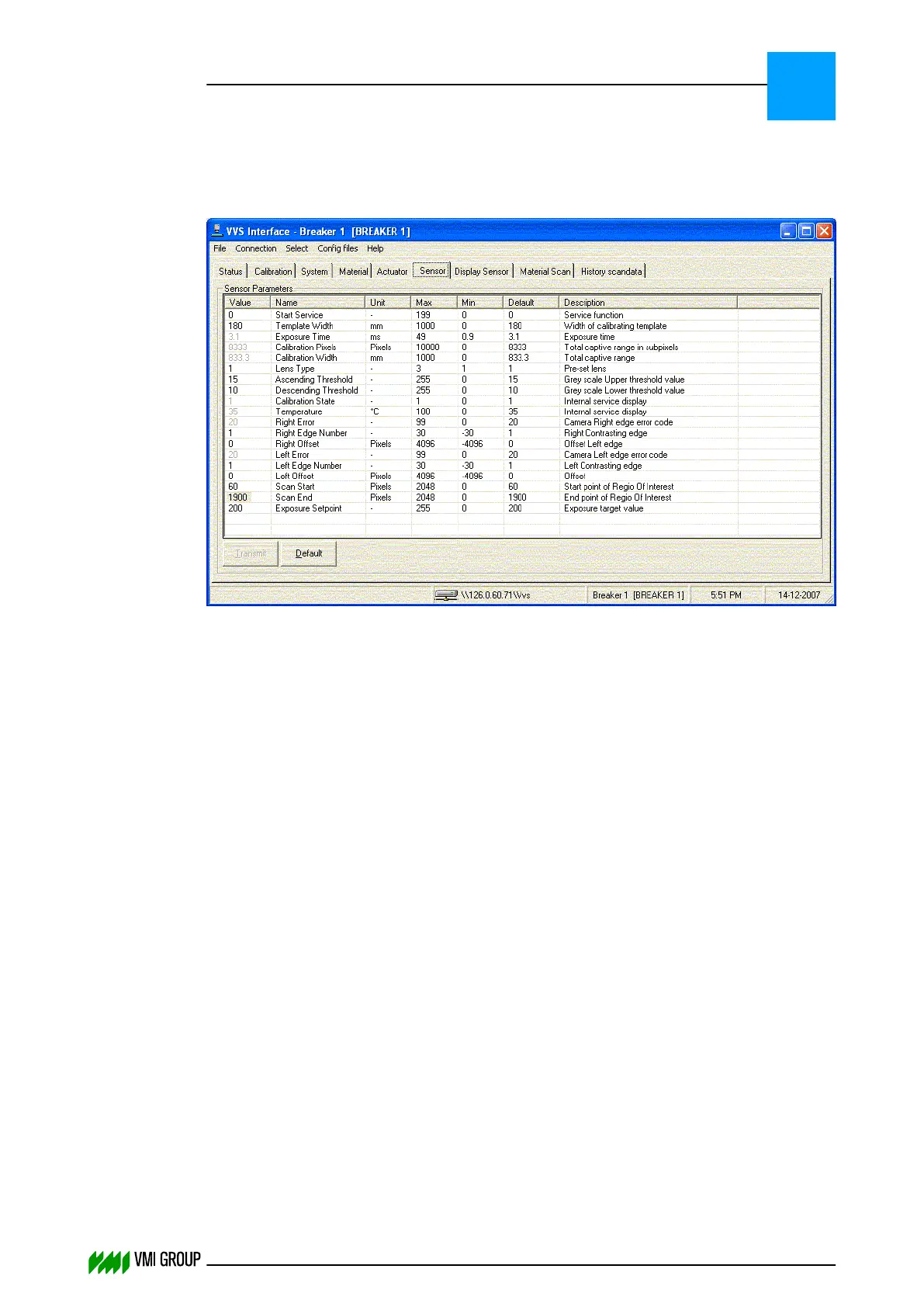
Solution:
In most cases the problem is solved by increasing the threshold. The 'Ascending Threshold'
and 'Descending Threshold' are adjusted in the VVSU SENSOR tab:
Select the SENSOR tab and adjust the values to respectively 50 and 45 (for OL80).
8.6.3 Deviation between measured and actual bodyply width (only
for 24x)
Problem:
The Body‑ply width shown in the material scan (VVSU) deviates from the actual material
width.
Cause:
Material-to-Camera distance is different between Pre-assembly and Body-ply position.
Description:
The two cameras of the Carcass conveyor are calibrated in the PA position. So, the width
measurements by the camera in PA position should always reflect the actual material width.
If this is not the case, then recalibrate the two cameras (refer to Alignments, adjustments
and calibrations on page 5
‑
1).
Width measurements by the camera in Body-ply position could have a deviation due to the
material-to-camera distance.
TROUBLESHOOTING
Calculation problems
8
THINKING FORWARD
VMI Vision System VVS (OL82) VVSX 13.0.12.0, VVSU 3.0.6 / 4 / 2016-07-11 / pd#175592
8-28



 To Next Page