Legend Description Illustration
In the drop-down menu sensor 1 or 2 can be selected to
manipulate the associated cursors and thereby change the
ROI of the sensor.
Save Edges Click Save Edges to send the new positions of the cursors
(ROI) to the cameras to activate the new region of interest.
Legend The color of the legend corresponds with the color of the
associated curve and cursors.
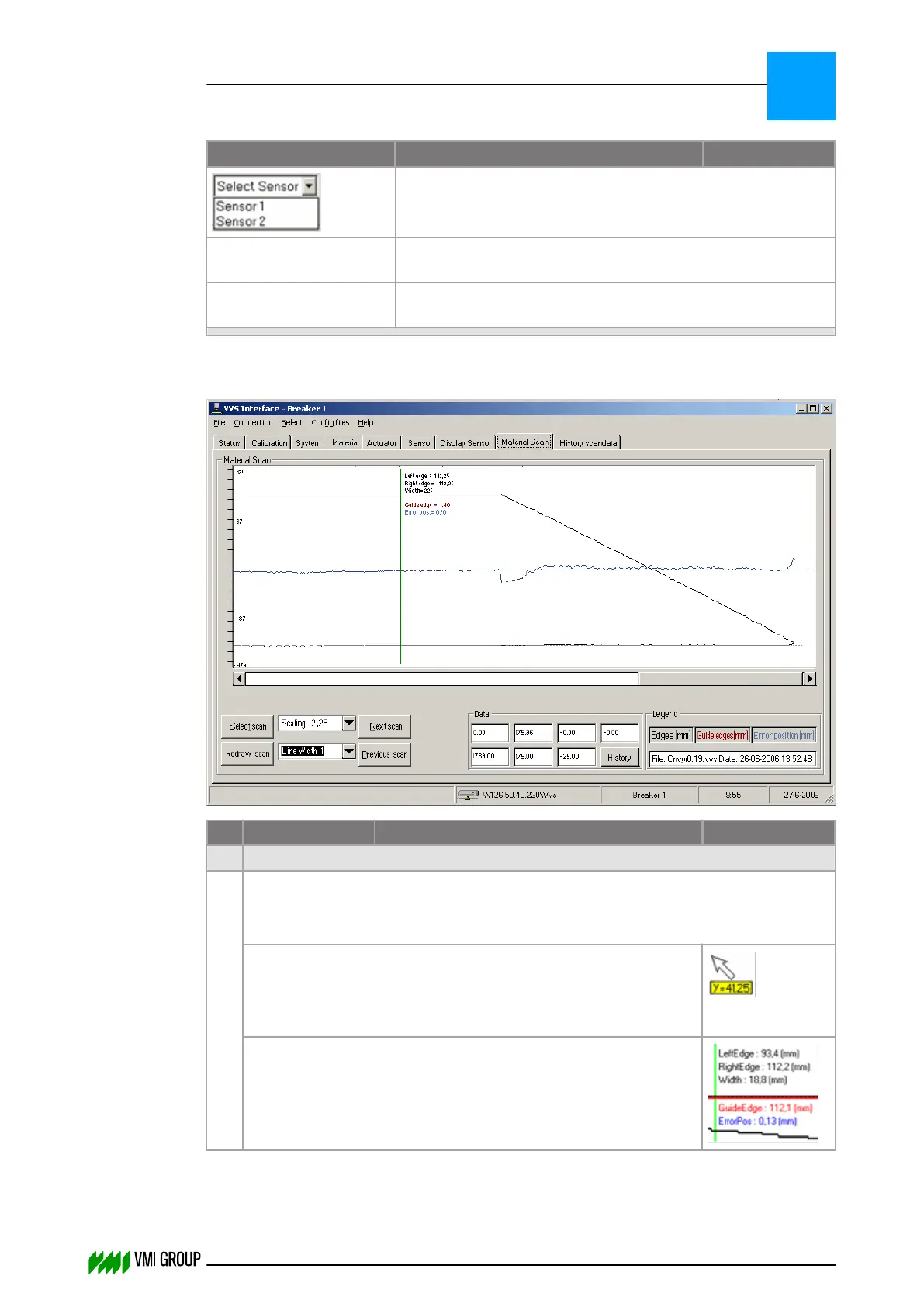
7.3.4.7 Material scan screen
No. Legend Description Illustration
1 Material Scan
Shows the most recent material scan of the selected conveyor.
The ruler at the left side is divided in centimeters (cm).
The value inside the scan field is in millimeters (mm) analog to the data.
When the mouse pointer is moved over the material scan field
a measuring value appears.
The distance between mouse pointer tip and centerline is then
displayed in mm (Y=41,25).
Left‑click to get a vertical cursor on the material scan field at the
position of the mouse pointer.
In the top of the field the positions of the edges, width and error
appear.
VVSU OPERATION
Screen layout (generic)
7
THINKING FORWARD
VMI Vision System VVS (OL82) VVSX 13.0.12.0, VVSU 3.0.6 / 4 / 2016-07-11 / pd#175592
7-19



 To Next Page