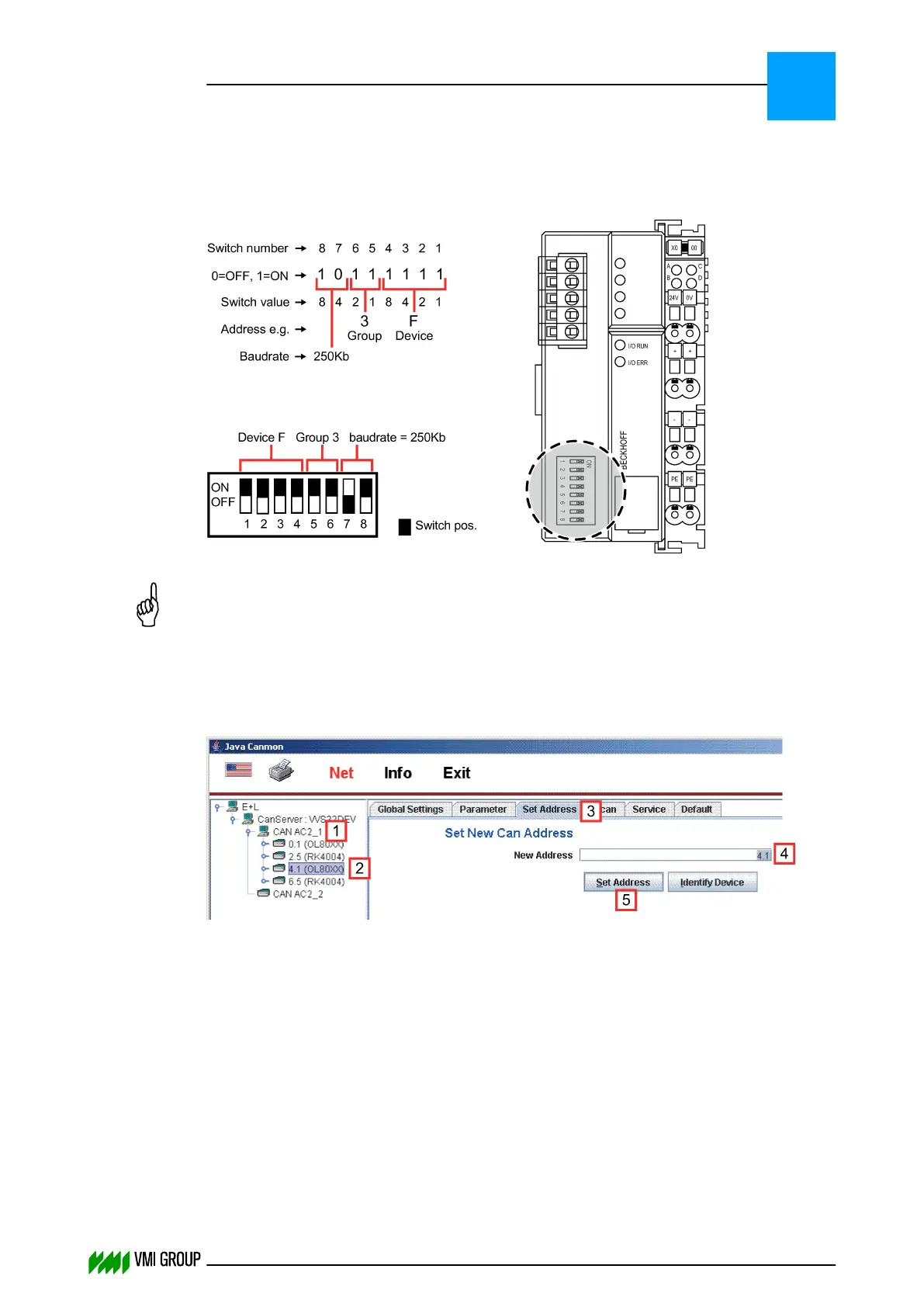
3.2.6.3 How to set the address of Beckhoff BK5120
Devices like Beckhoff BK5120 have their address set by dipswitches. For the encoder the
most significant bits indicate the encoder baud rate.
NOTICE
The switch must be read upside down compared to the Boolean address notation.
3.2.6.4 How to set the address of the camera
The address can be set as follows:
1. Start Java Canmon.
2. Select the CAN channel [1].
3. Select the device for which you want to adjust the CAN address [2].
4. Go to the SET ADDRESS tab [3].
5. Enter the new device address [4].
6. Click the SET ADDRESS button [5].
INSTALLATION AND CONFIGURATION
Configuration
3
THINKING FORWARD
VMI Vision System VVS (OL82) VVSX 13.0.12.0, VVSU 3.0.6 / 4 / 2016-07-11 / pd#175592
3-18



 To Next Page