3.2.6.5 How to set the virtual address of the camera
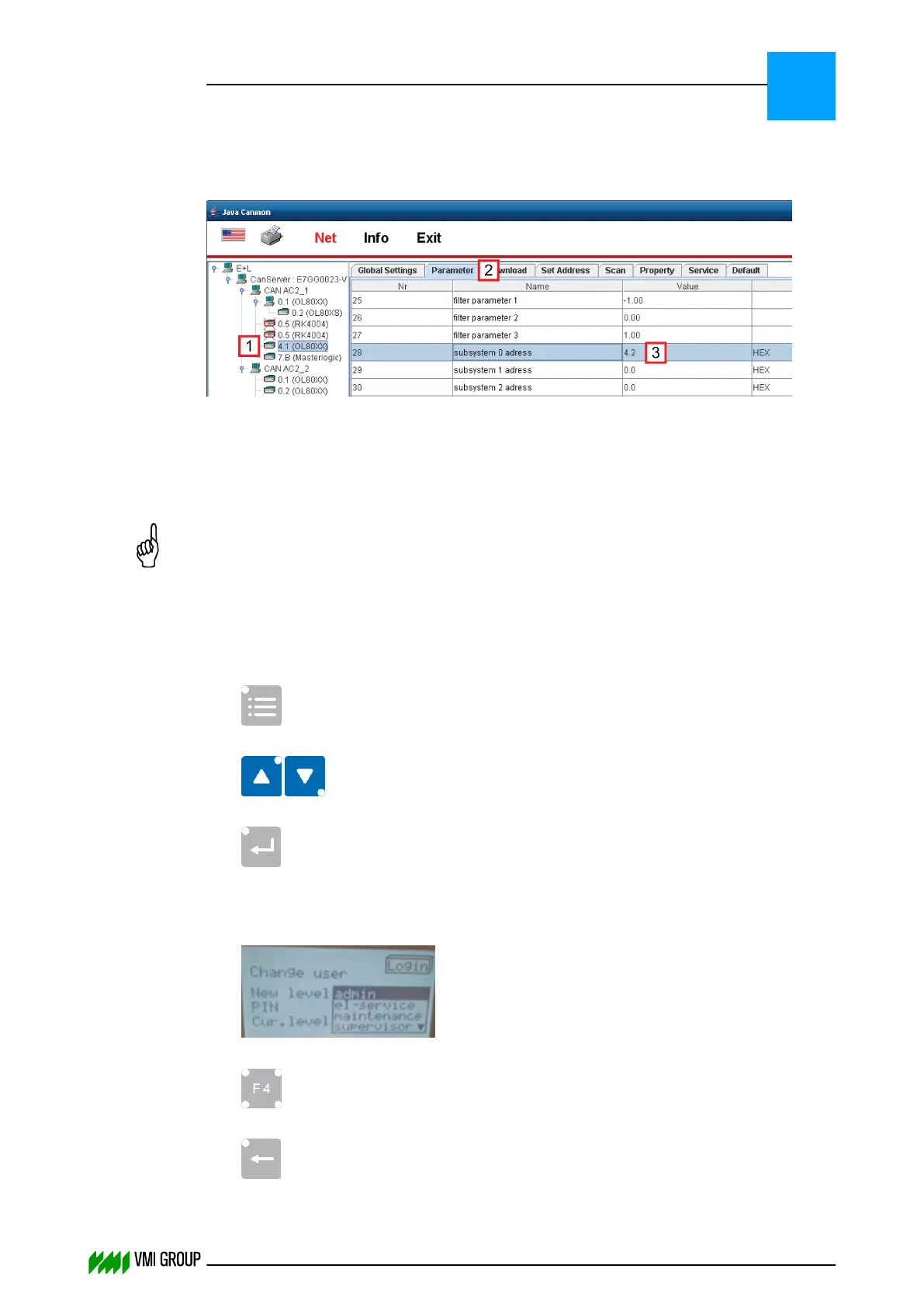
The virtual camera address can be set as follows:
1. Start Java Canmon.
2. Select the camera for which you want to adjust the virtual address [1].
3. Go to the PARAMETER tab [2].
4. Enter the virtual address in parameter 28, subsystem 0 address [3].
NOTICE
The virtual camera 'subsystem 0 address' is the camera address plus 0.1.
For example, camera address 4.1 has subsystem 0 address 4.2.
3.2.6.6 Configure the number of cameras on the CAN bus
To configure the number of cameras that are exposed on the CAN bus:
1.
Press the MENU button on the DO82 unit.
2.
Select the ADMINISTRATION section using the UP/DOWN arrows [8].
3.
Press ENTER.
4. Select USER and press ENTER.
5. Select LOGIN and press ENTER.
6.
Change user to ADMIN.
7.
Press LOGIN [F4].
8.
Use the BACK button to navigate back to the main menu.
INSTALLATION AND CONFIGURATION
Configuration
3
THINKING FORWARD
VMI Vision System VVS (OL82) VVSX 13.0.12.0, VVSU 3.0.6 / 4 / 2016-07-11 / pd#175592
3-19



 To Next Page