2-46 DHS Installation
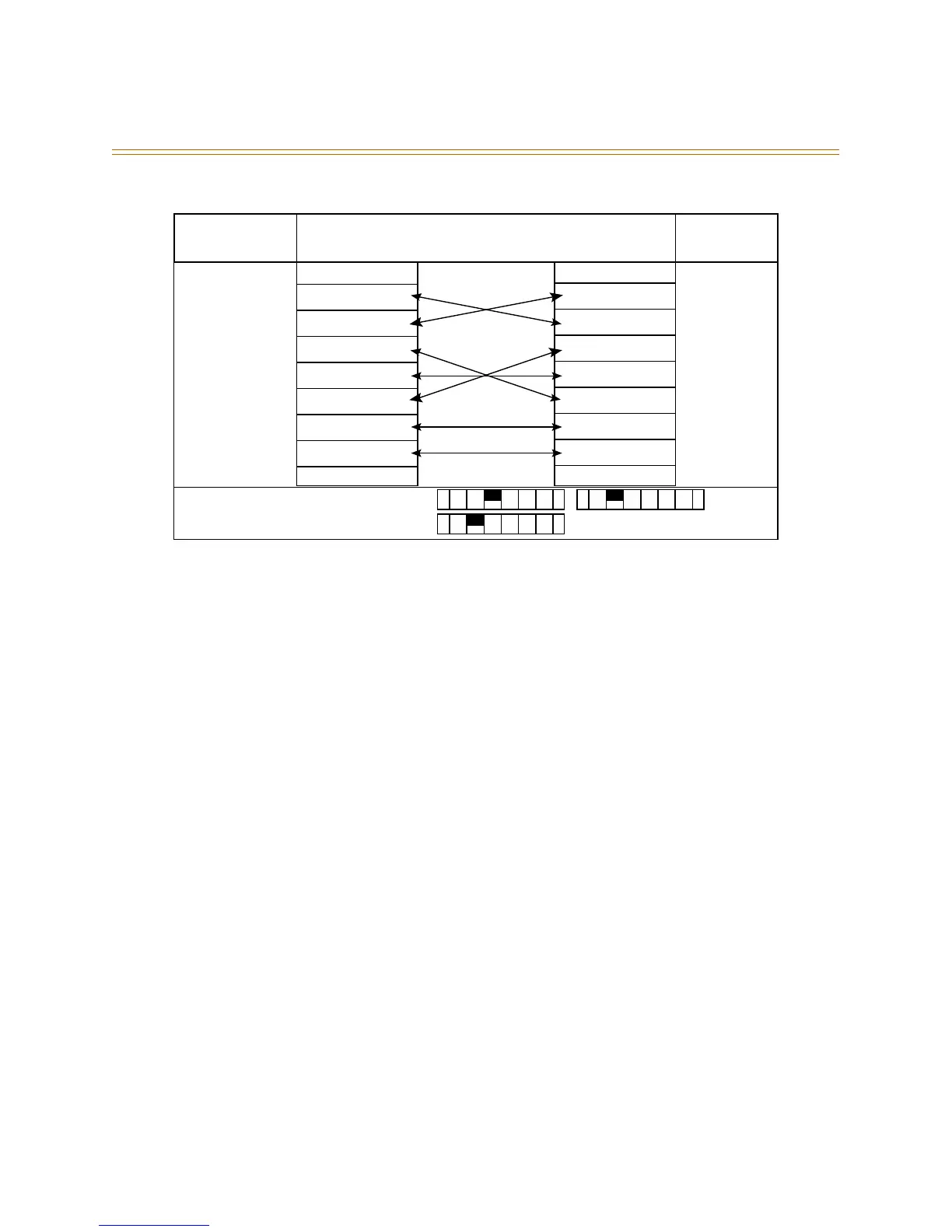
Figure 2-24: Caller ID Connection
Programming Caller ID
Perform the following steps to program the 1480-00 Caller ID data collection module for
the DHS system. From any executive station:
1. [FEAT] + [#] + [
*
] + [000000] (default password)
2. Press [SHOW]
3. Press [NEXT]
4. Press [NEXT]
5. Press [SHOW] at CO Line
6. Enter the 2-digit Line number 01
7. Press [SHOW]
8. Press [NEXT] until ICLID PORT# displays
9. Press [CHG]
10. Enter the line number
11. Press [SAVE]
12. Press [NEXT] to enter another line #
OR
13. Press [CLEAR] to exit programming.
At any executive station:
1. [FEAT] + [#] + [
*
] + [000000] (default password)
2. Press [SHOW]
3. Press [NEXT] until CALL HANDLING displays
4. Press [SHOW]
5. Press [NEXT] until WAIT ICLID displays
6. Press [CHG] until 7
7. Press [CLEAR] to exit programming.
1
2
3
4
5
6
7
8
9
1
2
3
4
5
6
7
8
9
Male DB-9 Connection Male DB-9
1480-00 Switch Settings:
1440-00 Switch Settings:
K
S
U
Caller ID
Box



 To Next Page