9.2.2 Learning hand-held
transmitters/central
transmitters in/out
To be able to use additional transmitters, they must be devices in the respec-
tive radio network. WMS Hand-held receivers and additional WMS Central
transmitters can be detected by the central transmitter and added to its net-
work.
NOTE WMS Hand-held transmitters first need to be woken up by pressing a button
so that they can be found by the central transmitter during scanning.
9.2.2.1 Learning in the hand-
held transmitters/central
transmitters
Proceed as follows to learn in hand-held transmitters or central transmitters.
Button Action/result
In the main menu, select the [System] menu and press ok.
The [System] menu opens.
Select the [Commissioning] menu here and press ok.
The [Commissioning] menu opens.
Using the selection cursor, select the
[in/out hand-held transmitter/central transmitter]
menu item.
Call up the function with ok.
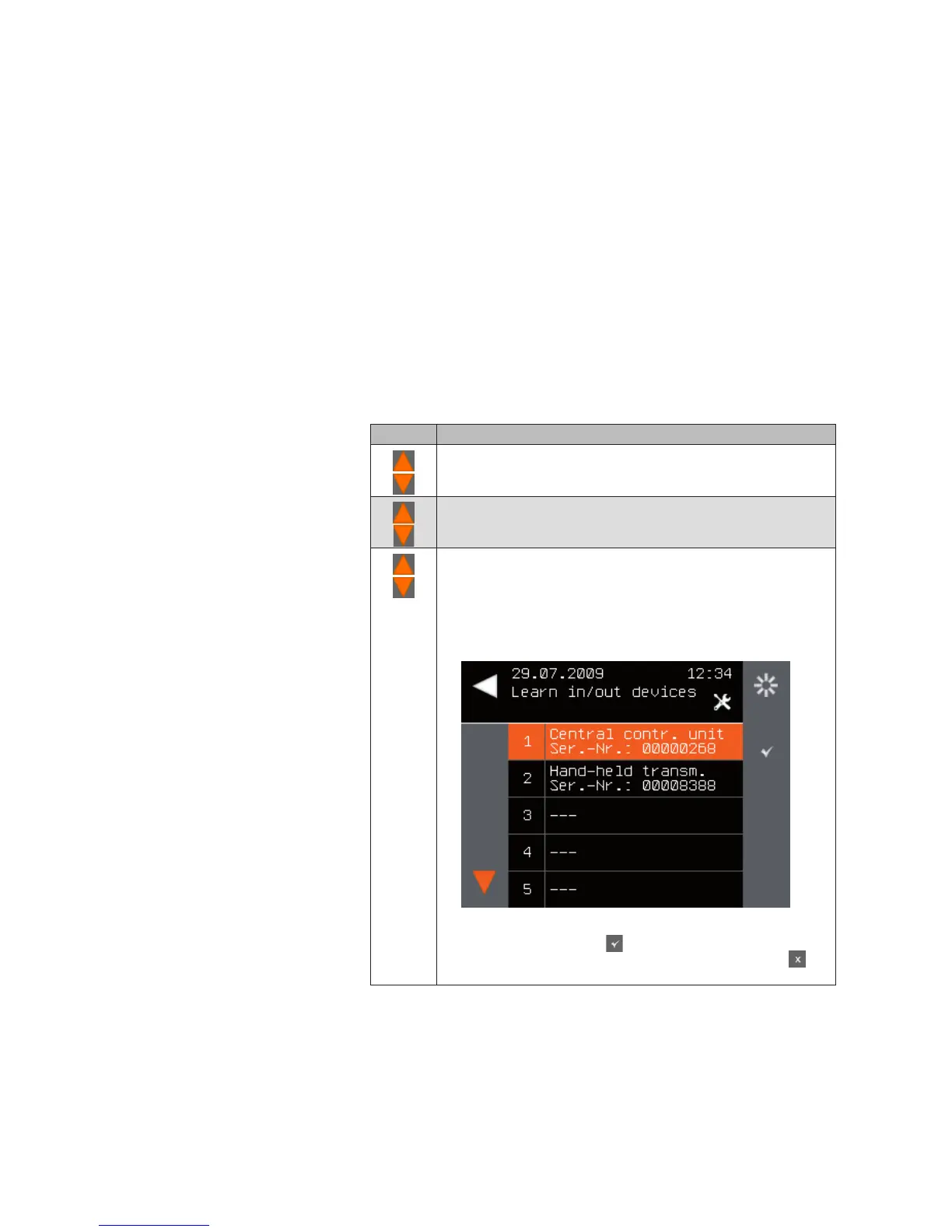
The central transmitter searches for WMS devices. Then the
following menu is displayed.
NOTE The overview shows all WMS devices that were found
for the first time ( button for learning in is activated)
or have already been learned into the network (
button for learning out is activated).
Main menu
System
Commissioning
Learn in/out hand-held transmitters/central
transmitters
System



 To Next Page