RECORDING SETUP DV-1 CONFIGURATION
34
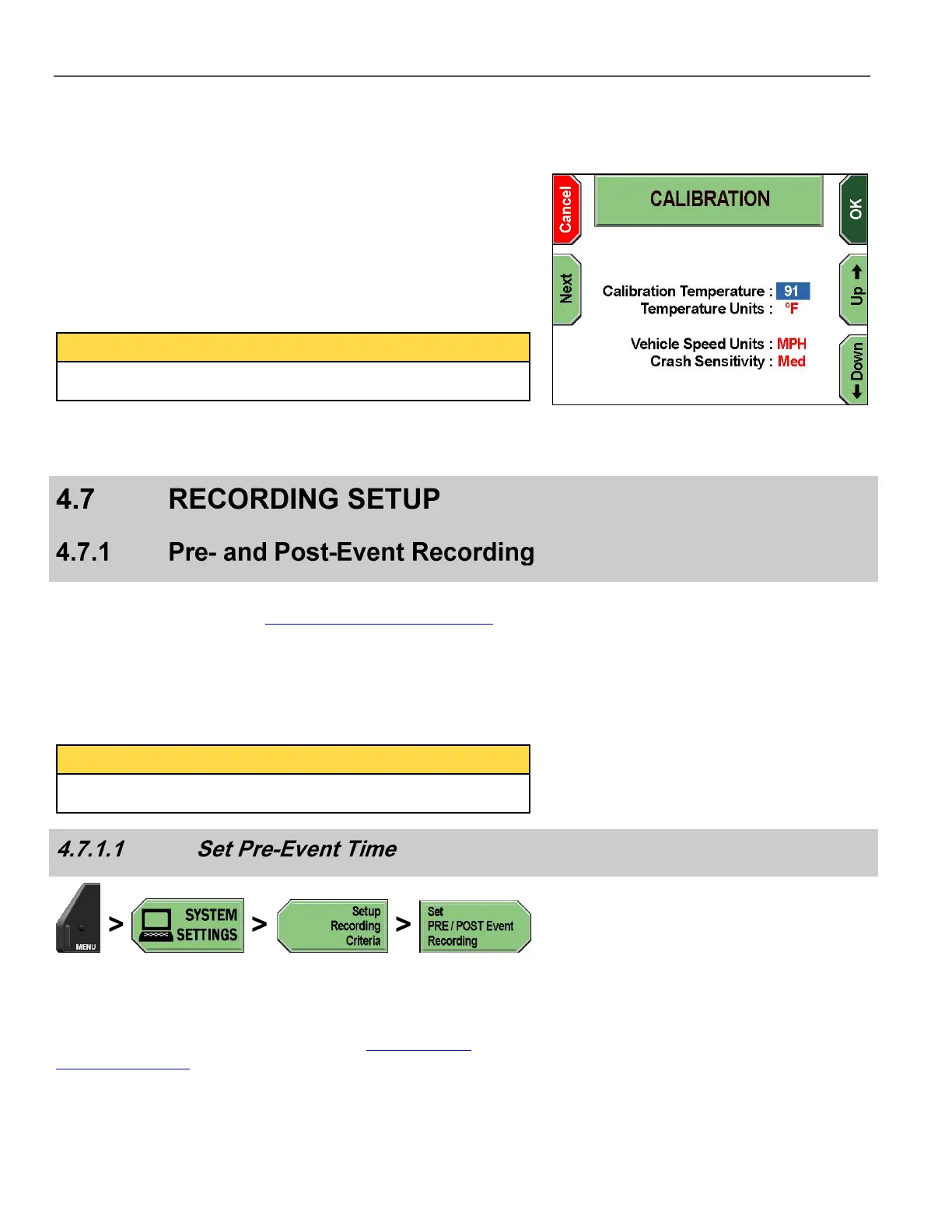
The CALIBRATION screen is displayed.
Press Next to move the cursor to the next setting. Press the Up &
Down keys to change the selected setting:
Calibration Temperature (DV-1A only) – Typically set to about
12°C (22°F) above the ambient temperature
Temperature Units – Either F (Fahrenheit) or C (Celsius)
Vehicle Speed Units – Either Miles Per Hour (MPH) or
Kilometers Per Hour (KPH)
Crash Sensitivity – Either Low, Medium, or High
The Crash Sensitivity setting may not be displayed on some
systems.
Press OK to save the current calibration, or Cancel to exit without
making changes.
Supervisor access is required unless the Set Pre/Post Event Times
permission is set to YES. See Manage Permissions for Settings on
page 80 for details on setting officer permissions.
The DV-1 features Pre- and Post-Event recording capabilities, which
cause the system to automatically add up to ten minutes of video
footage before and/or after a recorded event.
No audio is recorded during the Pre-Event period unless the
microphones were previously turned on.
Press MENU > SYSTEM SETTINGS > Setup Recording
Criteria > Set PRE/POST Event Recording.
If prompted to login, follow the steps listed in Supervisor and
Administrator Login on page 78.



 To Next Page