7.9 Issue remote authorisation
Remote authorisation enables the owner to issue locking
authorisations to a deposited key in the event of need. The
locking rights expire once the established validity period
comes to an end.
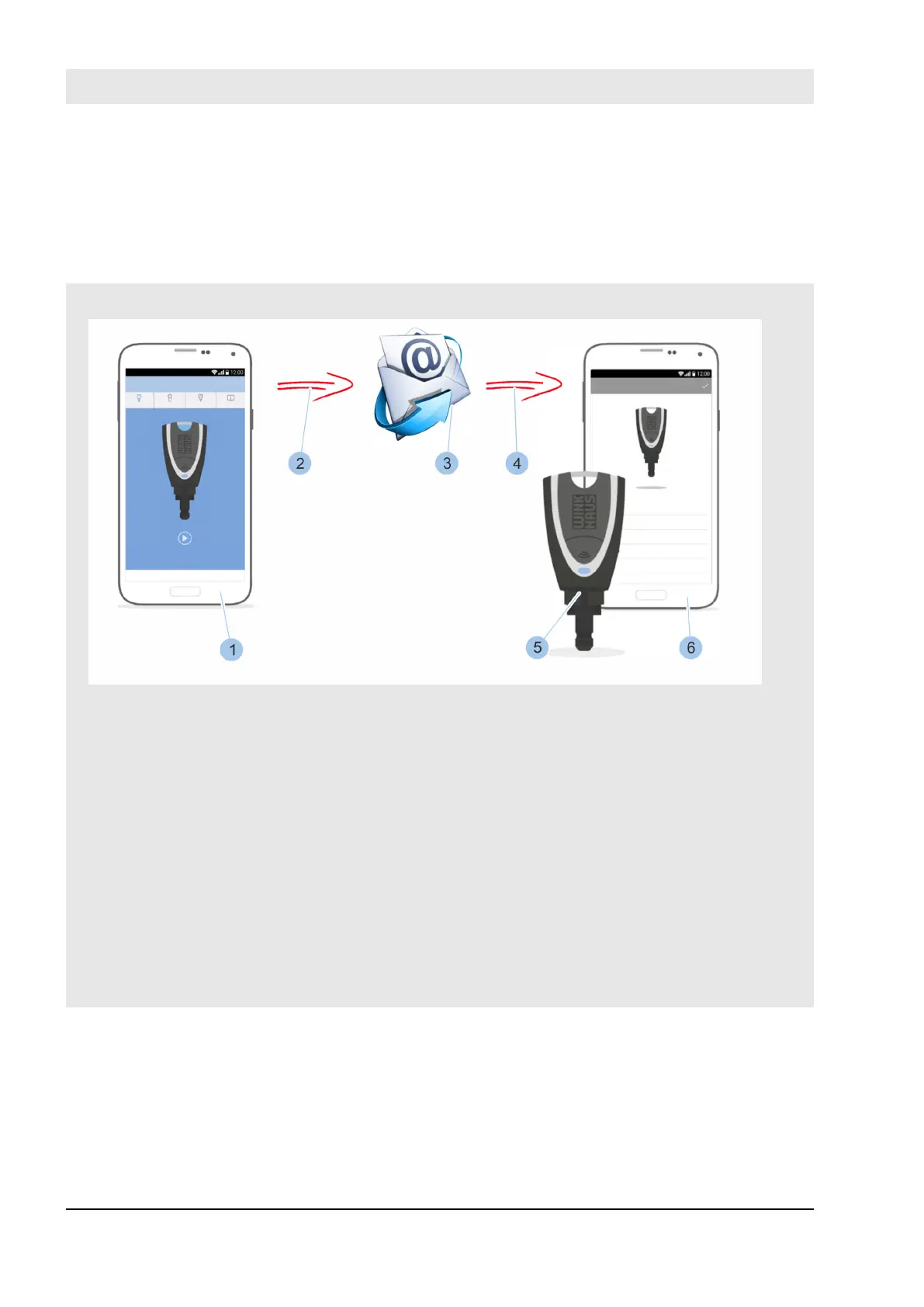
Fig. 105: Send remote authorisation
1 Homeowner's smartphone
2 Forward locking authorisations
3 Email with locking authorisation
(highly encrypted dataset)
4 Locking authorisations received
5 Neighbour has active deposited key
6 The neighbour's smartphone
A homeowner is on holiday with their family. They have
left an active key in deposit with their neighbour (5), but
the key does not have a locking authorisation for the
house. While on holiday, the owner is contacted by the
neighbour, who reports that the light is on in several
rooms.
The homeowner can now send a time-limited locking
authorisation (maximum validity 31 days) for the active
key using the app on their smartphone (1). The neighbour
receives the locking authorisation (3) via the app and can
then turn o the light in the rooms concerned.
Application example
The following prerequisites must be met, so that the neigh-
bour can access the remote authorisation:
n The locking system administrator has the Masterkey and
their smartphone ready to hand.
n Deposited key is an active key and belongs to the
system.
Manage locking system
23.03.2020blueCompact electronic locking system130



 To Next Page